- Sort Score
- Num 10 results
- Language All
Results 331 - 340 of 1,571 for Docs (0.02 seconds)
-
docs/bucket/quota/README.md
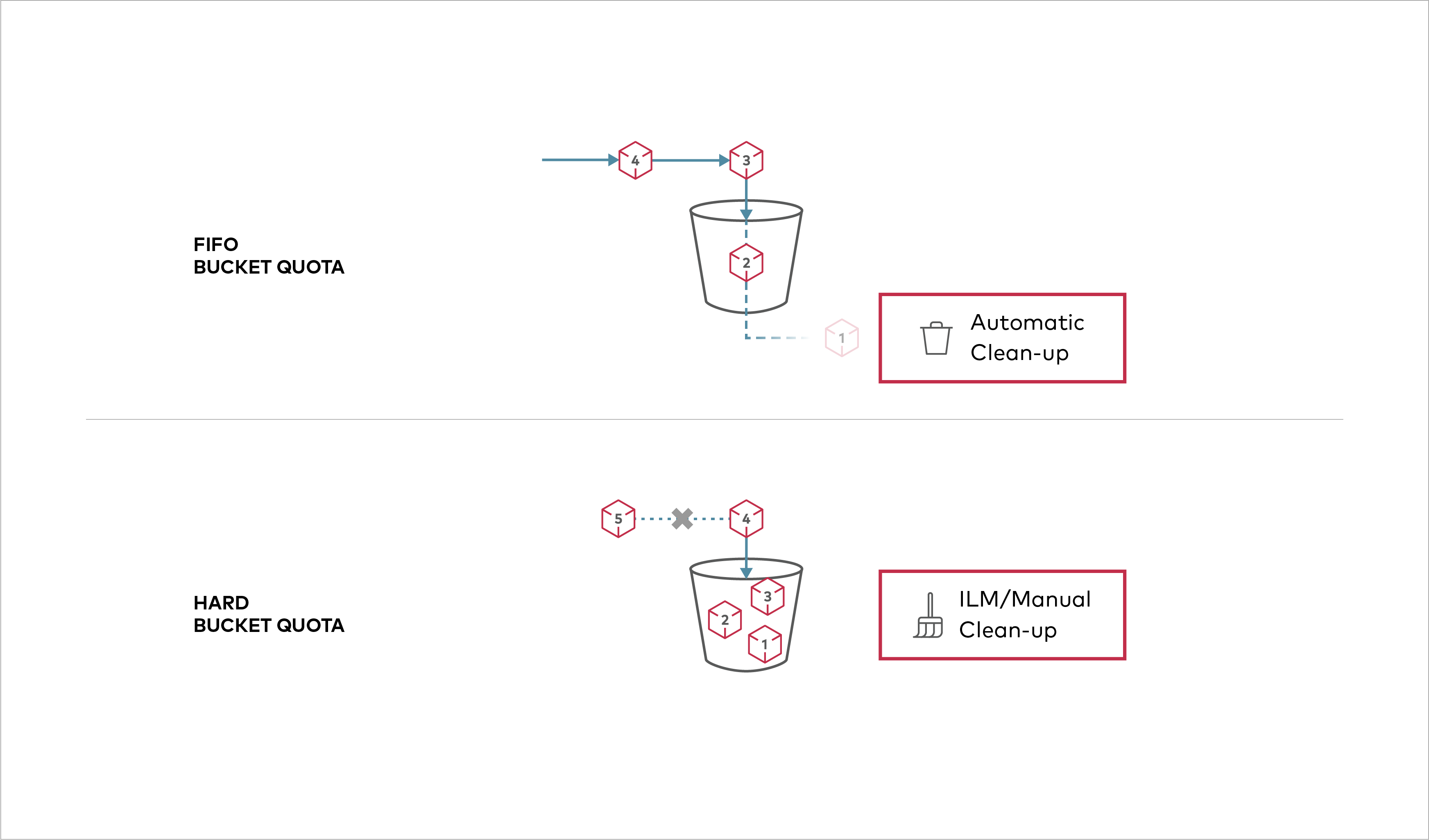 Buckets can be configured to have `Hard` quota - it disallows writes to the bucket after configured quota limit is reached. ## Prerequisites - Install MinIO - [MinIO Quickstart Guide](https://docs.min.io/community/minio-object-store/operations/deployments/baremetal-deploy-minio-on-redhat-linux.html#procedure).
Created: Sun Apr 05 19:28:12 GMT 2026 - Last Modified: Tue Aug 12 18:20:36 GMT 2025 - 1.1K bytes - Click Count (0) -
docs/fr/llm-prompt.md
```

- This does not apply in URLs, code blocks, and code snippets. Do not remove or add spaces there.

### Headings

- Prefer translating headings using the infinitive form (as is common in the existing French docs): `Créer…`, `Utiliser…`, `Ajouter…`.

- For headings that are instructions written in imperative in English (e.g. `Go check …`), keep them in imperative in French, using the formal grammar (e.g. `Allez voir …`).
Created: Sun Apr 05 07:19:11 GMT 2026 - Last Modified: Fri Jan 16 11:57:08 GMT 2026 - 3.6K bytes - Click Count (0) -
docs/en/docs/reference/staticfiles.md
# Static Files - `StaticFiles`

You can use the `StaticFiles` class to serve static files, like JavaScript, CSS, images, etc.

Read more about it in the [FastAPI docs for Static Files](https://fastapi.tiangolo.com/tutorial/static-files/).

You can import it directly from `fastapi.staticfiles`:

```python
from fastapi.staticfiles import StaticFiles
```
Created: Sun Apr 05 07:19:11 GMT 2026 - Last Modified: Thu Apr 18 19:53:19 GMT 2024 - 391 bytes - Click Count (0) -
docs/erasure/README.md
The drives should all be of approximately the same size.

## Get Started with MinIO in Erasure Code

### 1. Prerequisites
Created: Sun Apr 05 19:28:12 GMT 2026 - Last Modified: Tue Aug 12 18:20:36 GMT 2025 - 4.2K bytes - Click Count (0) -
docs/zh-hant/docs/tutorial/request-forms.md
表單資料通常會使用「媒體類型」`application/x-www-form-urlencoded` 進行編碼。

但當表單包含檔案時,會使用 `multipart/form-data`。你會在下一章閱讀如何處理檔案。

若想進一步了解這些編碼與表單欄位,請參考 [<abbr title="Mozilla Developer Network - Mozilla 開發者網路">MDN</abbr> web docs 的 `POST`](https://developer.mozilla.org/en-US/docs/Web/HTTP/Methods/POST)。

///

/// warning

你可以在一個 *路徑操作(path operation)* 中宣告多個 `Form` 參數,但不能同時再宣告期望以 JSON 接收的 `Body` 欄位,因為該請求的本文會使用 `application/x-www-form-urlencoded` 編碼,而不是 `application/json`。
Created: Sun Apr 05 07:19:11 GMT 2026 - Last Modified: Fri Mar 20 17:05:38 GMT 2026 - 2.5K bytes - Click Count (0) -
docs/uk/docs/tutorial/first-steps.md
### Інтерактивна API документація { #interactive-api-docs } Тепер перейдіть сюди [http://127.0.0.1:8000/docs](http://127.0.0.1:8000/docs). Ви побачите автоматичну інтерактивну API документацію (надається [Swagger UI](https://github.com/swagger-api/swagger-ui)):  ### Альтернативна API документація { #alternative-api-docs }Created: Sun Apr 05 07:19:11 GMT 2026 - Last Modified: Thu Mar 19 18:27:41 GMT 2026 - 18.7K bytes - Click Count (0) -
docs/en/docs/advanced/templates.md
Also, before that, in previous versions, the `request` object was passed as part of the key-value pairs in the context for Jinja2.

///

/// tip

By declaring `response_class=HTMLResponse` the docs UI will be able to know that the response will be HTML.

///

/// note | Technical Details

You could also use `from starlette.templating import Jinja2Templates`.
Created: Sun Apr 05 07:19:11 GMT 2026 - Last Modified: Thu Mar 05 18:13:19 GMT 2026 - 3.4K bytes - Click Count (0) -
docs/zh-hant/docs/tutorial/header-param-models.md
在 Pydantic 模型中宣告你需要的標頭參數,然後將參數宣告為 `Header`:

{* ../../docs_src/header_param_models/tutorial001_an_py310.py hl[9:14,18] *}

FastAPI 會從請求的標頭為每個欄位擷取資料,並交給你已定義的 Pydantic 模型實例。

## 檢視文件 { #check-the-docs }

你可以在 `/docs` 的文件介面看到所需的標頭:

<div class="screenshot">
<img src="/img/tutorial/header-param-models/image01.png">
</div>

## 禁止額外標頭 { #forbid-extra-headers }

在某些特殊情境(可能不常見)下,你可能想限制允許接收的標頭。
Created: Sun Apr 05 07:19:11 GMT 2026 - Last Modified: Sat Feb 14 08:15:26 GMT 2026 - 2.3K bytes - Click Count (0) -
docs/en/docs/tutorial/bigger-applications.md
///

## Check the automatic API docs { #check-the-automatic-api-docs }

Now, run your app:

<div class="termy">

```console
$ fastapi dev

<span style="color: green;">INFO</span>:     Uvicorn running on http://127.0.0.1:8000 (Press CTRL+C to quit)
```

</div>

And open the docs at [http://127.0.0.1:8000/docs](http://127.0.0.1:8000/docs).
Created: Sun Apr 05 07:19:11 GMT 2026 - Last Modified: Sat Mar 07 09:29:03 GMT 2026 - 19.2K bytes - Click Count (0) -
docs/tr/docs/tutorial/first-steps.md
### Etkileşimli API Dokümantasyonu { #interactive-api-docs } Şimdi [http://127.0.0.1:8000/docs](http://127.0.0.1:8000/docs) adresine gidin. Otomatik etkileşimli API dokümantasyonunu ([Swagger UI](https://github.com/swagger-api/swagger-ui) tarafından sağlanan) göreceksiniz:  ### Alternatif API Dokümantasyonu { #alternative-api-docs }Created: Sun Apr 05 07:19:11 GMT 2026 - Last Modified: Fri Mar 20 07:53:17 GMT 2026 - 14.4K bytes - Click Count (0)