- Sort Score
- Num 10 results
- Language All
Results 271 - 280 of 820 for environment (0.07 seconds)
-
buildscripts/verify-build.sh
Created: Sun Apr 05 19:28:12 GMT 2026 - Last Modified: Fri May 24 19:28:51 GMT 2024 - 6.7K bytes - Click Count (0) -
guava-tests/test/com/google/common/base/FinalizableReferenceQueueClassLoaderUnloadingTest.java
    // If the class is accessible to the system ClassLoader (ClassLoader.getSystemClassLoader())
    // then FRQ does not bother to load Finalizer.class through a separate ClassLoader. That happens
    // in our test environment, which foils the purpose of this test, so we disable the logic for
    // our test by setting a static field. We are changing the field in the parallel version of FRQ
Created: Fri Apr 03 12:43:13 GMT 2026 - Last Modified: Thu Feb 26 02:41:17 GMT 2026 - 7.7K bytes - Click Count (0) -
docs/en/docs/tutorial/security/oauth2-jwt.md
## Install `PyJWT` { #install-pyjwt }

We need to install `PyJWT` to generate and verify the JWT tokens in Python.

Make sure you create a [virtual environment](../../virtual-environments.md), activate it, and then install `pyjwt`:

<div class="termy">

```console
$ pip install pyjwt

---> 100%
```

</div>

/// info
Created: Sun Apr 05 07:19:11 GMT 2026 - Last Modified: Thu Mar 05 18:13:19 GMT 2026 - 10.7K bytes - Click Count (0) -
compat/maven-toolchain-builder/src/main/java/org/apache/maven/toolchain/building/DefaultToolchainsBuilder.java
            interpolator.addValueSource(new EnvarBasedValueSource());
        } catch (IOException e) {
            problems.add(
                    Problem.Severity.WARNING,
                    "Failed to use environment variables for interpolation: " + e.getMessage(),
                    -1,
                    -1,
                    e);
        }

        interpolator.addPostProcessor(new InterpolationPostProcessor() {
Created: Sun Apr 05 03:35:12 GMT 2026 - Last Modified: Wed Mar 05 09:37:42 GMT 2025 - 7.3K bytes - Click Count (0) -
internal/config/etcd/etcd.go
	"go.uber.org/zap"
)

const (
	// Default values used while communicating with etcd.
	defaultDialTimeout   = 5 * time.Second
	defaultDialKeepAlive = 30 * time.Second
)

// etcd environment values
const (
	Endpoints     = "endpoints"
	PathPrefix    = "path_prefix"
	CoreDNSPath   = "coredns_path"
	ClientCert    = "client_cert"
	ClientCertKey = "client_cert_key"
Created: Sun Apr 05 19:28:12 GMT 2026 - Last Modified: Fri May 16 14:27:42 GMT 2025 - 5.2K bytes - Click Count (0) -
docs/federation/lookup/README.md
- CoreDNS (for DNS management based on populated bucket DNS service records, optional) ## Architecture 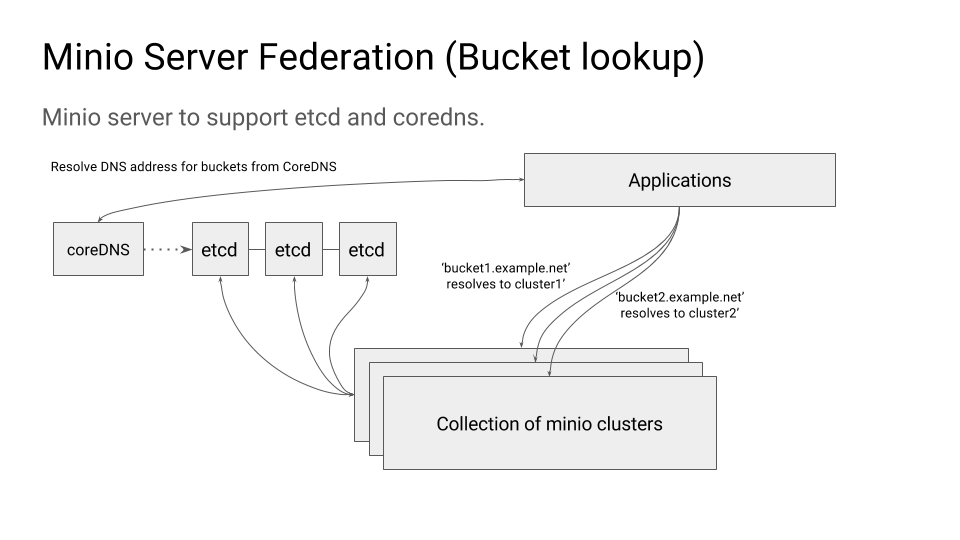 ### Environment variables #### MINIO_ETCD_ENDPOINTS This is comma separated list of etcd servers that you want to use as the MinIO federation back-end. This should
Created: Sun Apr 05 19:28:12 GMT 2026 - Last Modified: Tue Aug 12 18:20:36 GMT 2025 - 4.2K bytes - Click Count (0) -
guava-tests/test/com/google/common/math/MathPreconditionsTest.java
        assertThrows(
            ArithmeticException.class,
            () -> MathPreconditions.checkInRangeForRoundingInputs(false, 1.0, RoundingMode.UP));
    // b/38490623: The string contains "1.0" under most environment but just "1" under J2CL.
    assertThat(expected).hasMessageThat().contains("1");
    assertThat(expected).hasMessageThat().contains("UP");
  }

  public void testCheckNoOverflow_success() {
Created: Fri Apr 03 12:43:13 GMT 2026 - Last Modified: Tue Mar 03 05:21:26 GMT 2026 - 8.1K bytes - Click Count (0) -
src/test/java/org/codelibs/fess/mylasta/direction/sponsor/FessSecurityResourceProviderTest.java
    }

    // Test thread safety
    @Test
    public void test_threadSafety() {
        // Test that the provider returns the same instances in multi-threaded environment
        final int threadCount = 10;
        final Thread[] threads = new Thread[threadCount];
        final InvertibleCryptographer[] invertibles = new InvertibleCryptographer[threadCount];
Created: Tue Mar 31 13:07:34 GMT 2026 - Last Modified: Fri Mar 13 23:01:26 GMT 2026 - 13.2K bytes - Click Count (0) -
src/main/java/org/codelibs/fess/app/web/api/ApiResult.java
        protected List<Map<String, String>> fessProps;
        /** Bug report properties. */
        protected List<Map<String, String>> bugReportProps;

        /**
         * Sets the environment properties.
         * @param envProps The environment properties.
         * @return This ApiSystemInfoResponse instance.
         */
        public ApiSystemInfoResponse envProps(final List<Map<String, String>> envProps) {
Created: Tue Mar 31 13:07:34 GMT 2026 - Last Modified: Sat Mar 28 11:55:54 GMT 2026 - 25.8K bytes - Click Count (0) -
buildscripts/verify-healing-empty-erasure-set.sh
function check_online() {
	if ! grep -q 'API:' ${WORK_DIR}/dist-minio-*.log; then
		echo "1"
	fi
}

function purge() {
	echo rm -rf "$1"
}

function __init__() {
	echo "Initializing environment"
	mkdir -p "$WORK_DIR"
	mkdir -p "$MINIO_CONFIG_DIR"

	## version is purposefully set to '3' for minio to migrate configuration file
Created: Sun Apr 05 19:28:12 GMT 2026 - Last Modified: Fri Jul 12 20:51:54 GMT 2024 - 3.7K bytes - Click Count (0)