- Sort Score
- Num 10 results
- Language All
Results 41 - 50 of 132 for sudo (0.48 seconds)
-
docs/bucket/replication/setup_3site_replication.sh
dd if=/dev/urandom bs=1 count=7048531 of=/tmp/7048531.txt
dd if=/dev/urandom bs=1 count=2847391 of=/tmp/2847391.txt

sudo apt install jq -y
Created: Sun Apr 05 19:28:12 GMT 2026 - Last Modified: Tue Sep 24 08:03:58 GMT 2024 - 10.3K bytes - Click Count (0) -
android/guava-tests/test/com/google/common/io/FilesSimplifyPathTest.java
     * - Run the test.
     * - Pull the relevant lines of output from the test into a testcases file.
     * - Test the output:
     * --- cat testcases | while read L; do
     *       X=($L)
     *       A=$( cd /b/c && sudo mkdir -p ${X[0]} && cd ${X[0]} && pwd |
     *           sed -e 's#^//*#/#' )
     *       B=$( cd /b/c && cd ${X[1]} && pwd )
     *       cmp -s <(echo $A) <(echo $B) || echo "$X[0] -> $A vs. $B"
Created: Fri Apr 03 12:43:13 GMT 2026 - Last Modified: Thu Mar 12 17:47:10 GMT 2026 - 11.9K bytes - Click Count (0) -
guava-tests/test/com/google/common/io/FilesSimplifyPathTest.java
     * - Run the test.
     * - Pull the relevant lines of output from the test into a testcases file.
     * - Test the output:
     * --- cat testcases | while read L; do
     *       X=($L)
     *       A=$( cd /b/c && sudo mkdir -p ${X[0]} && cd ${X[0]} && pwd |
     *           sed -e 's#^//*#/#' )
     *       B=$( cd /b/c && cd ${X[1]} && pwd )
     *       cmp -s <(echo $A) <(echo $B) || echo "$X[0] -> $A vs. $B"
Created: Fri Apr 03 12:43:13 GMT 2026 - Last Modified: Thu Mar 12 17:47:10 GMT 2026 - 11.9K bytes - Click Count (0) -
docs/distributed/decom-encrypted-kes.sh
fi

if [ ! -f ./kes ]; then
	wget --quiet -O kes https://github.com/minio/kes/releases/latest/download/kes-linux-amd64 &&
		chmod +x kes
fi

if ! openssl version &>/dev/null; then
	apt install openssl || sudo apt install opensssl
fi

# Start KES Server
(./kes server --dev 2>&1 >kes-server.log) &
kes_pid=$!
sleep 5s
API_KEY=$(grep "API Key" <kes-server.log | awk -F" " '{print $3}')
Created: Sun Apr 05 19:28:12 GMT 2026 - Last Modified: Mon May 27 19:17:46 GMT 2024 - 7.1K bytes - Click Count (1) -
Vagrantfile
end

def deb_common(config, name, extra: '')
  # http://foo-o-rama.com/vagrant--stdin-is-not-a-tty--fix.html
  config.vm.provision 'fix-no-tty', type: 'shell' do |s|
      s.privileged = false
      s.inline = "sudo sed -i '/tty/!s/mesg n/tty -s \\&\\& mesg n/' /root/.profile"
  end
  extra_with_lintian = <<-SHELL
    #{extra}
    install lintian
  SHELL
  linux_common(
    config,
    name,
Created: Wed Apr 08 16:19:15 GMT 2026 - Last Modified: Wed Feb 17 17:41:23 GMT 2021 - 14.9K bytes - Click Count (0) -
.github/workflows/maven.yml
Created: Sun Apr 05 03:35:12 GMT 2026 - Last Modified: Tue Mar 24 08:21:28 GMT 2026 - 12.2K bytes - Click Count (0) -
docs/bigdata/README.md
Navigate to **Custom core-site** to configure MinIO parameters for `_s3a_` connector 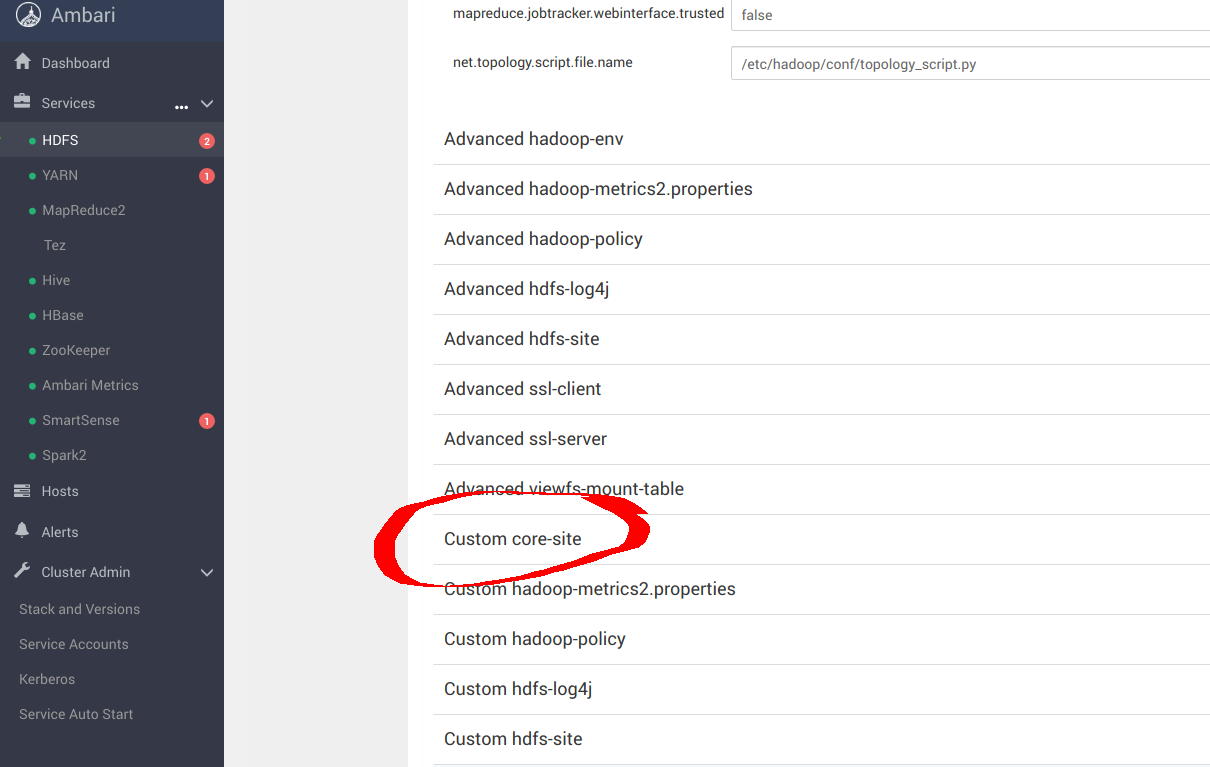 ``` sudo pip install yq alias kv-pairify='yq ".configuration[]" | jq ".[]" | jq -r ".name + \"=\" + .value"' ```
Created: Sun Apr 05 19:28:12 GMT 2026 - Last Modified: Tue Aug 12 18:20:36 GMT 2025 - 14.7K bytes - Click Count (0) -
docs/ko/docs/advanced/behind-a-proxy.md
[providers]
  [providers.file]
    filename = "routes.toml"
```

이는 Traefik이 9999 포트에서 리슨하고, 다른 파일 `routes.toml`을 사용하도록 지시합니다.

/// tip | 팁

표준 HTTP 포트 80 대신 9999 포트를 사용해서, 관리자(`sudo`) 권한으로 실행하지 않아도 되게 했습니다.

///

이제 다른 파일 `routes.toml`을 생성하세요:

```TOML hl_lines="5  12  20"
[http]
  [http.middlewares]

    [http.middlewares.api-stripprefix.stripPrefix]
Created: Sun Apr 05 07:19:11 GMT 2026 - Last Modified: Fri Mar 20 14:06:26 GMT 2026 - 17.9K bytes - Click Count (0) -
docs/en/docs/advanced/behind-a-proxy.md
```

This tells Traefik to listen on port 9999 and to use another file `routes.toml`.

/// tip

We are using port 9999 instead of the standard HTTP port 80 so that you don't have to run it with admin (`sudo`) privileges.

///

Now create that other file `routes.toml`:

```TOML hl_lines="5  12  20"
[http]
  [http.middlewares]

    [http.middlewares.api-stripprefix.stripPrefix]
Created: Sun Apr 05 07:19:11 GMT 2026 - Last Modified: Thu Mar 05 18:13:19 GMT 2026 - 15.8K bytes - Click Count (0) -
docs/zh-hant/docs/advanced/behind-a-proxy.md
    address = ":9999"

[providers]
  [providers.file]
    filename = "routes.toml"
```

這告訴 Traefik 監聽 9999 埠,並使用另一個檔案 `routes.toml`。

/// tip

我們使用 9999 埠而不是標準的 HTTP 80 埠,這樣你就不需要以管理員(`sudo`)權限來執行。

///

接著建立另一個 `routes.toml` 檔案:

```TOML hl_lines="5  12  20"
[http]
  [http.middlewares]

    [http.middlewares.api-stripprefix.stripPrefix]
      prefixes = ["/api/v1"]
Created: Sun Apr 05 07:19:11 GMT 2026 - Last Modified: Fri Mar 20 17:05:38 GMT 2026 - 15.3K bytes - Click Count (0)