- Sort Score
- Num 10 results
- Language All
Results 341 - 350 of 727 for instale (0.04 seconds)
-
ci/official/containers/ml_build/rbe_nvidia.packages.txt
Created: Tue Apr 07 12:39:13 GMT 2026 - Last Modified: Thu Sep 18 00:19:40 GMT 2025 - 307 bytes - Click Count (0) -
.github/workflows/contributors.yml
      - name: Setup uv
        uses: astral-sh/setup-uv@v7
        with:
          enable-cache: true
          cache-dependency-glob: |
            pyproject.toml
            uv.lock
      - name: Install Dependencies
        run: uv sync --locked --no-dev --group github-actions
      # Allow debugging with tmate
      - name: Setup tmate session
        uses: mxschmitt/action-tmate@v3
Created: Sun Apr 05 07:19:11 GMT 2026 - Last Modified: Sat Jan 10 22:02:57 GMT 2026 - 1.5K bytes - Click Count (0) -
.github/workflows/sponsors.yml
      - name: Setup uv
        uses: astral-sh/setup-uv@v7
        with:
          enable-cache: true
          cache-dependency-glob: |
            pyproject.toml
            uv.lock
      - name: Install Dependencies
        run: uv sync --locked --no-dev --group github-actions
      # Allow debugging with tmate
      - name: Setup tmate session
        uses: mxschmitt/action-tmate@v3
Created: Sun Apr 05 07:19:11 GMT 2026 - Last Modified: Sat Jan 10 22:02:57 GMT 2026 - 1.4K bytes - Click Count (0) -
docs/ja/docs/deployment/manually.md
## サーバープログラムをインストール { #install-the-server-program }

FastAPI をインストールすると、本番サーバーの Uvicorn が同梱されており、`fastapi run` コマンドで起動できます。

ただし、ASGI サーバーを手動でインストールすることもできます。

[仮想環境](../virtual-environments.md)を作成して有効化し、サーバーアプリケーションをインストールしてください。

例として、Uvicorn をインストールするには:

<div class="termy">

```console
$ pip install "uvicorn[standard]"

---> 100%
```

</div>
Created: Sun Apr 05 07:19:11 GMT 2026 - Last Modified: Fri Mar 20 14:07:17 GMT 2026 - 7.8K bytes - Click Count (0) -
docs/uk/docs/tutorial/testing.md
Переконайтеся, що ви створили [віртуальне середовище](../virtual-environments.md), активували його, а потім встановили `httpx`, наприклад:

```console
$ pip install httpx
```

///

Імпортуйте `TestClient`.

Створіть `TestClient`, передавши йому ваш застосунок **FastAPI**.

Створюйте функції з іменами, що починаються з `test_` (це стандартна угода для `pytest`).
Created: Sun Apr 05 07:19:11 GMT 2026 - Last Modified: Thu Mar 19 18:27:41 GMT 2026 - 8.6K bytes - Click Count (0) -
main.go
//
// You should have received a copy of the GNU Affero General Public License
// along with this program.  If not, see <http://www.gnu.org/licenses/>.

package main // import "github.com/minio/minio"

//go:generate go install tool

import (
	"os"

	// MUST be first import.
	_ "github.com/minio/minio/internal/init"

	minio "github.com/minio/minio/cmd"
)

func main() {
	minio.Main(os.Args)
Created: Sun Apr 05 19:28:12 GMT 2026 - Last Modified: Thu Apr 24 23:34:11 GMT 2025 - 1004 bytes - Click Count (0) -
docs/bucket/quota/README.md
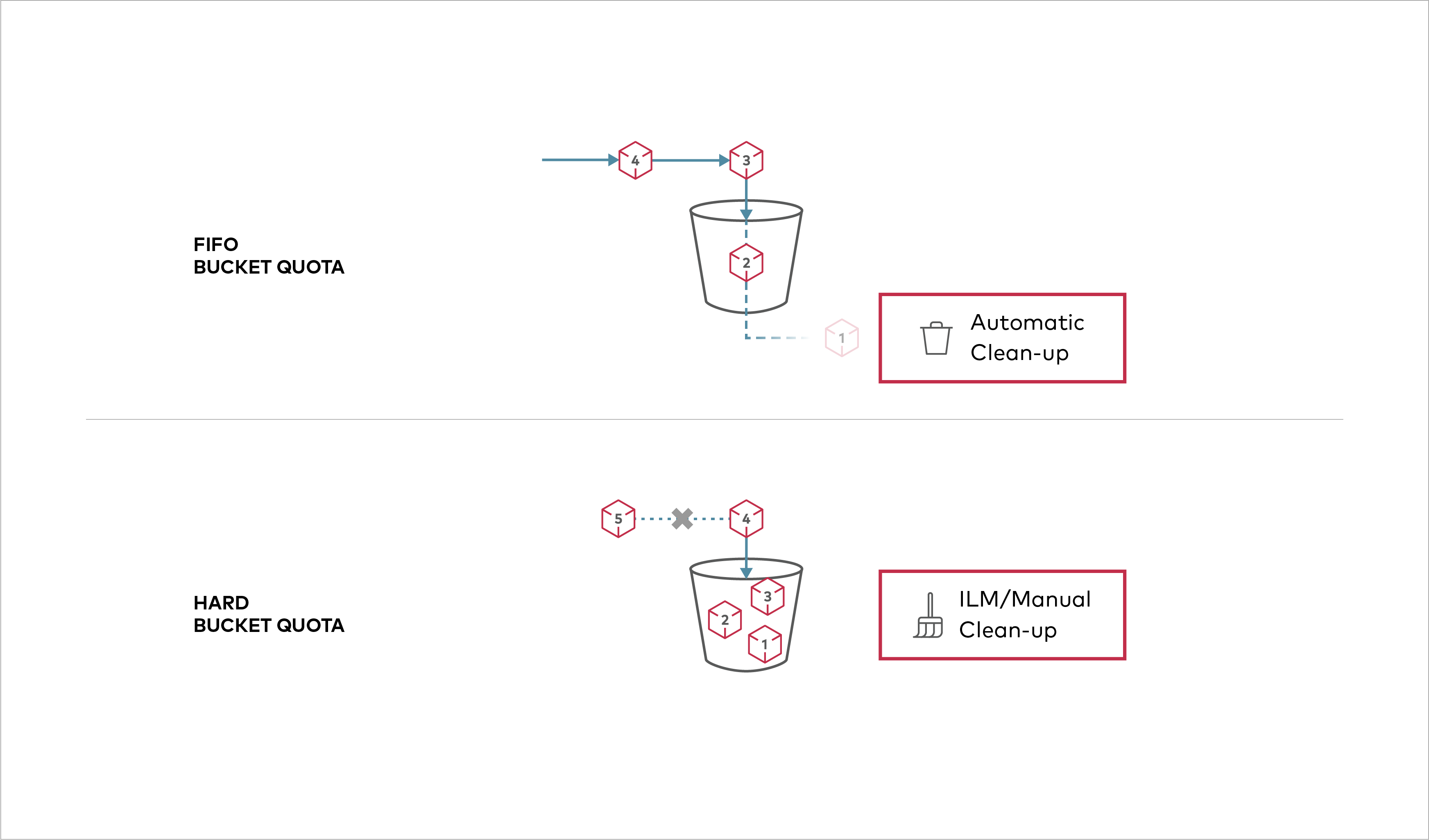 Buckets can be configured to have `Hard` quota - it disallows writes to the bucket after configured quota limit is reached. ## Prerequisites - Install MinIO - [MinIO Quickstart Guide](https://docs.min.io/community/minio-object-store/operations/deployments/baremetal-deploy-minio-on-redhat-linux.html#procedure).
Created: Sun Apr 05 19:28:12 GMT 2026 - Last Modified: Tue Aug 12 18:20:36 GMT 2025 - 1.1K bytes - Click Count (0) -
impl/maven-core/lifecycle-executor.txt
        <test>org.apache.maven.plugins:maven-surefire-plugin:test</test>
        <package>org.apache.maven.plugins:maven-jar-plugin:jar</package>
        <install>org.apache.maven.plugins:maven-install-plugin:install</install>
        <deploy>org.apache.maven.plugins:maven-deploy-plugin:deploy</deploy>
      </phases>
    </lifecycle>
  </lifecycles>
</configuration>
Created: Sun Apr 05 03:35:12 GMT 2026 - Last Modified: Fri Oct 25 12:31:46 GMT 2024 - 9.7K bytes - Click Count (0) -
ci/official/requirements_updater/numpy1_requirements/requirements.in
opt_einsum == 3.3.0
astunparse == 1.6.3
dill == 0.3.7
astor == 0.7.1
typing_extensions ~= 4.14.1
gast == 0.4.0
termcolor == 2.3.0
wrapt == 1.16.0
tblib == 2.0.0
ml_dtypes >= 0.5.1, < 0.6.0
auditwheel >= 6.1.0
# Install tensorboard, and keras
# Note that here we want the latest version that matches TF major.minor version
# Note that we must use nightly here as these are used in nightly jobs
# For release jobs, we will pin these on the release branch
Created: Tue Apr 07 12:39:13 GMT 2026 - Last Modified: Mon Jan 26 22:44:40 GMT 2026 - 1.2K bytes - Click Count (0) -
docs/fr/docs/advanced/templates.md
Created: Sun Apr 05 07:19:11 GMT 2026 - Last Modified: Thu Mar 19 18:37:13 GMT 2026 - 3.7K bytes - Click Count (0)