- Sort Score
- Result 10 results
- Languages All
Results 1631 - 1640 of 1,886 for Spread (0.05 sec)
-
helm-releases/minio-3.0.0.tgz
run the below commands: 1. export POD_NAME=$(kubectl get pods --namespace {{ .Release.Namespace }} -l "release={{ .Release.Name }}" -o jsonpath="{.items[0].metadata.name}") 2. kubectl port-forward $POD_NAME 9000 --namespace {{ .Release.Namespace }} Read more about port forwarding here: http://kubernetes.io/docs/user-guide/kubectl/kubectl_port-forward/ You can now access Minio server on http://localhost:9000. Follow the below steps to connect to Minio server with mc client: 1. Download the Minio mc...Registered: Sun Dec 28 19:28:13 UTC 2025 - Last Modified: Thu Sep 02 01:47:43 UTC 2021 - 13.8K bytes - Viewed (0) -
helm-releases/minio-3.1.3.tgz
run the below commands: 1. export POD_NAME=$(kubectl get pods --namespace {{ .Release.Namespace }} -l "release={{ .Release.Name }}" -o jsonpath="{.items[0].metadata.name}") 2. kubectl port-forward $POD_NAME 9000 --namespace {{ .Release.Namespace }} Read more about port forwarding here: http://kubernetes.io/docs/user-guide/kubectl/kubectl_port-forward/ You can now access Minio server on http://localhost:9000. Follow the below steps to connect to Minio server with mc client: 1. Download the Minio mc...Registered: Sun Dec 28 19:28:13 UTC 2025 - Last Modified: Sat Sep 18 18:09:59 UTC 2021 - 14.4K bytes - Viewed (0) -
src/test/java/jcifs/pac/kerberos/KerberosApRequestTest.java
        // ap-options [2] BIT STRING
        v.add(new DERTaggedObject(true, 2, new DERBitString(new byte[] { apOptions }))); // first byte read by impl
        return new DERSequence(v);
    }

    @Test
    @DisplayName("byte[] ctor: empty token throws PACDecodingException with clear message")
    void byteArrayConstructor_emptyToken_throws() {
Registered: Sat Dec 20 13:44:44 UTC 2025 - Last Modified: Thu Aug 14 05:31:44 UTC 2025 - 10.3K bytes - Viewed (0) -
src/test/java/jcifs/internal/smb1/trans/nt/FileNotifyInformationImplTest.java
        assertEquals(action, notifyInfo.getAction());
        assertEquals(fileName, notifyInfo.getFileName());
    }

    @Test
    @DisplayName("Test decode correctly calculates bytes read")
    void testDecodeBytesReadCalculation() throws SMBProtocolDecodingException {
        String fileName = "test123.doc";
        byte[] buffer = createValidNotificationBuffer(fileName, FileNotifyInformation.FILE_ACTION_ADDED);
Registered: Sat Dec 20 13:44:44 UTC 2025 - Last Modified: Thu Aug 14 05:31:44 UTC 2025 - 13.1K bytes - Viewed (0) -
docs/es/docs/advanced/path-operation-advanced-configuration.md
{
    "openapi": "3.1.0",
    "info": {
        "title": "FastAPI",
        "version": "0.1.0"
    },
    "paths": {
        "/items/": {
            "get": {
                "summary": "Read Items",
                "operationId": "read_items_items__get",
                "responses": {
                    "200": {
                        "description": "Successful Response",
Registered: Sun Dec 28 07:19:09 UTC 2025 - Last Modified: Wed Dec 17 20:41:43 UTC 2025 - 8.3K bytes - Viewed (0) -
docs/pt/docs/advanced/path-operation-advanced-configuration.md
{
    "openapi": "3.1.0",
    "info": {
        "title": "FastAPI",
        "version": "0.1.0"
    },
    "paths": {
        "/items/": {
            "get": {
                "summary": "Read Items",
                "operationId": "read_items_items__get",
                "responses": {
                    "200": {
                        "description": "Successful Response",
Registered: Sun Dec 28 07:19:09 UTC 2025 - Last Modified: Wed Dec 17 20:41:43 UTC 2025 - 8.7K bytes - Viewed (0) -
docs/ru/docs/environment-variables.md
$ $Env:MY_NAME = "Wade Wilson"

// Используйте её с другими программами, например
$ echo "Hello $Env:MY_NAME"

Hello Wade Wilson
```

</div>

////

## Чтение переменных окружения в python { #read-env-vars-in-python }

Так же существует возможность создания переменных окружения **вне** Python, в терминале (или любым другим способом), а затем **чтения их в Python**.

Например, у вас есть файл `main.py`:
Registered: Sun Dec 28 07:19:09 UTC 2025 - Last Modified: Tue Sep 30 11:24:39 UTC 2025 - 12.7K bytes - Viewed (0) -
helm-releases/minio-5.0.6.tgz
actions: # - "s3:CreateBucket" # - "s3:DeleteBucket" # - "s3:GetBucketLocation" # - "s3:ListBucket" # - "s3:ListBucketMultipartU" ## readonlyexamplepolic policy grants access to buckets with name starting with example. ## In addition, grants objects read permissions on buckets starting with example. # - name: readonlyexamplepolic # statements: # - resources: # - 'arn:aws:s3:::example*/*' # actions: # - "s3:GetObject" # - resources: # - 'arn:aws:s3:::example*' # actions: # - "s3:GetBucketLocation" #...
Registered: Sun Dec 28 19:28:13 UTC 2025 - Last Modified: Mon Feb 13 06:53:06 UTC 2023 - 20.3K bytes - Viewed (0) -
docs/bucket/replication/README.md
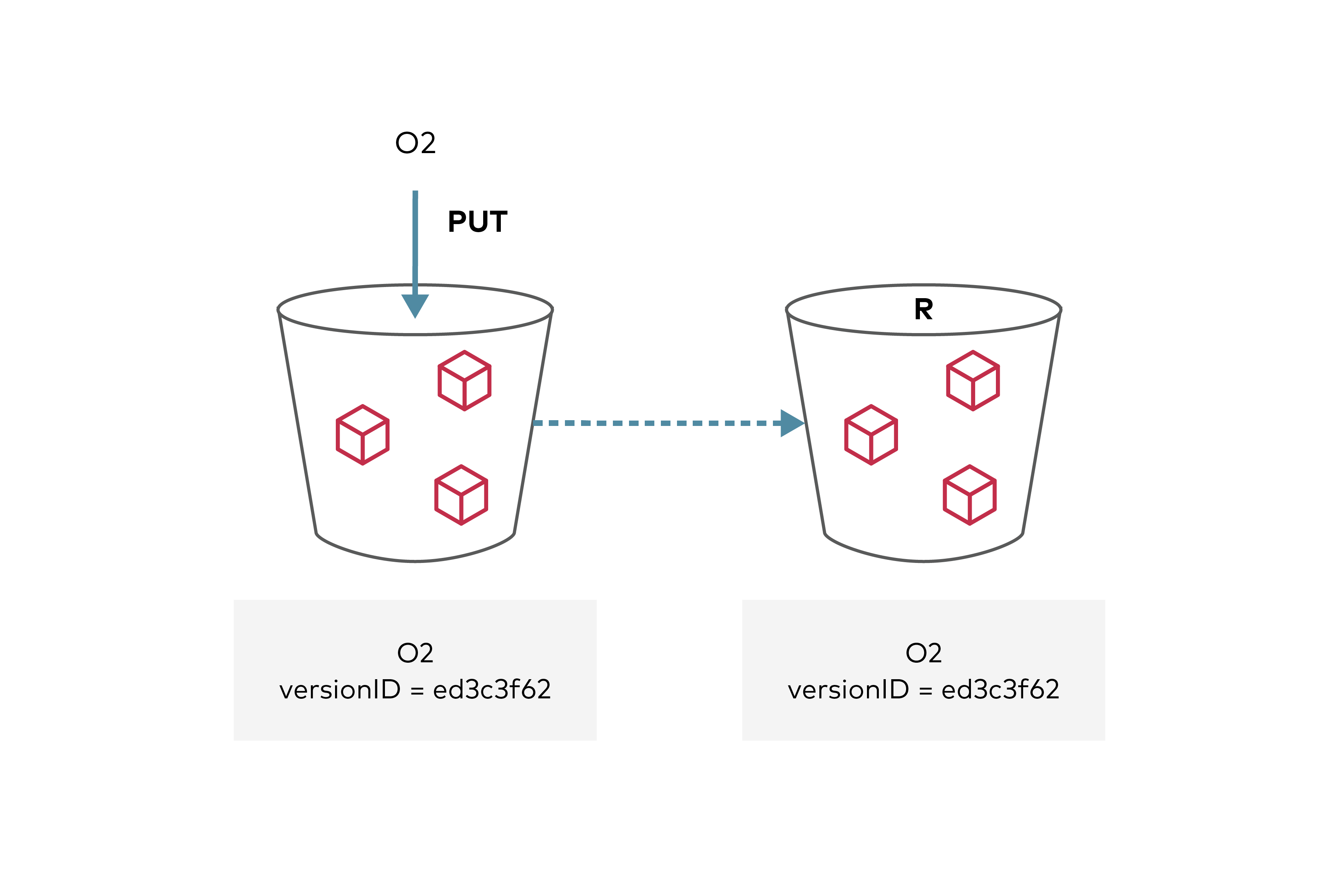
Registered: Sun Dec 28 19:28:13 UTC 2025 - Last Modified: Tue Aug 12 18:20:36 UTC 2025 - 18.3K bytes - Viewed (0) -
guava/src/com/google/common/util/concurrent/AtomicLongMap.java
   */
  public long sum() {
    return map.values().stream().mapToLong(Long::longValue).sum();
  }

  @LazyInit private transient @Nullable Map<K, Long> asMap;

  /** Returns a live, read-only view of the map backing this {@code AtomicLongMap}. */
  public Map<K, Long> asMap() {
    Map<K, Long> result = asMap;
    return (result == null) ? asMap = createAsMap() : result;
  }
Registered: Fri Dec 26 12:43:10 UTC 2025 - Last Modified: Fri Oct 10 23:13:45 UTC 2025 - 11.7K bytes - Viewed (0)