- Sort Score
- Num 10 results
- Language All
Results 671 - 680 of 1,000 for imag (0.02 seconds)
-
docs/uk/docs/tutorial/sql-databases.md
</div>

Потім перейдіть до інтерфейсу `/docs`, ви побачите, що **FastAPI** використовує ці **моделі** для **документування** API, а також для **серіалізації** та **валідації** даних.

<div class="screenshot">
<img src="/img/tutorial/sql-databases/image01.png">
</div>

## Оновіть застосунок кількома моделями { #update-the-app-with-multiple-models }

Тепер трохи **відрефакторимо** застосунок, щоб підвищити **безпеку** та **гнучкість**.
Created: Sun Apr 05 07:19:11 GMT 2026 - Last Modified: Thu Mar 19 18:27:41 GMT 2026 - 22.2K bytes - Click Count (0) -
docs/en/docs/advanced/security/oauth2-scopes.md
And you will be able to select which scopes you want to give access to: `me` and `items`.

This is the same mechanism used when you give permissions while logging in with Facebook, Google, GitHub, etc:

<img src="/img/tutorial/security/image11.png">

## JWT token with scopes { #jwt-token-with-scopes }

Now, modify the token *path operation* to return the scopes requested.
Created: Sun Apr 05 07:19:11 GMT 2026 - Last Modified: Thu Mar 05 18:13:19 GMT 2026 - 13.4K bytes - Click Count (0) -
ci/official/wheel.sh
  tfrun nvidia-smi
fi

# Update the version numbers for Nightly only
if [[ "$TFCI_NIGHTLY_UPDATE_VERSION_ENABLE" == 1 ]]; then
  python_bin=python3
  # TODO(belitskiy): Add a `python3` alias/symlink to Windows Docker image.
  if [[ $(uname -s) = MSYS_NT* ]]; then
    python_bin="python"
  fi
  tfrun "$python_bin" tensorflow/tools/ci_build/update_version.py --nightly
  # replace tensorflow to tf_nightly in the wheel name
Created: Tue Apr 07 12:39:13 GMT 2026 - Last Modified: Mon Mar 03 17:29:53 GMT 2025 - 3.8K bytes - Click Count (0) -
docs/bucket/quota/README.md
# Bucket Quota Configuration Quickstart Guide [](https://slack.min.io) [](https://hub.docker.com/r/minio/minio/) 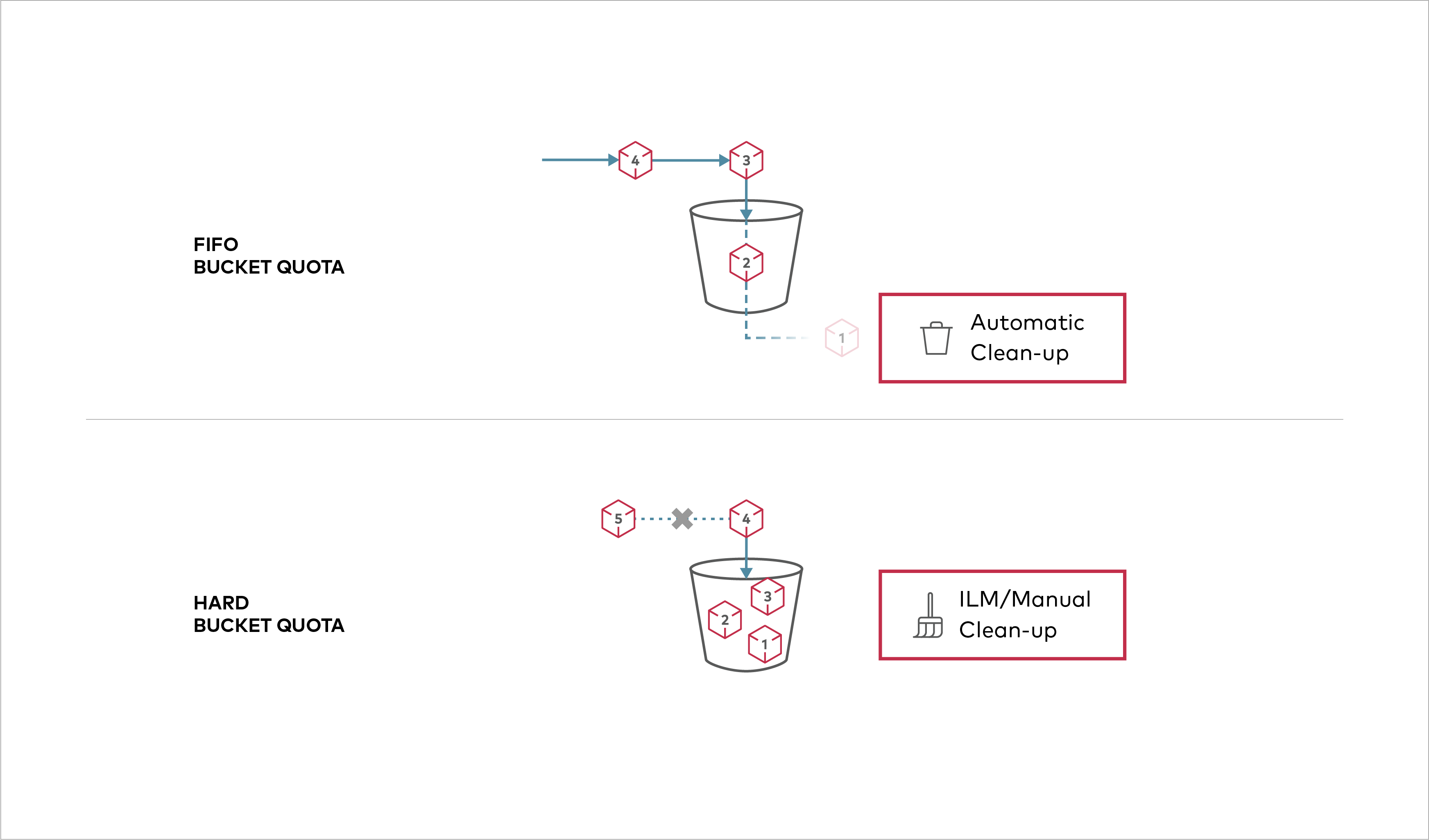 Buckets can be configured to have `Hard` quota - it disallows writes to the bucket after configured quota limit is reached.
Created: Sun Apr 05 19:28:12 GMT 2026 - Last Modified: Tue Aug 12 18:20:36 GMT 2025 - 1.1K bytes - Click Count (0) -
docs/ko/docs/advanced/dataclasses.md
`response_model` 매개변수에서도 `dataclasses`를 사용할 수 있습니다:

{* ../../docs_src/dataclasses_/tutorial002_py310.py hl[1,6:12,18] *}

dataclass는 자동으로 Pydantic dataclass로 변환됩니다.

이렇게 하면 해당 스키마가 API docs 사용자 인터페이스에 표시됩니다:

<img src="/img/tutorial/dataclasses/image01.png">

## 중첩 데이터 구조에서 Dataclasses 사용하기 { #dataclasses-in-nested-data-structures }

`dataclasses`를 다른 타입 애너테이션과 조합해 중첩 데이터 구조를 만들 수도 있습니다.
Created: Sun Apr 05 07:19:11 GMT 2026 - Last Modified: Fri Mar 20 14:06:26 GMT 2026 - 4.8K bytes - Click Count (0) -
docs/ja/docs/advanced/openapi-webhooks.md
### ドキュメントの確認 { #check-the-docs }

アプリを起動し、[http://127.0.0.1:8000/docs](http://127.0.0.1:8000/docs) にアクセスします。

ドキュメントには通常の *path operations* に加えて、**webhooks** も表示されます:
Created: Sun Apr 05 07:19:11 GMT 2026 - Last Modified: Fri Mar 20 14:07:17 GMT 2026 - 3.5K bytes - Click Count (0) -
docs/de/docs/tutorial/response-model.md
Wenn Sie sich die automatische Dokumentation betrachten, können Sie sehen, dass Eingabe- und Ausgabemodell beide ihr eigenes JSON-Schema haben:

<img src="/img/tutorial/response-model/image01.png">

Und beide Modelle werden auch in der interaktiven API-Dokumentation verwendet:

<img src="/img/tutorial/response-model/image02.png">

## Andere Rückgabetyp-Annotationen { #other-return-type-annotations }
Created: Sun Apr 05 07:19:11 GMT 2026 - Last Modified: Thu Mar 19 17:58:09 GMT 2026 - 17.5K bytes - Click Count (0) -
docs/ru/docs/tutorial/sql-databases.md
```

</div>

Затем перейдите в UI `/docs`. Вы увидите, что **FastAPI** использует эти **модели** для **документирования** API, а также для **сериализации** и **валидации** данных.

<div class="screenshot">
<img src="/img/tutorial/sql-databases/image01.png">
</div>

## Обновление приложения с несколькими моделями { #update-the-app-with-multiple-models }
Created: Sun Apr 05 07:19:11 GMT 2026 - Last Modified: Thu Mar 19 17:56:20 GMT 2026 - 23.2K bytes - Click Count (0) -
docs/en/docs/tutorial/query-params-str-validations.md
///

The interactive API docs will update accordingly, to allow multiple values:

<img src="/img/tutorial/query-params-str-validations/image02.png">

### Query parameter list / multiple values with defaults { #query-parameter-list-multiple-values-with-defaults }
Created: Sun Apr 05 07:19:11 GMT 2026 - Last Modified: Thu Mar 05 18:13:19 GMT 2026 - 16.3K bytes - Click Count (0) -
docs/en/docs/tutorial/response-model.md
When you see the automatic docs, you can check that the input model and output model will both have their own JSON Schema:

<img src="/img/tutorial/response-model/image01.png">

And both models will be used for the interactive API documentation:

<img src="/img/tutorial/response-model/image02.png">

## Other Return Type Annotations { #other-return-type-annotations }
Created: Sun Apr 05 07:19:11 GMT 2026 - Last Modified: Thu Mar 05 18:13:19 GMT 2026 - 15.5K bytes - Click Count (0)