- Sort Score
- Num 10 results
- Language All
Results 421 - 430 of 484 for point (0.01 seconds)
-
internal/bucket/lifecycle/filter.go
			return err
		}
	case !f.Tag.IsEmpty():
		if err := e.EncodeElement(f.Tag, xml.StartElement{Name: xml.Name{Local: "Tag"}}); err != nil {
			return err
		}
	default:
		// Always print Prefix field when both And & Tag are empty
		if err := e.EncodeElement(f.Prefix, xml.StartElement{Name: xml.Name{Local: "Prefix"}}); err != nil {
			return err
		}

		if f.ObjectSizeLessThan > 0 {
Created: Sun Dec 28 19:28:13 GMT 2025 - Last Modified: Wed Sep 04 17:01:26 GMT 2024 - 6.2K bytes - Click Count (0) -
build-logic-commons/gradle-plugin/src/main/kotlin/gradlebuild.code-quality.gradle.kts
            "errorprone",
            project.objects.property<Boolean>()
        ).apply {
            // Enable it only for the main source set by default, as incremental Groovy
            // joint-compilation doesn't work with the Error Prone annotation processor
            enabled.convention(isMainSourceSet)
        }

        if (isMainSourceSet) {
Created: Wed Dec 31 11:36:14 GMT 2025 - Last Modified: Wed Oct 01 11:57:43 GMT 2025 - 9.3K bytes - Click Count (0) -
docs/sts/wso2.md
## Get started

### 1. Prerequisites

- JAVA 1.8 and above installed already and JAVA_HOME points to JAVA 1.8 installation.
- Download WSO2 follow their [installation guide](https://docs.wso2.com/display/IS540/Installation+Guide).

### 2. Configure WSO2
Created: Sun Dec 28 19:28:13 GMT 2025 - Last Modified: Tue Aug 12 18:20:36 GMT 2025 - 8.7K bytes - Click Count (0) -
compat/maven-embedder/src/main/java/org/apache/maven/cli/logging/Slf4jStdoutLogger.java
        this.out = requireNonNull(out);
    }

    //
    // These are the only methods we need in our primordial logger
    //
    @Override
    public void error(String msg) {
        out.print(ERROR);
        out.println(msg);
    }

    @Override
    public void error(String msg, Throwable t) {
        error(msg);

        if (null != t) {
            t.printStackTrace(out);
        }
    }
Created: Sun Dec 28 03:35:09 GMT 2025 - Last Modified: Fri Jun 06 14:28:57 GMT 2025 - 6.2K bytes - Click Count (0) -
docs/bigdata/README.md
### **4.1 Spark Pi**

Test the Spark installation by running the following compute intensive example, which calculates pi by “throwing darts” at a circle. The program generates points in the unit square ((0,0) to (1,1)) and counts how many points fall within the unit circle within the square. The result approximates pi.

Follow these steps to run the Spark Pi example:

- Login as user **‘spark’**.
Created: Sun Dec 28 19:28:13 GMT 2025 - Last Modified: Tue Aug 12 18:20:36 GMT 2025 - 14.7K bytes - Click Count (0) -
cmd/server-startup-msg.go
	// Get saved credentials.
	cred := globalActiveCred

	// Get saved region.
	region := globalSite.Region()

	apiEndpointStr := strings.TrimSpace(strings.Join(apiEndpoints, "  "))
	// Colorize the message and print.
	logger.Startup(color.Blue("API: ") + color.Bold(fmt.Sprintf("%s ", apiEndpointStr)))
	if color.IsTerminal() && (!globalServerCtxt.Anonymous && !globalServerCtxt.JSON && globalAPIConfig.permitRootAccess()) {
Created: Sun Dec 28 19:28:13 GMT 2025 - Last Modified: Tue Aug 12 18:20:36 GMT 2025 - 6.2K bytes - Click Count (0) -
docs/integrations/veeam/README.md
- Since we selected Copy mode when creating the SOBR, the backup will be copied to the capacity tier as soon as it is created on the performance tier. - For Veeam Backup with Immutability, you can choose a number of restore points or days to make backups immutable. 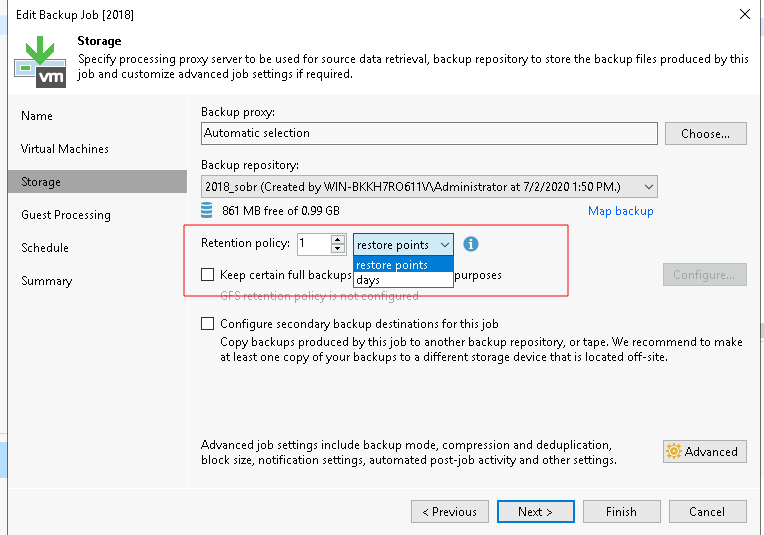
Created: Sun Dec 28 19:28:13 GMT 2025 - Last Modified: Tue Aug 12 18:20:36 GMT 2025 - 5.5K bytes - Click Count (0) -
internal/s3select/json/record.go
func (r *Record) Set(name string, value *sql.Value) (sql.Record, error) {
	var v any
	if b, ok := value.ToBool(); ok {
		v = b
	} else if f, ok := value.ToFloat(); ok {
		v = f
	} else if i, ok := value.ToInt(); ok {
		v = i
	} else if t, ok := value.ToTimestamp(); ok {
		v = sql.FormatSQLTimestamp(t)
	} else if s, ok := value.ToString(); ok {
		v = s
	} else if value.IsNull() {
		v = nil
	} else if value.IsMissing() {
Created: Sun Dec 28 19:28:13 GMT 2025 - Last Modified: Fri Aug 29 02:39:48 GMT 2025 - 5.2K bytes - Click Count (0) -
docs/es/docs/tutorial/extra-models.md
```Python
user_dict = user_in.dict()
```

ahora tenemos un `dict` con los datos en la variable `user_dict` (es un `dict` en lugar de un objeto modelo Pydantic).

Y si llamamos a:

```Python
print(user_dict)
```

obtendremos un `dict` de Python con:

```Python
{
    'username': 'john',
    'password': 'secret',
    'email': '******@****.***',
    'full_name': None,
}
```
Created: Sun Dec 28 07:19:09 GMT 2025 - Last Modified: Tue Dec 16 16:33:45 GMT 2025 - 7.6K bytes - Click Count (0) -
docs/ru/docs/environment-variables.md
Created: Sun Dec 28 07:19:09 GMT 2025 - Last Modified: Tue Sep 30 11:24:39 GMT 2025 - 12.7K bytes - Click Count (0)