- Sort Score
- Num 10 results
- Language All
Results 351 - 360 of 1,058 for png (0.02 seconds)
-
scripts/playwright/header_param_models/image01.py
    page.get_by_role("button", name="Try it out").click()
    # Manually add the screenshot
    page.screenshot(path="docs/en/docs/img/tutorial/header-param-models/image01.png")

    # ---------------------
    context.close()
    browser.close()


process = subprocess.Popen(
    ["fastapi", "run", "docs_src/header_param_models/tutorial001.py"]
)
try:
    for _ in range(3):
Created: Sun Apr 05 07:19:11 GMT 2026 - Last Modified: Tue Sep 17 18:54:10 GMT 2024 - 1.1K bytes - Click Count (0) -
scripts/playwright/request_form_models/image01.py
    page.get_by_role("button", name="Try it out").click()
    # Manually add the screenshot
    page.screenshot(path="docs/en/docs/img/tutorial/request-form-models/image01.png")

    # ---------------------
    context.close()
    browser.close()


process = subprocess.Popen(
    ["fastapi", "run", "docs_src/request_form_models/tutorial001.py"]
)
try:
    for _ in range(3):
Created: Sun Apr 05 07:19:11 GMT 2026 - Last Modified: Fri Sep 13 09:14:46 GMT 2024 - 1.1K bytes - Click Count (0) -
docs/zh/docs/tutorial/path-params.md
注意,上面的错误清晰地指出了未通过校验的具体位置。

这在开发调试与 API 交互的代码时非常有用。

///

## 文档 { #documentation }

访问 [http://127.0.0.1:8000/docs](http://127.0.0.1:8000/docs),查看自动生成的交互式 API 文档:

<img src="/img/tutorial/path-params/image01.png">

/// check | 检查

还是使用 Python 类型声明,**FastAPI** 提供了(集成 Swagger UI 的)自动交互式文档。

注意,路径参数的类型是整数。

///

## 基于标准的好处,备选文档 { #standards-based-benefits-alternative-documentation }
Created: Sun Apr 05 07:19:11 GMT 2026 - Last Modified: Fri Mar 20 17:06:37 GMT 2026 - 7.6K bytes - Click Count (0) -
docs/ja/docs/python-types.md
<img src="/img/python-types/image02.png">

これであれば、あなたは「ベルを鳴らす」ものを見つけるまで、オプションを見てスクロールできます:

<img src="/img/python-types/image03.png">

## より強い動機 { #more-motivation }

この関数を見てください。すでに型ヒントを持っています:

{* ../../docs_src/python_types/tutorial003_py310.py hl[1] *}

エディタは変数の型を知っているので、補完だけでなく、エラーチェックをすることもできます:

<img src="/img/python-types/image04.png">
Created: Sun Apr 05 07:19:11 GMT 2026 - Last Modified: Fri Mar 20 14:07:17 GMT 2026 - 14.3K bytes - Click Count (0) -
docs/zh-hant/docs/tutorial/security/first-steps.md
開啟互動式文件:[http://127.0.0.1:8000/docs](http://127.0.0.1:8000/docs)。

你會看到類似這樣:

<img src="/img/tutorial/security/image01.png">

/// check | Authorize 按鈕!

你會看到一個新的「Authorize」按鈕。

而你的「路徑操作」右上角也會出現一個小鎖頭可以點擊。

///

點擊後會跳出一個小視窗,讓你輸入 `username` 與 `password`(以及其他可選欄位):

<img src="/img/tutorial/security/image02.png">

/// note | 注意

不管你在表單輸入什麼,現在都還不會成功;等等我們會把它完成。

///

這當然不是給最終使用者用的前端,但它是用來互動式文件化整個 API 的極佳自動化工具。
Created: Sun Apr 05 07:19:11 GMT 2026 - Last Modified: Fri Mar 20 17:05:38 GMT 2026 - 7.2K bytes - Click Count (0) -
docs/zh/docs/tutorial/security/first-steps.md
打开交互式文档:[http://127.0.0.1:8000/docs](http://127.0.0.1:8000/docs)。

你会看到类似这样的界面:

<img src="/img/tutorial/security/image01.png">

/// check | Authorize 按钮!

页面右上角已经有一个崭新的“Authorize”按钮。

你的*路径操作*右上角还有一个可点击的小锁图标。

///

点击它,会弹出一个授权表单,可输入 `username` 和 `password`(以及其它可选字段):

<img src="/img/tutorial/security/image02.png">

/// note | 注意

目前无论在表单中输入什么都不会生效,我们稍后就会实现它。

///
Created: Sun Apr 05 07:19:11 GMT 2026 - Last Modified: Fri Mar 20 17:06:37 GMT 2026 - 7.5K bytes - Click Count (0) -
src/test/resources/data/gsaconfig.xml
</collection> </collections> <globalparams> <bad_urls><![CDATA[ contains:/images/ contains:? contains:\\.xml$ # test regexp:/([^/]*)/\\1/\\1/ .gif$ .jpg$ .jpeg$ .png$ regexpIgnoreCase:\\.dll$ regexpIgnoreCase:\\.exe$ /?S=A$ /?S=D$ contains:\001 contains:\002 contains:\003 .html/$ ]]></bad_urls> <good_urls><. Ви побачите альтернативну автоматичну документацію (надану [ReDoc](https://github.com/Rebilly/ReDoc)):  ## Приклад оновлення { #example-upgrade }Created: Sun Apr 05 07:19:11 GMT 2026 - Last Modified: Thu Mar 19 18:27:41 GMT 2026 - 29.1K bytes - Click Count (0) -
docs/en/docs/features.md
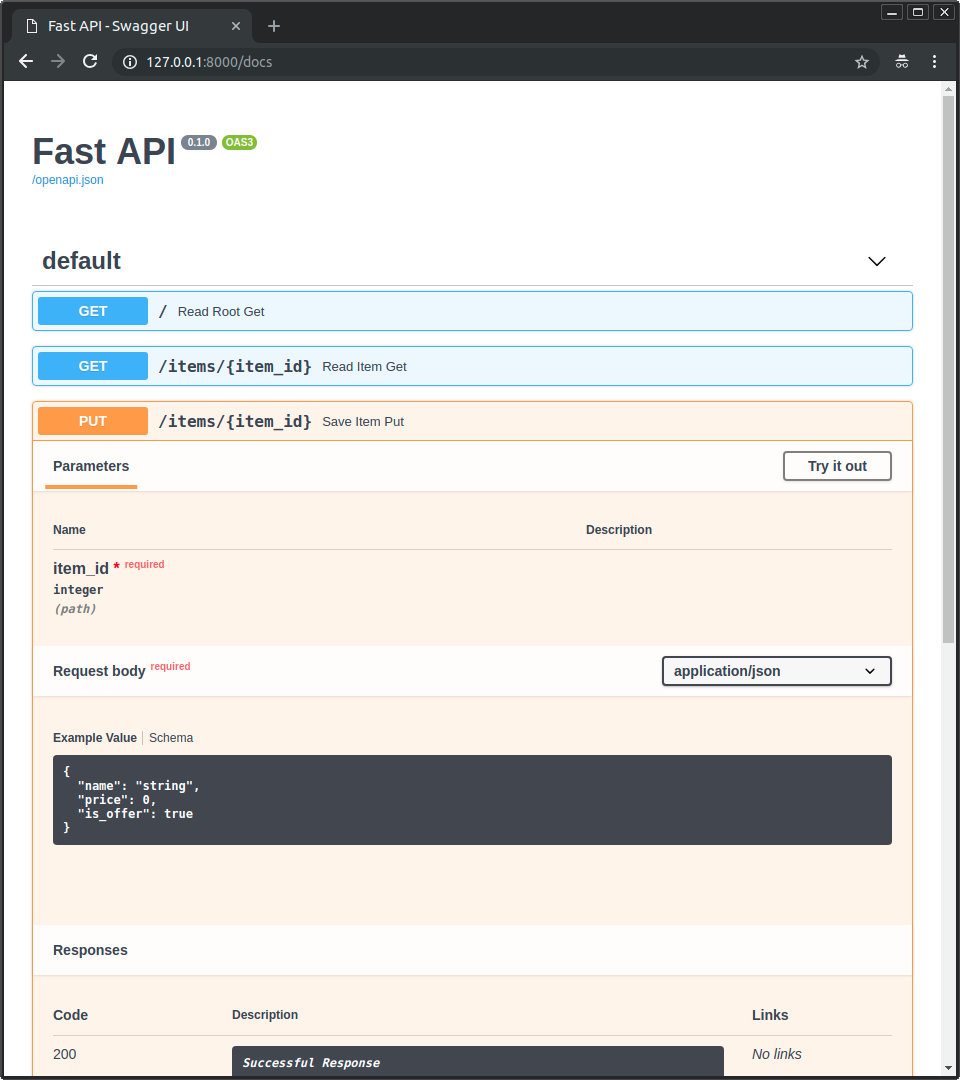 * Alternative API documentation with [**ReDoc**](https://github.com/Rebilly/ReDoc). 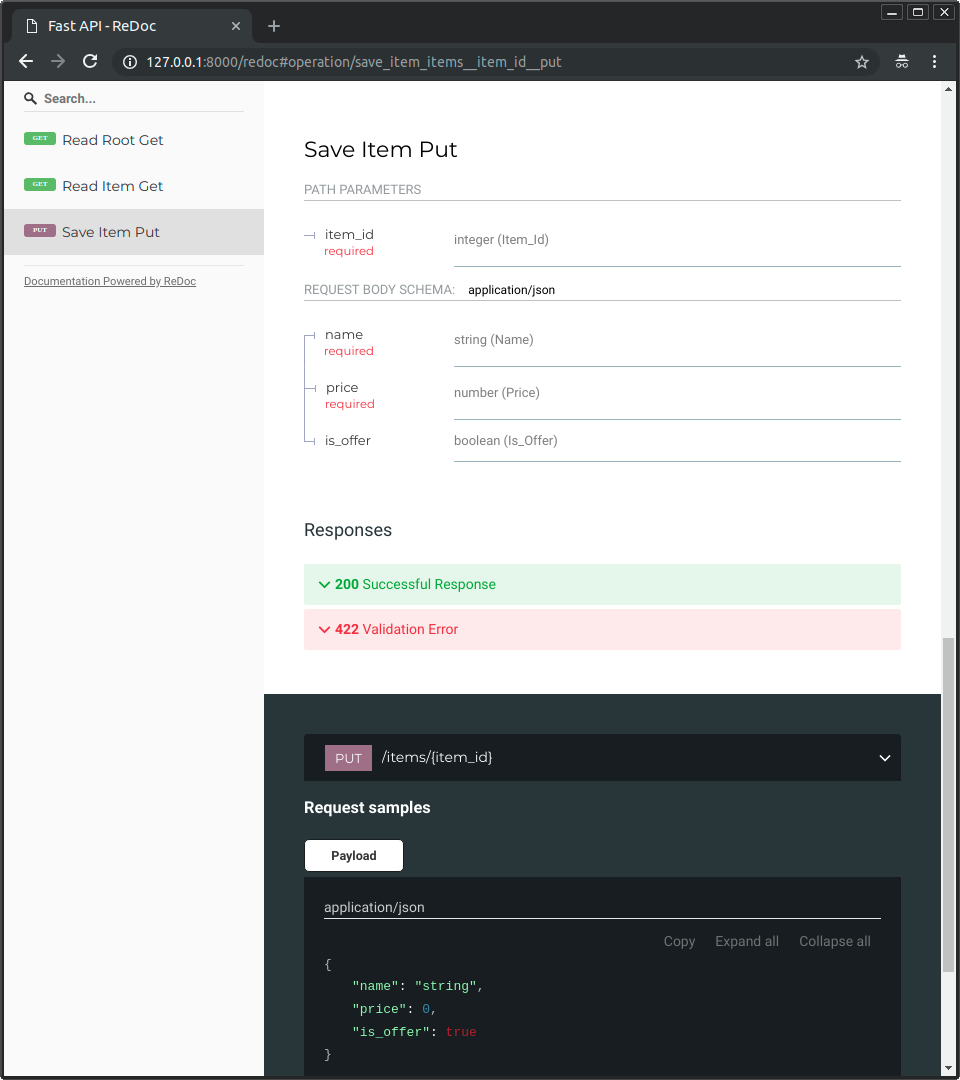 ### Just Modern Python { #just-modern-python }
Created: Sun Apr 05 07:19:11 GMT 2026 - Last Modified: Thu Mar 05 18:13:19 GMT 2026 - 8.9K bytes - Click Count (0) -
docs/en/docs/index.md
 ### Alternative API docs { #alternative-api-docs } And now, go to [http://127.0.0.1:8000/redoc](http://127.0.0.1:8000/redoc). You will see the alternative automatic documentation (provided by [ReDoc](https://github.com/Rebilly/ReDoc)):  ## Example upgrade { #example-upgrade }Created: Sun Apr 05 07:19:11 GMT 2026 - Last Modified: Sat Mar 07 09:29:03 GMT 2026 - 21.4K bytes - Click Count (0)