- Sort Score
- Num 10 results
- Language All
Results 251 - 260 of 298 for Available (0.14 seconds)
-
api/go1.21.txt
pkg bytes, func ContainsFunc([]uint8, func(int32) bool) bool #54386
pkg bytes, method (*Buffer) AvailableBuffer() []uint8 #53685
pkg bytes, method (*Buffer) Available() int #53685
pkg cmp, func Compare[$0 Ordered]($0, $0) int #59488
pkg cmp, func Less[$0 Ordered]($0, $0) bool #59488
pkg cmp, type Ordered interface {} #59488
pkg context, func AfterFunc(Context, func()) func() bool #57928
Created: Tue Dec 30 11:13:12 GMT 2025 - Last Modified: Mon Aug 07 09:39:17 GMT 2023 - 25.6K bytes - Click Count (0) -
helm-releases/minio-3.3.2.tgz
{{ .Values.service.port }} on an external IP address. Get the service external IP address by: kubectl get svc --namespace {{ .Release.Namespace }} -l app={{ template "minio.fullname" . }} Note that the public IP may take a couple of minutes to be available. You can now access MinIO server on http://<External-IP>:9000. Follow the below steps to connect to MinIO server with mc client: 1. Download the MinIO mc client - https://docs.minio.io/docs/minio-client-quickstart-guide 2. export MC_HOST_{{ template...Created: Sun Dec 28 19:28:13 GMT 2025 - Last Modified: Sat Dec 11 17:26:01 GMT 2021 - 14.6K bytes - Click Count (0) -
helm-releases/minio-3.3.4.tgz
{{ .Values.service.port }} on an external IP address. Get the service external IP address by: kubectl get svc --namespace {{ .Release.Namespace }} -l app={{ template "minio.fullname" . }} Note that the public IP may take a couple of minutes to be available. You can now access MinIO server on http://<External-IP>:9000. Follow the below steps to connect to MinIO server with mc client: 1. Download the MinIO mc client - https://docs.minio.io/docs/minio-client-quickstart-guide 2. export MC_HOST_{{ template...Created: Sun Dec 28 19:28:13 GMT 2025 - Last Modified: Sat Dec 11 17:59:34 GMT 2021 - 14.6K bytes - Click Count (0) -
helm-releases/minio-3.4.2.tgz
{{ .Values.service.port }} on an external IP address. Get the service external IP address by: kubectl get svc --namespace {{ .Release.Namespace }} -l app={{ template "minio.fullname" . }} Note that the public IP may take a couple of minutes to be available. You can now access MinIO server on http://<External-IP>:9000. Follow the below steps to connect to MinIO server with mc client: 1. Download the MinIO mc client - https://docs.minio.io/docs/minio-client-quickstart-guide 2. export MC_HOST_{{ template...Created: Sun Dec 28 19:28:13 GMT 2025 - Last Modified: Tue Dec 21 02:58:25 GMT 2021 - 15.2K bytes - Click Count (0) -
helm-releases/minio-3.4.4.tgz
{{ .Values.service.port }} on an external IP address. Get the service external IP address by: kubectl get svc --namespace {{ .Release.Namespace }} -l app={{ template "minio.fullname" . }} Note that the public IP may take a couple of minutes to be available. You can now access MinIO server on http://<External-IP>:9000. Follow the below steps to connect to MinIO server with mc client: 1. Download the MinIO mc client - https://docs.minio.io/docs/minio-client-quickstart-guide 2. export MC_HOST_{{ template...Created: Sun Dec 28 19:28:13 GMT 2025 - Last Modified: Fri Dec 31 04:21:24 GMT 2021 - 15.2K bytes - Click Count (0) -
helm-releases/minio-3.4.5.tgz
{{ .Values.service.port }} on an external IP address. Get the service external IP address by: kubectl get svc --namespace {{ .Release.Namespace }} -l app={{ template "minio.fullname" . }} Note that the public IP may take a couple of minutes to be available. You can now access MinIO server on http://<External-IP>:9000. Follow the below steps to connect to MinIO server with mc client: 1. Download the MinIO mc client - https://docs.minio.io/docs/minio-client-quickstart-guide 2. export MC_HOST_{{ template...Created: Sun Dec 28 19:28:13 GMT 2025 - Last Modified: Wed Jan 05 19:32:55 GMT 2022 - 15.2K bytes - Click Count (0) -
helm-releases/minio-3.5.3.tgz
{{ .Values.service.port }} on an external IP address. Get the service external IP address by: kubectl get svc --namespace {{ .Release.Namespace }} -l app={{ template "minio.fullname" . }} Note that the public IP may take a couple of minutes to be available. You can now access MinIO server on http://<External-IP>:9000. Follow the below steps to connect to MinIO server with mc client: 1. Download the MinIO mc client - https://docs.minio.io/docs/minio-client-quickstart-guide 2. export MC_HOST_{{ template...Created: Sun Dec 28 19:28:13 GMT 2025 - Last Modified: Sun Feb 13 23:43:44 GMT 2022 - 15.4K bytes - Click Count (0) -
src/archive/tar/strconv.go
	}
}

// fitsInBase256 reports whether x can be encoded into n bytes using base-256
// encoding. Unlike octal encoding, base-256 encoding does not require that the
// string ends with a NUL character. Thus, all n bytes are available for output.
//
// If operating in binary mode, this assumes strict GNU binary mode; which means
// that the first byte can only be either 0x80 or 0xff. Thus, the first byte is
Created: Tue Dec 30 11:13:12 GMT 2025 - Last Modified: Mon Sep 08 17:08:20 GMT 2025 - 9.1K bytes - Click Count (0) -
docs/bucket/replication/README.md
To perform bi-directional replication, repeat the above process on the target site - this time setting the source bucket as the replication target. It is recommended that replication be run in a system with at least two CPU's available to the process, so that replication can run in its own thread. 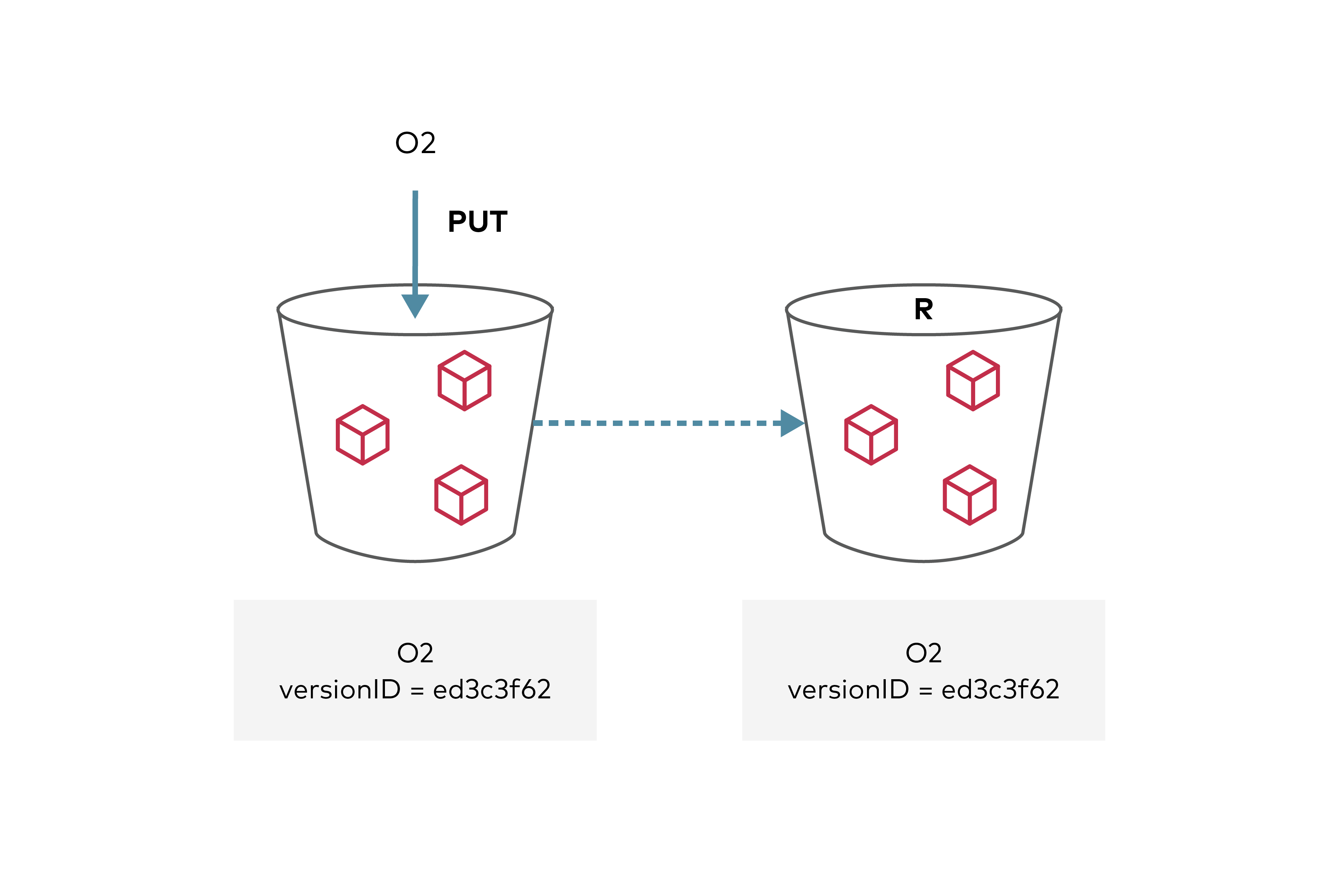
Created: Sun Dec 28 19:28:13 GMT 2025 - Last Modified: Tue Aug 12 18:20:36 GMT 2025 - 18.3K bytes - Click Count (0) -
tensorflow/c/c_test_util.cc
  TF_SetAttrType(desc, "T", TF_INT32);
  // Set device to CPU since there is no version of split for int32 on GPU
  // TODO(iga): Convert all these helpers and tests to use floats because
  // they are usually available on GPUs. After doing this, remove TF_SetDevice
  // call in c_api_function_test.cc
  TF_SetDevice(desc, "/cpu:0");
  *op = TF_FinishOperation(desc, s);
  ASSERT_EQ(TF_OK, TF_GetCode(s)) << TF_Message(s);
Created: Tue Dec 30 12:39:10 GMT 2025 - Last Modified: Sat Oct 04 05:55:32 GMT 2025 - 17.8K bytes - Click Count (1)