- Sort Score
- Num 10 results
- Language All
Results 241 - 250 of 338 for RAW (0.02 seconds)
-
benchmarks/src/main/java/org/elasticsearch/benchmark/search/aggregations/bucket/terms/StringTermsSerializationBenchmark.java
Created: Wed Apr 08 16:19:15 GMT 2026 - Last Modified: Thu Aug 12 21:50:17 GMT 2021 - 3K bytes - Click Count (0) -
src/archive/tar/common.go
// no holes in it). On the other hand, the zero value of sparseDatas implies
// that the file has no data in it, which is rather odd.
//
// As an example, if the underlying raw file contains the 10-byte data:
//
//	var compactFile = "abcdefgh"
//
// And the sparse map has the following entries:
//
//	var spd sparseDatas = []sparseEntry{
Created: Tue Apr 07 11:13:11 GMT 2026 - Last Modified: Tue Oct 07 19:46:36 GMT 2025 - 24.5K bytes - Click Count (0) -
api/go1.21.txt
pkg crypto/x509, type RevocationListEntry struct, Extensions []pkix.Extension #53573
pkg crypto/x509, type RevocationListEntry struct, ExtraExtensions []pkix.Extension #53573
pkg crypto/x509, type RevocationListEntry struct, Raw []uint8 #53573
pkg crypto/x509, type RevocationListEntry struct, ReasonCode int #53573
pkg crypto/x509, type RevocationListEntry struct, RevocationTime time.Time #53573
Created: Tue Apr 07 11:13:11 GMT 2026 - Last Modified: Mon Aug 07 09:39:17 GMT 2023 - 25.6K bytes - Click Count (0) -
src/main/java/jcifs/config/BaseConfiguration.java
    protected int lanmanCompatibility = 3;
    /** Whether to allow fallback to NTLM authentication */
    protected boolean allowNTLMFallback = true;
    /** Whether to use raw NTLM authentication without SPNEGO */
    protected boolean useRawNTLM = false;
    /** Whether to disable SPNEGO integrity checking */
    protected boolean disableSpnegoIntegrity = false;
Created: Sun Apr 05 00:10:12 GMT 2026 - Last Modified: Sun Aug 31 08:00:57 GMT 2025 - 36.5K bytes - Click Count (0) -
docs/pt/docs/advanced/templates.md
```jinja hl_lines="7"
{!../../docs_src/templates/templates/item.html!}
```

### Valores de contexto do template { #template-context-values }

No código HTML que contém:

{% raw %}

```jinja
Item ID: {{ id }}
```

{% endraw %}

...aparecerá o `id` obtido do "context" `dict` que você passou:

```Python
{"id": id}
```

Por exemplo, dado um ID de valor `42`, aparecerá:
Created: Sun Apr 05 07:19:11 GMT 2026 - Last Modified: Thu Mar 19 18:20:43 GMT 2026 - 3.6K bytes - Click Count (0) -
docs/tuning/README.md
- `tuned`
- `curl`

### Install `tuned.conf` performance profile

#### Step 1 - download `tuned.conf` from the referenced link
```
wget https://raw.githubusercontent.com/minio/minio/master/docs/tuning/tuned.conf
```

#### Step 2 - install tuned.conf as supported performance profile on all nodes
```
sudo mkdir -p /usr/lib/tuned/minio/
Created: Sun Apr 05 19:28:12 GMT 2026 - Last Modified: Fri Jul 19 01:15:02 GMT 2024 - 644 bytes - Click Count (0) -
docs/de/docs/advanced/templates.md
```jinja hl_lines="7"
{!../../docs_src/templates/templates/item.html!}
```

### Template-Kontextwerte { #template-context-values }

Im HTML, welches enthält:

{% raw %}

```jinja
Item ID: {{ id }}
```

{% endraw %}

... wird die `id` angezeigt, welche dem „Kontext“-`dict` entnommen wird, welches Sie übergeben haben:

```Python
{"id": id}
```
Created: Sun Apr 05 07:19:11 GMT 2026 - Last Modified: Thu Mar 19 17:58:09 GMT 2026 - 4.2K bytes - Click Count (0) -
build-tools-internal/src/integTest/groovy/org/elasticsearch/gradle/internal/PublishPluginFuncTest.groovy
  <url>unknown</url>
  <scm>
    <url>unknown</url>
  </scm>
  <inceptionYear>2009</inceptionYear>
  <licenses>
    <license>
      <name>Elastic License 2.0</name>
      <url>https://raw.githubusercontent.com/elastic/elasticsearch/v1.0/licenses/ELASTIC-LICENSE-2.0.txt</url>
      <distribution>repo</distribution>
    </license>
    <license>
      <name>Server Side Public License, v 1</name>
Created: Wed Apr 08 16:19:15 GMT 2026 - Last Modified: Tue Jun 22 07:24:59 GMT 2021 - 19K bytes - Click Count (0) -
docs/zh-hant/docs/advanced/templates.md
接著你可以在 `templates/item.html` 編寫模板,例如:

```jinja hl_lines="7"
{!../../docs_src/templates/templates/item.html!}
```

### 模板 context 值 { #template-context-values }

在包含以下內容的 HTML 中:

{% raw %}

```jinja
Item ID: {{ id }}
```

{% endraw %}

...它會顯示你在傳入的 context `dict` 中提供的 `id`:

```Python
{"id": id}
```

例如,若 ID 為 `42`,會渲染為:

```html
Item ID: 42
```
Created: Sun Apr 05 07:19:11 GMT 2026 - Last Modified: Fri Mar 20 17:05:38 GMT 2026 - 3.3K bytes - Click Count (0) -
docs/bucket/versioning/README.md
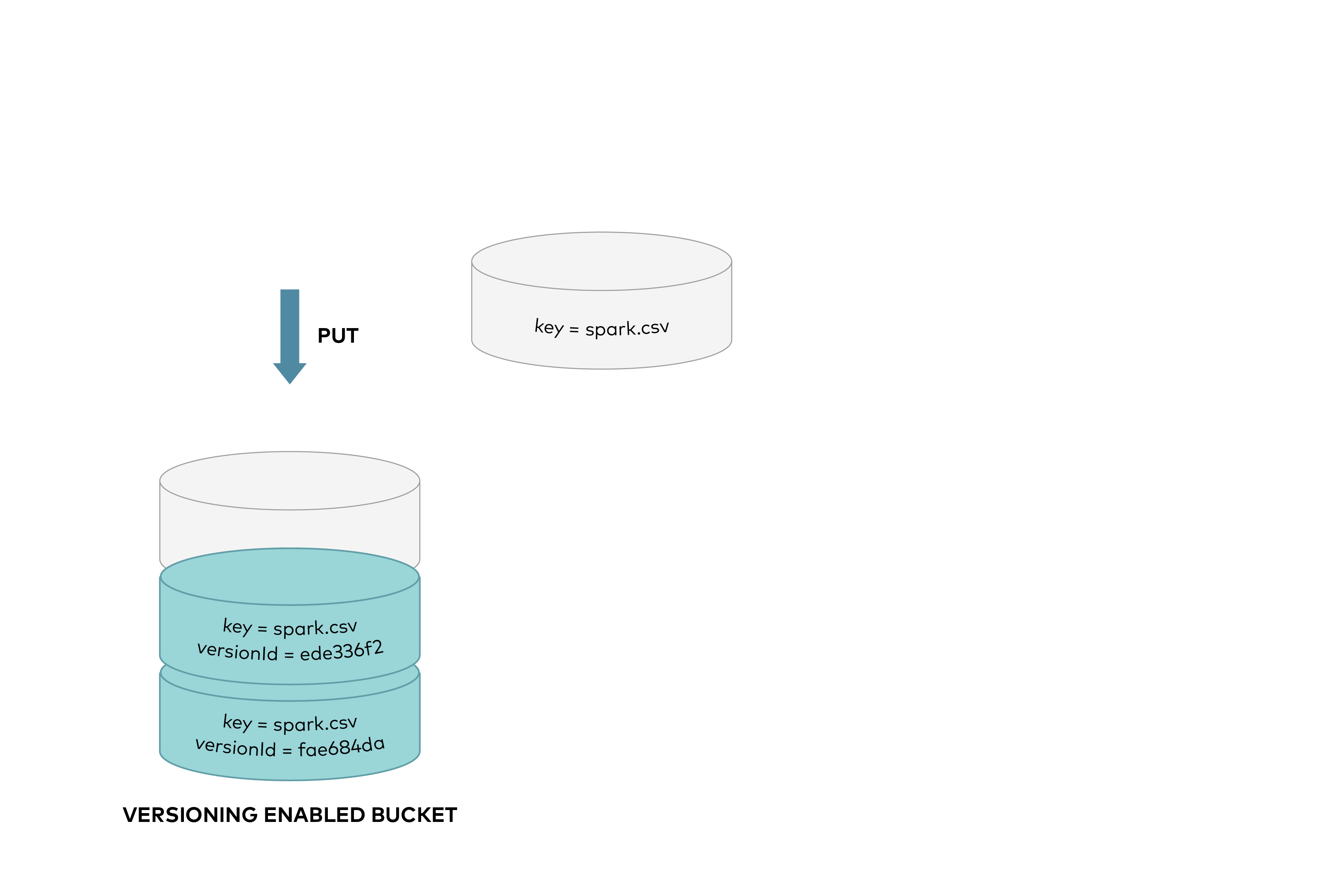 This protects against accidental overwrites or deletes of objects, allows previous versions to be retrieved. When you DELETE an object, all versions remain in the bucket and MinIO adds a delete marker, as shown below:
Created: Sun Apr 05 19:28:12 GMT 2026 - Last Modified: Tue Aug 12 18:20:36 GMT 2025 - 12K bytes - Click Count (0)