- Sort Score
- Num 10 results
- Language All
Results 211 - 220 of 1,076 for Guides (0.04 seconds)
-
docs/es/docs/advanced/strict-content-type.md
```

También hay un frontend en

```
http://localhost:8000
```

/// tip | Consejo

Ten en cuenta que ambos tienen el mismo host.

///

Luego, usando el frontend, puedes hacer que el agente de IA haga cosas en tu nombre.

Como está corriendo localmente y no en Internet abierta, decides no tener ninguna autenticación configurada, confiando simplemente en el acceso a la red local.
Created: Sun Apr 05 07:19:11 GMT 2026 - Last Modified: Thu Mar 19 18:12:26 GMT 2026 - 3.4K bytes - Click Count (0) -
docs/es/docs/advanced/advanced-python-types.md
## Usar `Union` u `Optional` { #using-union-or-optional }

Si por alguna razón tu código no puede usar `|`, por ejemplo si no está en una anotación de tipos sino en algo como `response_model=`, en lugar de usar la barra vertical (`|`) puedes usar `Union` de `typing`.

Por ejemplo, podrías declarar que algo podría ser un `str` o `None`:

```python
from typing import Union


def say_hi(name: Union[str, None]):
        print(f"Hi {name}!")
```
Created: Sun Apr 05 07:19:11 GMT 2026 - Last Modified: Fri Feb 13 13:41:41 GMT 2026 - 2.1K bytes - Click Count (0) -
.github/bot_config.yml
       * Refer [windows setup guide](https://www.tensorflow.org/install/gpu#windows_setup).
     * If you have above configuration and using _**Ubuntu/Linux**_ platform -
       * Try adding the CUDA, CUPTI, and cuDNN installation directories to the $LD_LIBRARY_PATH environment variable.
       * Refer [linux setup guide](https://www.tensorflow.org/install/gpu#linux_setup).
Created: Tue Apr 07 12:39:13 GMT 2026 - Last Modified: Mon Jun 30 16:38:59 GMT 2025 - 4K bytes - Click Count (1) -
docs/es/docs/translation-banner.md
/// details | 🌐 Traducción por IA y humanos

Esta traducción fue hecha por IA guiada por humanos. 🤝

Podría tener errores al interpretar el significado original, o sonar poco natural, etc. 🤖

Puedes mejorar esta traducción [ayudándonos a guiar mejor al LLM de IA](https://fastapi.tiangolo.com/es/contributing/#translations).

[Versión en inglés](ENGLISH_VERSION_URL)
Created: Sun Apr 05 07:19:11 GMT 2026 - Last Modified: Fri Feb 13 13:41:41 GMT 2026 - 388 bytes - Click Count (0) -
helm-releases/minio-3.1.2.tgz
Configure resource requests and limits ## ref: http://kubernetes.io/docs/user-guide/compute-resources/ ## resources: requests: memory: 16Gi ## List of users to be created after minio install ## users: ## Username, password and policy to be assigned to the user ## Default policies are [readonly|readwrite|writeonly|consoleAdmin|diagnostics] ## Add new policies as explained here https://docs.min.io/docs/minio-multi-user-quickstart-guide.html ## NOTE: this will fail if LDAP is enabled in your MinIO deployment...
Created: Sun Apr 05 19:28:12 GMT 2026 - Last Modified: Sat Sep 18 04:26:47 GMT 2021 - 14.4K bytes - Click Count (0) -
helm-releases/minio-3.1.4.tgz
Configure resource requests and limits ## ref: http://kubernetes.io/docs/user-guide/compute-resources/ ## resources: requests: memory: 16Gi ## List of users to be created after minio install ## users: ## Username, password and policy to be assigned to the user ## Default policies are [readonly|readwrite|writeonly|consoleAdmin|diagnostics] ## Add new policies as explained here https://docs.min.io/docs/minio-multi-user-quickstart-guide.html ## NOTE: this will fail if LDAP is enabled in your MinIO deployment...
Created: Sun Apr 05 19:28:12 GMT 2026 - Last Modified: Mon Sep 20 05:30:22 GMT 2021 - 14.4K bytes - Click Count (0) -
helm-releases/minio-3.1.5.tgz
Configure resource requests and limits ## ref: http://kubernetes.io/docs/user-guide/compute-resources/ ## resources: requests: memory: 16Gi ## List of users to be created after minio install ## users: ## Username, password and policy to be assigned to the user ## Default policies are [readonly|readwrite|writeonly|consoleAdmin|diagnostics] ## Add new policies as explained here https://docs.min.io/docs/minio-multi-user-quickstart-guide.html ## NOTE: this will fail if LDAP is enabled in your MinIO deployment...
Created: Sun Apr 05 19:28:12 GMT 2026 - Last Modified: Wed Sep 22 16:52:01 GMT 2021 - 14.4K bytes - Click Count (0) -
docs/sts/dex.md
# Dex Quickstart Guide [](https://slack.min.io)
Created: Sun Apr 05 19:28:12 GMT 2026 - Last Modified: Tue Aug 12 18:20:36 GMT 2025 - 3.8K bytes - Click Count (0) -
docs/bucket/quota/README.md
# Bucket Quota Configuration Quickstart Guide [](https://slack.min.io) [](https://hub.docker.com/r/minio/minio/) 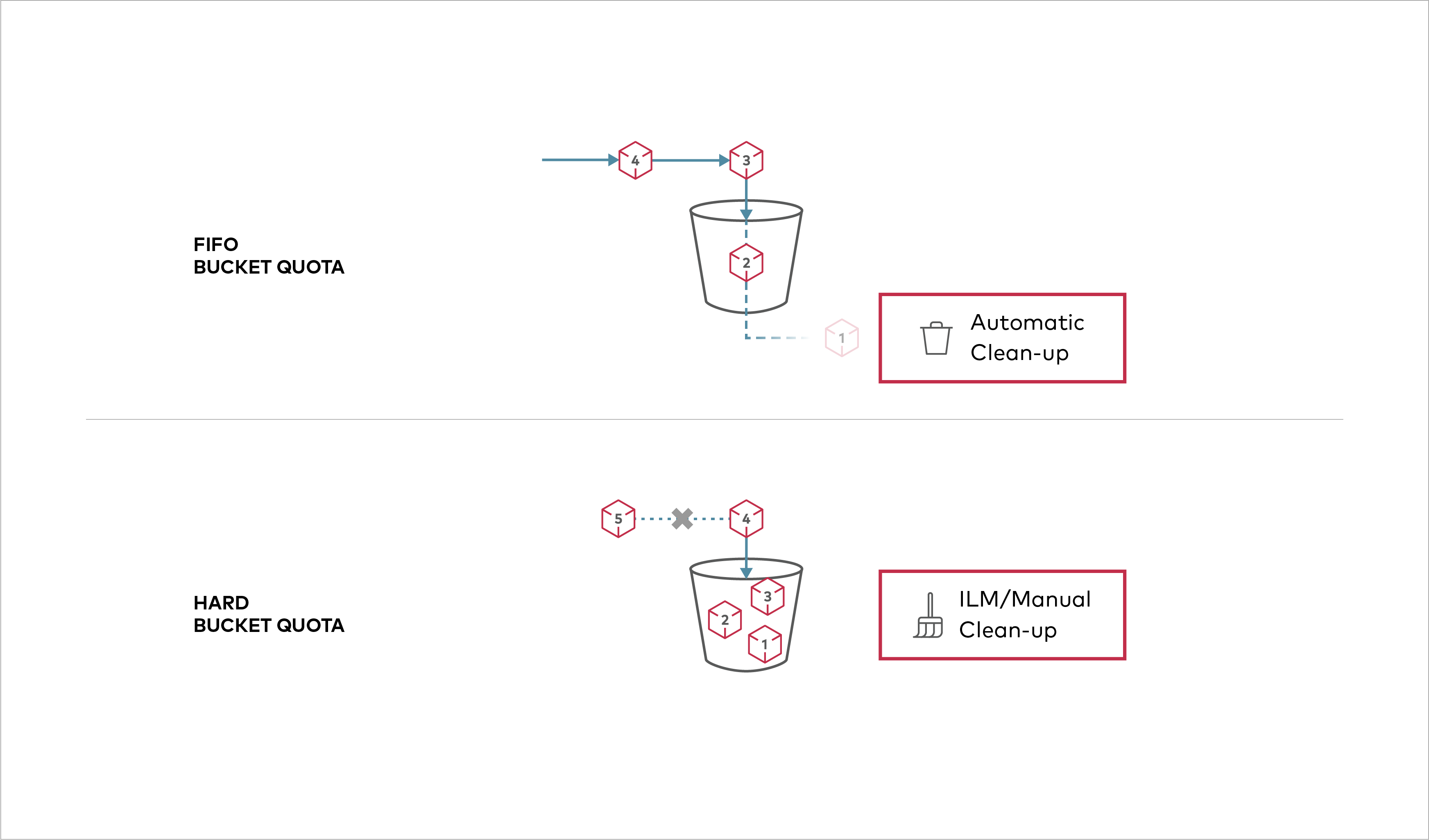 Buckets can be configured to have `Hard` quota - it disallows writes to the bucket after configured quota limit is reached.
Created: Sun Apr 05 19:28:12 GMT 2026 - Last Modified: Tue Aug 12 18:20:36 GMT 2025 - 1.1K bytes - Click Count (0) -
docs/es/docs/advanced/testing-websockets.md
# Probando WebSockets { #testing-websockets }

Puedes usar el mismo `TestClient` para probar WebSockets.

Para esto, usas el `TestClient` en un statement `with`, conectándote al WebSocket:

{* ../../docs_src/app_testing/tutorial002_py310.py hl[27:31] *}

/// note | Nota

Para más detalles, revisa la documentación de Starlette sobre [probar WebSockets](https://www.starlette.dev/testclient/#testing-websocket-sessions).
Created: Sun Apr 05 07:19:11 GMT 2026 - Last Modified: Thu Mar 19 18:15:55 GMT 2026 - 429 bytes - Click Count (0)