- Sort Score
- Num 10 results
- Language All
Results 1 - 10 of 222 for Slack (0.02 seconds)
The search processing time has exceeded the limit. The displayed results may be partial.
-
samples/slack/src/main/java/okhttp3/slack/SlackApi.java
import okio.ByteString;

/**
 * API access to the <a href="https://api.slack.com/apps">Slack API</a> as an application. One
 * instance of this class may operate without a user, or on behalf of many users. Use the Slack API
 * dashboard to create a client ID and secret for this application.
 *
 * <p>You must configure your Slack API OAuth and Permissions page with a localhost URL like {@code
Created: Fri Apr 03 11:42:14 GMT 2026 - Last Modified: Fri Jul 06 19:30:55 GMT 2018 - 4.4K bytes - Click Count (0) -
src/test/resources/plugin/repo1/index.html
<a href="fess-ds-office365/" title="fess-ds-office365/">fess-ds-office365/</a>                                               -         -
<a href="fess-ds-slack/" title="fess-ds-slack/">fess-ds-slack/</a>                                                   -         -
<a href="fess-suggest/" title="fess-suggest/">fess-suggest/</a>                                                    -         -
Created: Tue Mar 31 13:07:34 GMT 2026 - Last Modified: Tue Aug 13 07:34:14 GMT 2019 - 3.3K bytes - Click Count (0) -
docs/orchestration/README.md
# MinIO Deployment Quickstart Guide [](https://slack.min.io) [](https://hub.docker.com/r/minio/minio/)
Created: Sun Apr 05 19:28:12 GMT 2026 - Last Modified: Tue Aug 12 18:20:36 GMT 2025 - 2.2K bytes - Click Count (0) -
docs/bucket/quota/README.md
# Bucket Quota Configuration Quickstart Guide [](https://slack.min.io) [](https://hub.docker.com/r/minio/minio/) 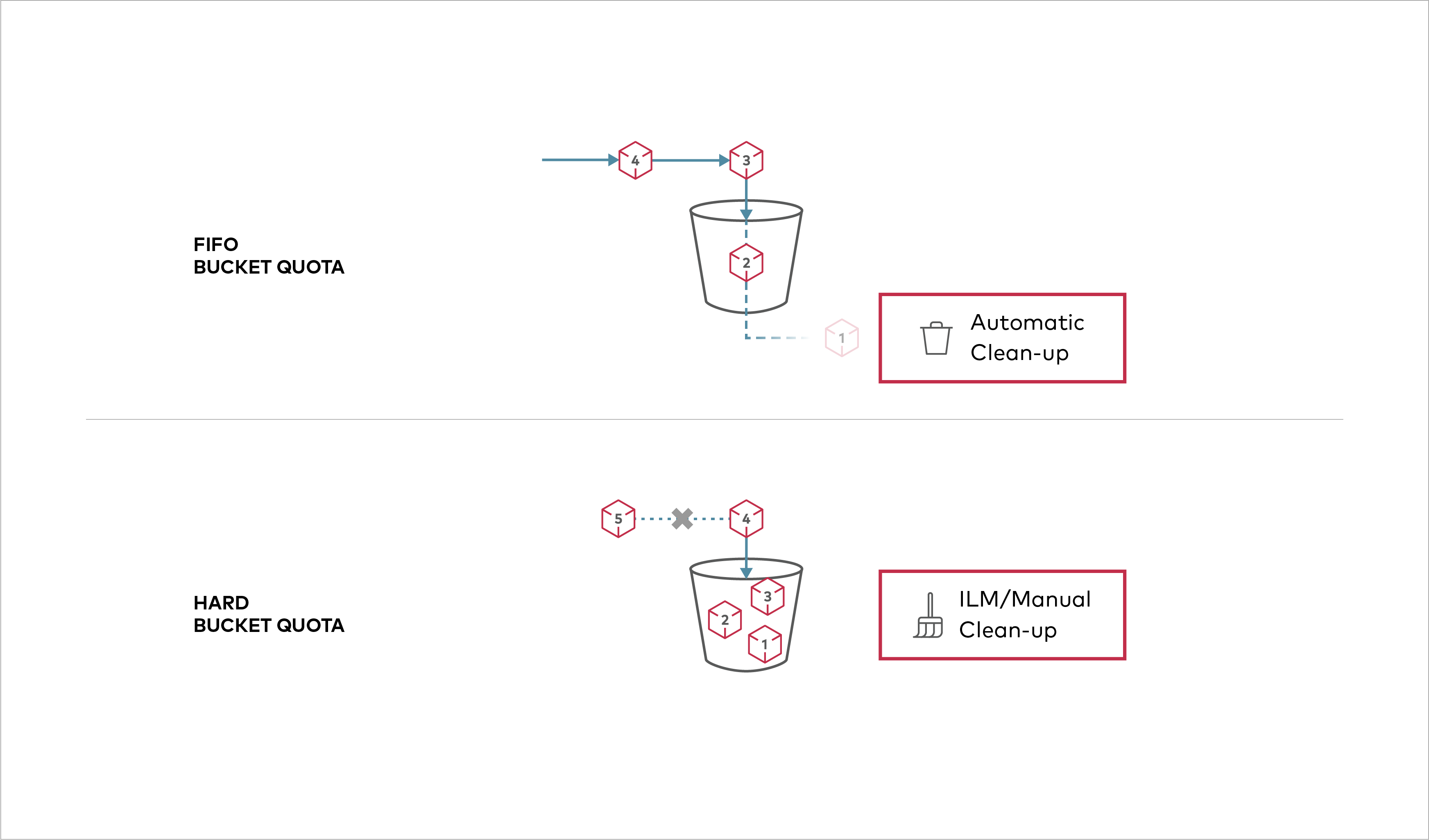 Buckets can be configured to have `Hard` quota - it disallows writes to the bucket after configured quota limit is reached.
Created: Sun Apr 05 19:28:12 GMT 2026 - Last Modified: Tue Aug 12 18:20:36 GMT 2025 - 1.1K bytes - Click Count (0) -
docs/extensions/fan-out/README.md
# Fan-Out Uploads [](https://slack.min.io) [](https://hub.docker.com/r/minio/minio/) ## Overview
Created: Sun Apr 05 19:28:12 GMT 2026 - Last Modified: Thu May 25 05:51:07 GMT 2023 - 1.4K bytes - Click Count (0) -
samples/slack/src/main/java/okhttp3/slack/SlackClient.java
 * See the License for the specific language governing permissions and
 * limitations under the License.
 */
package okhttp3.slack;

import java.io.IOException;
import java.io.InterruptedIOException;
import okhttp3.HttpUrl;
import okio.Timeout;

/** A connection to Slack as a single user. */
public final class SlackClient {
  private final SlackApi slackApi;
  private OAuthSessionFactory sessionFactory;
Created: Fri Apr 03 11:42:14 GMT 2026 - Last Modified: Sat Jan 12 03:31:36 GMT 2019 - 3.4K bytes - Click Count (0) -
docs/orchestration/docker-compose/README.md
# Deploy MinIO on Docker Compose [](https://slack.min.io) [](https://hub.docker.com/r/minio/minio/) Docker Compose allows defining and running single host, multi-container Docker applications.
Created: Sun Apr 05 19:28:12 GMT 2026 - Last Modified: Wed Oct 15 17:29:55 GMT 2025 - 3.3K bytes - Click Count (0) -
docs/sts/dex.md
# Dex Quickstart Guide [](https://slack.min.io)
Created: Sun Apr 05 19:28:12 GMT 2026 - Last Modified: Tue Aug 12 18:20:36 GMT 2025 - 3.8K bytes - Click Count (0) -
docs/extensions/s3zip/README.md
# Perform S3 operations in a ZIP content[](https://slack.min.io) [](https://hub.docker.com/r/minio/minio/) ## Overview
Created: Sun Apr 05 19:28:12 GMT 2026 - Last Modified: Wed Apr 10 16:28:27 GMT 2024 - 3K bytes - Click Count (0) -
src/main/java/org/codelibs/fess/helper/NotificationHelper.java
        sendToGoogleChat(cardView, discloser);
    }

    /**
     * Sends a notification to Slack.
     *
     * @param cardView the card view for the notification
     * @param discloser the mail posting discloser
     */
    protected void sendToSlack(final CardView cardView, final SMailPostingDiscloser discloser) {
        // https://api.slack.com/messaging/webhooks#posting_with_webhooks
Created: Tue Mar 31 13:07:34 GMT 2026 - Last Modified: Thu Jul 17 08:28:31 GMT 2025 - 6.2K bytes - Click Count (0)