- Sort Score
- Num 10 results
- Language All
Results 121 - 130 of 395 for editor (0.33 seconds)
-
docs/tr/docs/alternatives.md
/// check | **FastAPI**'a ilham olan

Model özelliklerinin “varsayılan” değerlerini kullanarak veri tiplerine ekstra doğrulamalar tanımlamak. Bu, editör desteğini iyileştirir ve Pydantic’te daha önce yoktu.
Created: Sun Apr 05 07:19:11 GMT 2026 - Last Modified: Fri Mar 20 07:53:17 GMT 2026 - 24K bytes - Click Count (0) -
docs/tr/docs/tutorial/response-model.md
Ama bu tarz durumların çoğunda modelin amacı, bu örnekteki gibi bazı verileri **filtrelemek/kaldırmak** olur.
Created: Sun Apr 05 07:19:11 GMT 2026 - Last Modified: Fri Mar 20 07:53:17 GMT 2026 - 17K bytes - Click Count (0) -
docs/es/docs/tutorial/response-model.md
/// tip | Consejo

Si tienes chequeo de tipos estricto en tu editor, mypy, etc., puedes declarar el tipo de retorno de la función como `Any`.

De esa manera le dices al editor que intencionalmente estás devolviendo cualquier cosa. Pero FastAPI todavía hará la documentación de datos, validación, filtrado, etc. con `response_model`.

///
Created: Sun Apr 05 07:19:11 GMT 2026 - Last Modified: Thu Mar 19 18:15:55 GMT 2026 - 17.1K bytes - Click Count (0) -
src/main/java/jcifs/smb1/smb1/SID.java
        }

        return ret.toString();
    }

    /**
     * Return a String representing this SID ideal for display to
     * users. This method should return the same text that the ACL
     * editor in Windows would display.
     * <p>
     * Specifically, if the SID has
     * been resolved and it is not a domain SID or builtin account,
     * the full DOMAIN\name form of the account will be
Created: Sun Apr 05 00:10:12 GMT 2026 - Last Modified: Sat Aug 16 01:32:48 GMT 2025 - 31.5K bytes - Click Count (0) -
docs/ja/docs/index.md
...以下の: ```Python ... "item_name": item.name ... ``` ...を: ```Python ... "item_price": item.price ... ``` ...に変更し、エディタが属性を自動補完し、その型を知ることを確認してください。 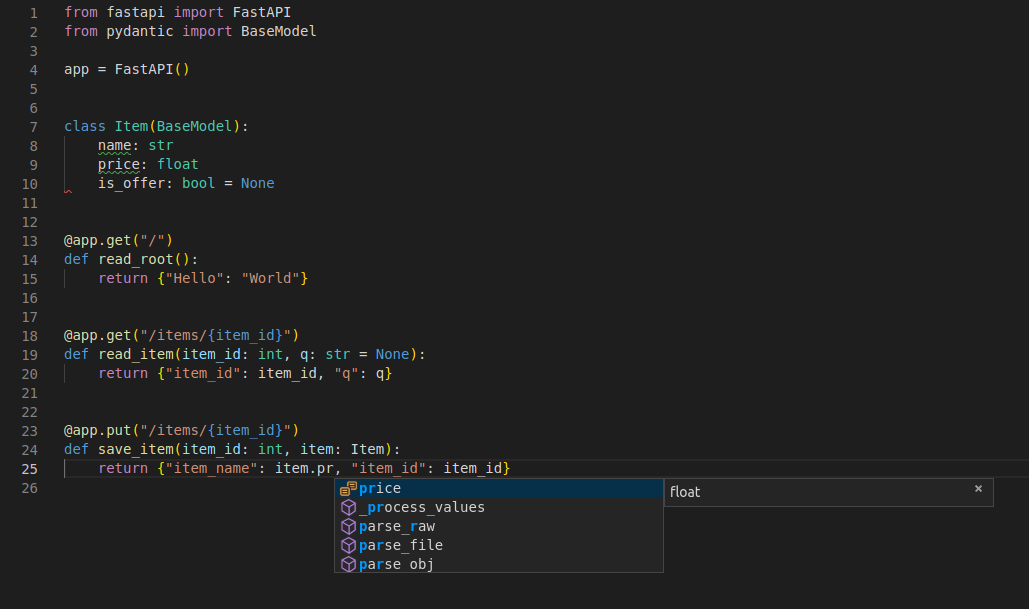 より多くの機能を含む、より完全な例については、<a href="https://fastapi.tiangolo.com/ja/tutorial/">Tutorial - User Guide</a> を参照してください。 **ネタバレ注意**: tutorial - user guide には以下が含まれます。Created: Sun Apr 05 07:19:11 GMT 2026 - Last Modified: Fri Mar 20 14:07:17 GMT 2026 - 25.6K bytes - Click Count (0) -
docs/fr/docs/features.md
Vous aurez rarement besoin de revenir aux documents. Voici comment votre éditeur peut vous aider : * dans [Visual Studio Code](https://code.visualstudio.com/) :  * dans [PyCharm](https://www.jetbrains.com/pycharm/) : 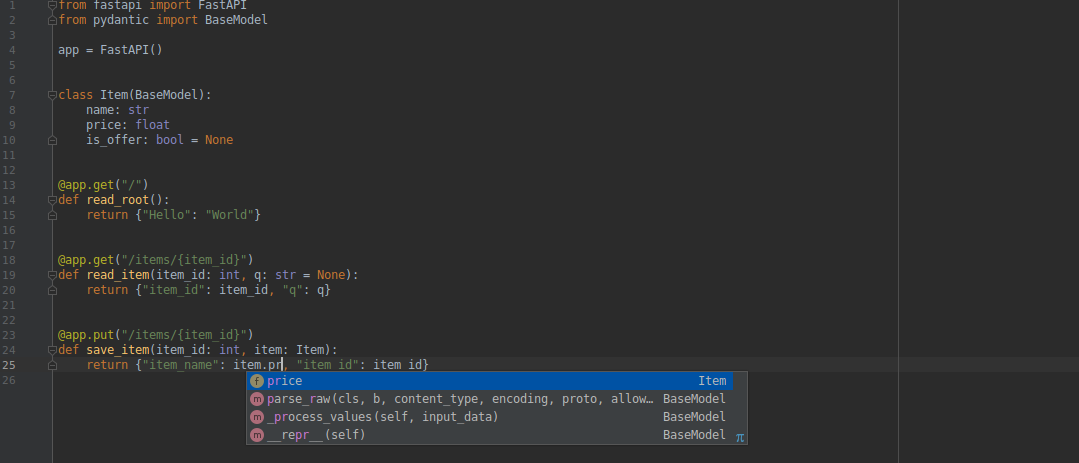
Created: Sun Apr 05 07:19:11 GMT 2026 - Last Modified: Thu Mar 19 18:37:13 GMT 2026 - 10.7K bytes - Click Count (0) -
docs/es/docs/tutorial/index.md
     <span style="background-color:#007166"><font color="#D3D7CF"> INFO </font></span>  Application startup complete.
```

</div>

Es **ALTAMENTE recomendable** que escribas o copies el código, lo edites y lo ejecutes localmente.

Usarlo en tu editor es lo que realmente te muestra los beneficios de FastAPI, al ver cuán poco código tienes que escribir, todos los chequeos de tipos, autocompletado, etc.

---

## Instalar FastAPI { #install-fastapi }
Created: Sun Apr 05 07:19:11 GMT 2026 - Last Modified: Thu Mar 19 18:15:55 GMT 2026 - 5.6K bytes - Click Count (0) -
docs/de/docs/tutorial/index.md
```

</div>

Es wird **dringend empfohlen**, den Code zu schreiben oder zu kopieren, ihn zu bearbeiten und lokal auszuführen.

Die Verwendung in Ihrem eigenen Editor zeigt Ihnen die Vorteile von FastAPI am besten, wenn Sie sehen, wie wenig Code Sie schreiben müssen, all die Typprüfungen, die automatische Vervollständigung usw.

---

## FastAPI installieren { #install-fastapi }
Created: Sun Apr 05 07:19:11 GMT 2026 - Last Modified: Thu Mar 19 17:58:09 GMT 2026 - 5.8K bytes - Click Count (0) -
docs/uk/docs/features.md
Вам рідко доведеться повертатися до документації. Ось як ваш редактор може вам допомогти: * у [Visual Studio Code](https://code.visualstudio.com/):  * у [PyCharm](https://www.jetbrains.com/pycharm/): 
Created: Sun Apr 05 07:19:11 GMT 2026 - Last Modified: Thu Mar 19 18:27:41 GMT 2026 - 15.1K bytes - Click Count (0) -
docs/zh/docs/virtual-environments.md
在你激活虚拟环境后,你可以运行你的程序,它将使用虚拟环境中的 Python 和你在其中安装的软件包。

<div class="termy">

```console
$ python main.py

Hello World
```

</div>

## 配置编辑器 { #configure-your-editor }

你可能会用到编辑器,请确保配置它使用与你创建的相同的虚拟环境(它可能会自动检测到),以便你可以获得自动补全和内联错误提示。

例如:

* [VS Code](https://code.visualstudio.com/docs/python/environments#_select-and-activate-an-environment)
Created: Sun Apr 05 07:19:11 GMT 2026 - Last Modified: Fri Mar 20 17:06:37 GMT 2026 - 21.4K bytes - Click Count (0)