- Sort Score
- Num 10 results
- Language All
Results 111 - 120 of 290 for pip (0.07 seconds)
-
docs/ja/docs/tutorial/security/oauth2-jwt.md
## `PyJWT` のインストール { #install-pyjwt }

PythonでJWTトークンの生成と検証を行うために、`PyJWT`をインストールする必要があります。

[仮想環境](../../virtual-environments.md)を作成し、アクティベートしてから、`pyjwt`をインストールしてください。

<div class="termy">

```console
$ pip install pyjwt

---> 100%
```

</div>

/// info | 情報

RSAやECDSAのようなデジタル署名アルゴリズムを使用する予定がある場合は、cryptographyライブラリの依存関係`pyjwt[crypto]`をインストールしてください。
Created: Sun Apr 05 07:19:11 GMT 2026 - Last Modified: Fri Mar 20 14:07:17 GMT 2026 - 14.6K bytes - Click Count (1) -
RELEASE.md
    keras
* **Apple Silicon users:** If you previously installed TensorFlow using
    `pip install tensorflow-macos`, please update your installation method. Use
    `pip install tensorflow` from now on.
* **Mac x86 users:** Mac x86 builds are being deprecated and will no longer be
  released as a Pip package from TF 2.17 onwards.

### Known Caveats
Created: Tue Apr 07 12:39:13 GMT 2026 - Last Modified: Mon Mar 30 18:31:38 GMT 2026 - 746.5K bytes - Click Count (3) -
docs/zh-hant/docs/tutorial/response-model.md
/// info | 說明

要使用 `EmailStr`,請先安裝 [`email-validator`](https://github.com/JoshData/python-email-validator)。

請先建立一個[虛擬環境](../virtual-environments.md)、啟用它,然後安裝,例如:

```console
$ pip install email-validator
```

或:

```console
$ pip install "pydantic[email]"
```

///

而我們使用這個模型同時宣告輸入與輸出:

{* ../../docs_src/response_model/tutorial002_py310.py hl[16] *}

現在,當瀏覽器建立一個帶有密碼的使用者時,API 會在回應中回傳相同的密碼。
Created: Sun Apr 05 07:19:11 GMT 2026 - Last Modified: Fri Mar 20 17:05:38 GMT 2026 - 14.5K bytes - Click Count (0) -
docs/en/docs/contributing.md
That way, you don't have to "install" your local version to be able to test every change.

/// note | Technical Details

This only happens when you install using `uv sync --extra all` instead of running `pip install fastapi` directly.

That is because `uv sync --extra all` will install the local version of FastAPI in "editable" mode by default.

///

### Format the code
Created: Sun Apr 05 07:19:11 GMT 2026 - Last Modified: Mon Mar 23 13:59:26 GMT 2026 - 10.6K bytes - Click Count (0) -
docs/bigdata/README.md
Navigate to **Custom core-site** to configure MinIO parameters for `_s3a_` connector 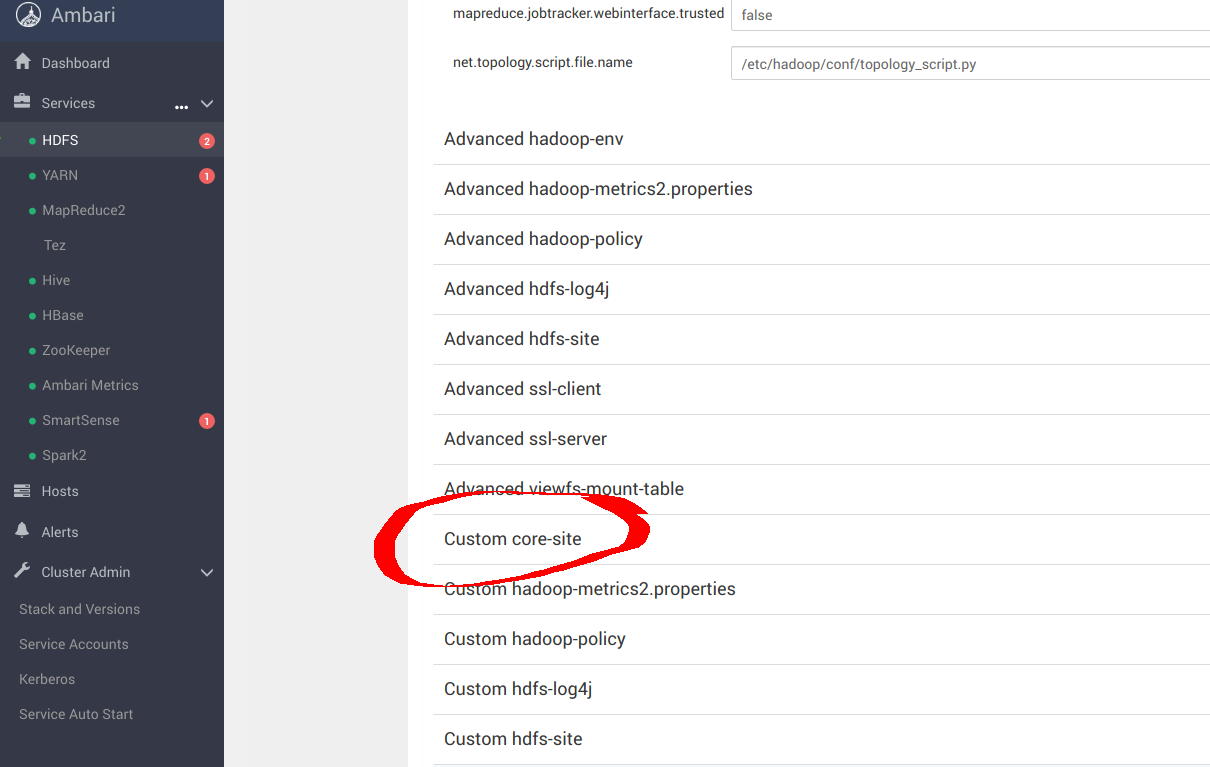 ``` sudo pip install yq alias kv-pairify='yq ".configuration[]" | jq ".[]" | jq -r ".name + \"=\" + .value"' ```
Created: Sun Apr 05 19:28:12 GMT 2026 - Last Modified: Tue Aug 12 18:20:36 GMT 2025 - 14.7K bytes - Click Count (0) -
docs/en/docs/_llm-test.md
See for example section `### Quotes` in `docs/de/llm-prompt.md`.

////

## Quotes in code snippets { #quotes-in-code-snippets }

//// tab | Test

`pip install "foo[bar]"`

Examples for string literals in code snippets: `"this"`, `'that'`.

A difficult example for string literals in code snippets: `f"I like {'oranges' if orange else "apples"}"`
Created: Sun Apr 05 07:19:11 GMT 2026 - Last Modified: Thu Mar 05 18:13:19 GMT 2026 - 11K bytes - Click Count (0) -
docs/en/docs/tutorial/sql-databases.md
## Install `SQLModel` { #install-sqlmodel }

First, make sure you create your [virtual environment](../virtual-environments.md), activate it, and then install `sqlmodel`:

<div class="termy">

```console
$ pip install sqlmodel
---> 100%
```

</div>

## Create the App with a Single Model { #create-the-app-with-a-single-model }

We'll create the simplest first version of the app with a single **SQLModel** model first.
Created: Sun Apr 05 07:19:11 GMT 2026 - Last Modified: Sat Mar 07 09:29:03 GMT 2026 - 15.3K bytes - Click Count (0) -
docs/ja/docs/_llm-test.md
//// tab | 情報

プロンプト設計者は、ストレートクォートをタイポグラフィックな引用符に変換するかどうかを選べます。そのままでも問題ありません。

例として `docs/de/llm-prompt.md` の「### Quotes」の節を参照してください。

////

## コードスニペット内の引用 { #quotes-in-code-snippets }

//// tab | テスト

`pip install "foo[bar]"`

コードスニペット中の文字列リテラルの例: `"this"`, `'that'`.

難しい文字列リテラルの例: `f"I like {'oranges' if orange else "apples"}"`
Created: Sun Apr 05 07:19:11 GMT 2026 - Last Modified: Fri Mar 20 14:07:17 GMT 2026 - 13.5K bytes - Click Count (0) -
ci/official/requirements_updater/numpy1_requirements/requirements_lock_3_10.txt
#
# This file is autogenerated by pip-compile with Python 3.10
# by the following command:
#
#    bazel run //ci/official/requirements_updater:requirements.update
#
absl-py==2.2.2 \
    --hash=sha256:bf25b2c2eed013ca456918c453d687eab4e8309fba81ee2f4c1a6aa2494175eb \
    --hash=sha256:e5797bc6abe45f64fd95dc06394ca3f2bedf3b5d895e9da691c9ee3397d70092
    # via
    #   keras-nightly
    #   tb-nightly
astor==0.7.1 \
Created: Tue Apr 07 12:39:13 GMT 2026 - Last Modified: Mon Mar 30 19:02:40 GMT 2026 - 66.1K bytes - Click Count (0) -
ci/official/requirements_updater/numpy1_requirements/requirements_lock_3_12.txt
#
# This file is autogenerated by pip-compile with Python 3.12
# by the following command:
#
#    bazel run //ci/official/requirements_updater:requirements.update
#
absl-py==2.2.2 \
    --hash=sha256:bf25b2c2eed013ca456918c453d687eab4e8309fba81ee2f4c1a6aa2494175eb \
    --hash=sha256:e5797bc6abe45f64fd95dc06394ca3f2bedf3b5d895e9da691c9ee3397d70092
    # via
    #   keras-nightly
    #   tb-nightly
astor==0.7.1 \
Created: Tue Apr 07 12:39:13 GMT 2026 - Last Modified: Mon Mar 30 19:02:40 GMT 2026 - 66.1K bytes - Click Count (0)