- Sort Score
- Num 10 results
- Language All
Results 881 - 890 of 1,058 for png (0.08 seconds)
-
docs/tr/docs/tutorial/dependencies/index.md
Bu nedenle interaktif dokümanlar, bu dependency'lerden gelen tüm bilgileri de içerir:

<img src="/img/tutorial/dependencies/image01.png">

## Basit Kullanım { #simple-usage }
Created: Sun Apr 05 07:19:11 GMT 2026 - Last Modified: Fri Mar 20 07:53:17 GMT 2026 - 10.2K bytes - Click Count (0) -
src/main/webapp/WEB-INF/view/searchResults.jsp
					<div class="me-3">
						<a class="link d-none d-sm-flex" href="${doc.url_link}" data-uri="${doc.url_link}" data-id="${doc.doc_id}"
							data-order="${s.index}"
						> <img src="${fe:url('/images/blank.png')}" alt="thumbnail"
							data-src="${fe:url('/thumbnail/')}?docId=${f:u(doc.doc_id)}&queryId=${f:u(queryId)}" class="thumbnail"
						>
						</a>
					</div>
					</c:if>
Created: Tue Mar 31 13:07:34 GMT 2026 - Last Modified: Mon Feb 23 08:03:44 GMT 2026 - 12.2K bytes - Click Count (0) -
docs/pt/docs/advanced/openapi-callbacks.md
Você verá sua documentação incluindo uma seção "Callbacks" para sua *operação de rota* que mostra como a *API externa* deveria ser:
Created: Sun Apr 05 07:19:11 GMT 2026 - Last Modified: Thu Mar 19 18:20:43 GMT 2026 - 8.1K bytes - Click Count (0) -
docs/es/docs/tutorial/dependencies/index.md
Así, la documentación interactiva tendrá toda la información de estas dependencias también:

<img src="/img/tutorial/dependencies/image01.png">

## Uso simple { #simple-usage }
Created: Sun Apr 05 07:19:11 GMT 2026 - Last Modified: Thu Mar 19 18:15:55 GMT 2026 - 10K bytes - Click Count (0) -
README.md
<div align="center"> <img src="https://www.tensorflow.org/images/tf_logo_horizontal.png"> </div> [](https://badge.fury.io/py/tensorflow) [](https://badge.fury.io/py/tensorflow) [](https://doi.org/10.5281/zenodo.4724125)
Created: Tue Apr 07 12:39:13 GMT 2026 - Last Modified: Thu Apr 02 10:38:57 GMT 2026 - 11.6K bytes - Click Count (0) -
docs/ja/docs/tutorial/first-steps.md
 ### 代替APIドキュメント { #alternative-api-docs } 次に、[http://127.0.0.1:8000/redoc](http://127.0.0.1:8000/redoc)にアクセスします。 先ほどとは異なる、自動生成された対話的APIドキュメントが表示されます([ReDoc](https://github.com/Rebilly/ReDoc)によって提供):  ### OpenAPI { #openapi }Created: Sun Apr 05 07:19:11 GMT 2026 - Last Modified: Fri Mar 20 14:07:17 GMT 2026 - 15.9K bytes - Click Count (0) -
docs/zh/docs/tutorial/response-model.md
这样,你就能兼得两方面的优势:带有**工具支持**的类型注解和**数据过滤**。

## 在文档中查看 { #see-it-in-the-docs }

当你查看自动文档时,你会看到输入模型和输出模型都会有各自的 JSON Schema:

<img src="/img/tutorial/response-model/image01.png">

并且两个模型都会用于交互式 API 文档:

<img src="/img/tutorial/response-model/image02.png">

## 其他返回类型注解 { #other-return-type-annotations }

有些情况下你会返回一些不是有效 Pydantic 字段的内容,并在函数上做了相应注解,只是为了获得工具链(编辑器、mypy 等)的支持。
Created: Sun Apr 05 07:19:11 GMT 2026 - Last Modified: Fri Mar 20 17:06:37 GMT 2026 - 14.5K bytes - Click Count (0) -
docs/fr/docs/advanced/openapi-callbacks.md
Vous verrez votre documentation incluant une section « Callbacks » pour votre *chemin d'accès* qui montre à quoi l’*API externe* devrait ressembler :
Created: Sun Apr 05 07:19:11 GMT 2026 - Last Modified: Thu Mar 19 18:37:13 GMT 2026 - 8.7K bytes - Click Count (0) -
docs/distributed/README.md
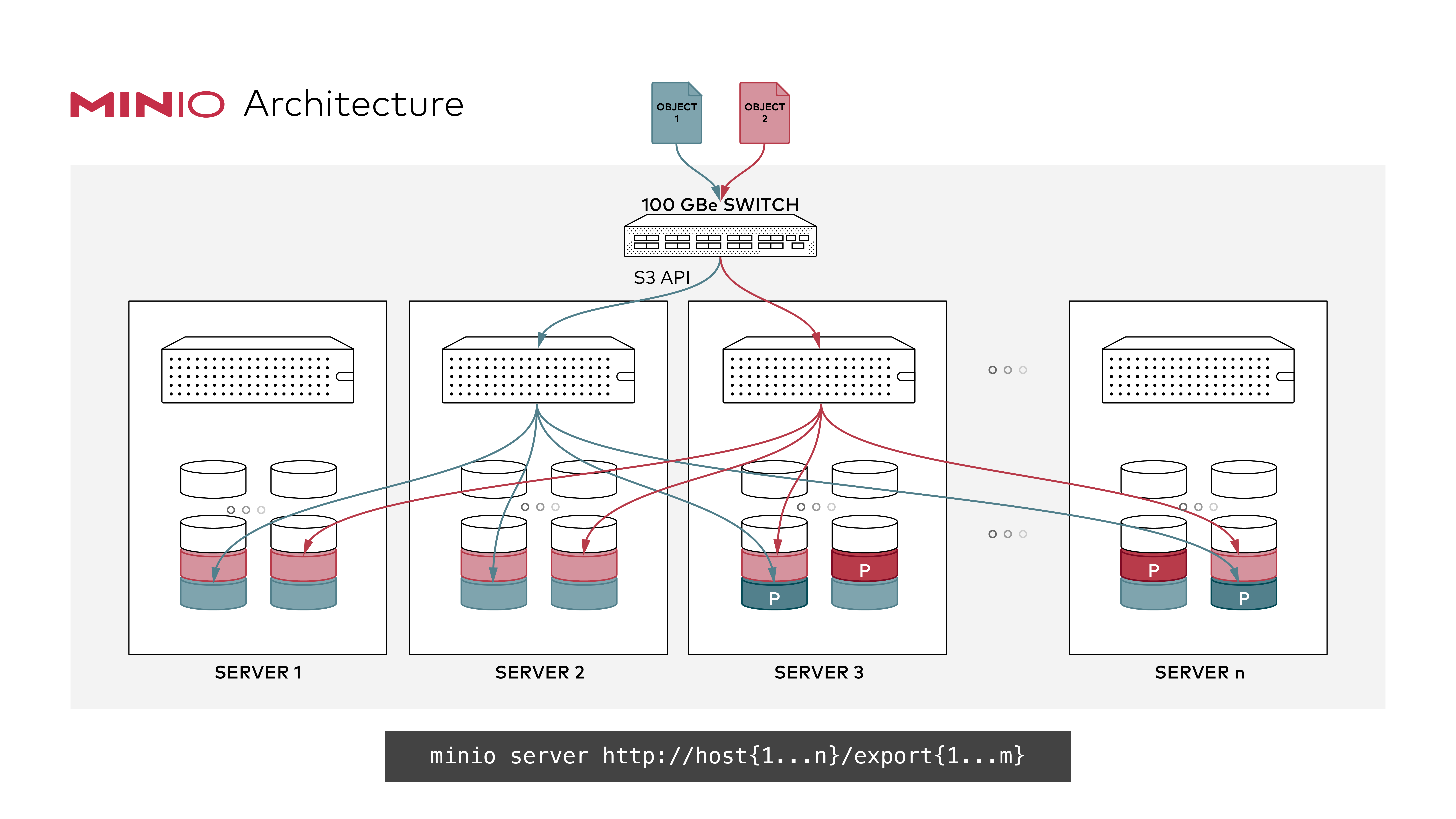 ### GNU/Linux and macOS ```sh export MINIO_ROOT_USER=<ACCESS_KEY> export MINIO_ROOT_PASSWORD=<SECRET_KEY> minio server http://host{1...n}/export{1...m} ```
Created: Sun Apr 05 19:28:12 GMT 2026 - Last Modified: Tue Aug 12 18:20:36 GMT 2025 - 8.9K bytes - Click Count (0) -
docs/tr/docs/advanced/custom-response.md
Ama `response_class` içinde `HTMLResponse` da verdiğiniz için **FastAPI**, bunu OpenAPI’de ve interaktif dokümanlarda `text/html` ile HTML olarak nasıl dokümante edeceğini bilir:

<img src="/img/tutorial/custom-response/image01.png">

## Mevcut Response'lar { #available-responses }

Mevcut response'lardan bazıları aşağıdadır.

Unutmayın: `Response` ile başka herhangi bir şeyi döndürebilir, hatta özel bir alt sınıf da oluşturabilirsiniz.
Created: Sun Apr 05 07:19:11 GMT 2026 - Last Modified: Fri Mar 20 07:53:17 GMT 2026 - 11.9K bytes - Click Count (0)