- Sort Score
- Num 10 results
- Language All
Results 301 - 310 of 331 for editar (0.05 seconds)
-
docs/es/docs/deployment/concepts.md
* Memoria
* Pasos previos antes de iniciar

Veremos cómo afectan estas **implementaciones**.

Al final, el objetivo principal es poder **servir a tus clientes de API** de una manera que sea **segura**, para **evitar interrupciones**, y usar los **recursos de cómputo** (por ejemplo, servidores remotos/máquinas virtuales) de la manera más eficiente posible. 🚀
Created: Sun Apr 05 07:19:11 GMT 2026 - Last Modified: Thu Mar 19 18:15:55 GMT 2026 - 20K bytes - Click Count (0) -
docs/uk/docs/virtual-environments.md
<div class="termy">

```console
$ python main.py

Hello World
```

</div>

## Налаштуйте ваш редактор { #configure-your-editor }
Created: Sun Apr 05 07:19:11 GMT 2026 - Last Modified: Thu Mar 19 18:27:41 GMT 2026 - 33.3K bytes - Click Count (0) -
docs/zh-hant/docs/index.md
``` …從: ```Python ... "item_name": item.name ... ``` …改為: ```Python ... "item_price": item.price ... ``` …然後看看你的編輯器如何自動補全屬性並知道它們的型別: 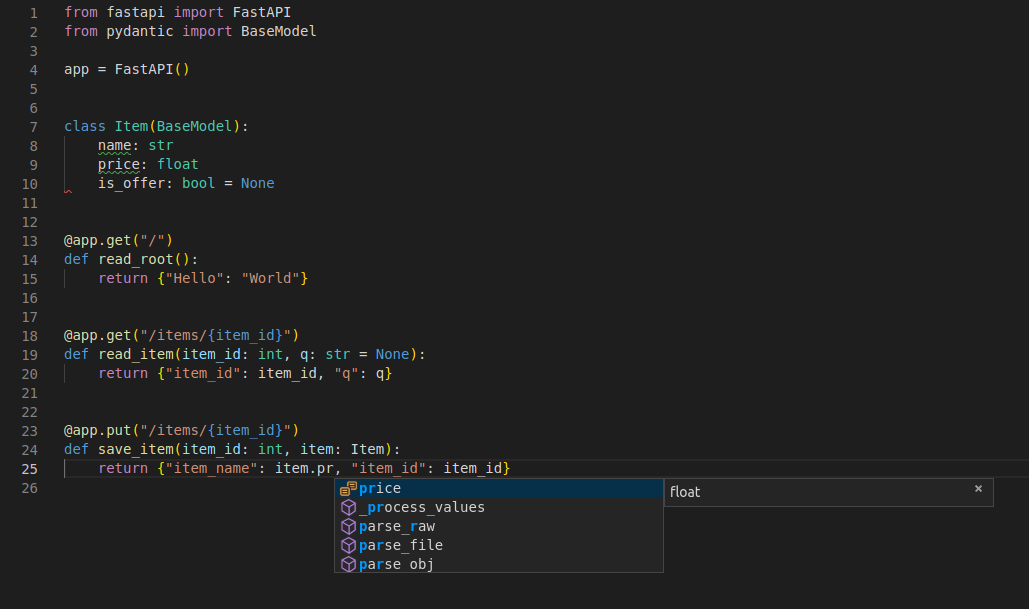 若想看包含更多功能的完整範例,請參考 <a href="https://fastapi.tiangolo.com/zh-hant/tutorial/">Tutorial - User Guide</a>。 **劇透警告**:教學 - 使用者指南包含:Created: Sun Apr 05 07:19:11 GMT 2026 - Last Modified: Fri Mar 20 17:05:38 GMT 2026 - 20.8K bytes - Click Count (0) -
docs/tr/docs/tutorial/query-params-str-validations.md
///

## Daha fazla metadata tanımlayın { #declare-more-metadata }

Parametre hakkında daha fazla bilgi ekleyebilirsiniz.

Bu bilgiler oluşturulan OpenAPI’a dahil edilir ve dokümantasyon arayüzleri ile harici araçlar tarafından kullanılır.

/// note | Not

Farklı araçların OpenAPI desteği farklı seviyelerde olabilir.
Created: Sun Apr 05 07:19:11 GMT 2026 - Last Modified: Fri Mar 20 07:53:17 GMT 2026 - 17.3K bytes - Click Count (0) -
docs/pt/docs/deployment/concepts.md
* Memória
* Etapas anteriores antes de iniciar

Veremos como eles afetariam as **implantações**.

No final, o principal objetivo é ser capaz de **atender seus clientes de API** de uma forma **segura**, **evitar interrupções** e usar os **recursos de computação** (por exemplo, servidores remotos/máquinas virtuais) da forma mais eficiente possível. 🚀
Created: Sun Apr 05 07:19:11 GMT 2026 - Last Modified: Thu Mar 19 18:20:43 GMT 2026 - 20.3K bytes - Click Count (0) -
docs/fr/docs/tutorial/response-model.md
/// tip | Astuce

Si vous avez des vérifications de type strictes dans votre éditeur, mypy, etc., vous pouvez déclarer le type de retour de la fonction en `Any`.
Created: Sun Apr 05 07:19:11 GMT 2026 - Last Modified: Thu Mar 19 18:37:13 GMT 2026 - 18.1K bytes - Click Count (0) -
src/main/java/jcifs/smb1/smb1/SID.java
        }

        return ret.toString();
    }

    /**
     * Return a String representing this SID ideal for display to
     * users. This method should return the same text that the ACL
     * editor in Windows would display.
     * <p>
     * Specifically, if the SID has
     * been resolved and it is not a domain SID or builtin account,
     * the full DOMAIN\name form of the account will be
Created: Sun Apr 05 00:10:12 GMT 2026 - Last Modified: Sat Aug 16 01:32:48 GMT 2025 - 31.5K bytes - Click Count (0) -
docs/ja/docs/index.md
...以下の: ```Python ... "item_name": item.name ... ``` ...を: ```Python ... "item_price": item.price ... ``` ...に変更し、エディタが属性を自動補完し、その型を知ることを確認してください。  より多くの機能を含む、より完全な例については、<a href="https://fastapi.tiangolo.com/ja/tutorial/">Tutorial - User Guide</a> を参照してください。 **ネタバレ注意**: tutorial - user guide には以下が含まれます。Created: Sun Apr 05 07:19:11 GMT 2026 - Last Modified: Fri Mar 20 14:07:17 GMT 2026 - 25.6K bytes - Click Count (0) -
docs/zh-hant/docs/virtual-environments.md
在啟用虛擬環境後,你可以執行你的程式,它將使用虛擬環境中的 Python 和你在其中安裝的套件。

<div class="termy">

```console
$ python main.py

Hello World
```

</div>

## 設定編輯器 { #configure-your-editor }

你可能會用到編輯器,請確保設定它使用你建立的相同虛擬環境(它可能會自動偵測到),以便你可以獲得自動完成和內嵌錯誤提示。

例如:

* [VS Code](https://code.visualstudio.com/docs/python/environments#_select-and-activate-an-environment)
Created: Sun Apr 05 07:19:11 GMT 2026 - Last Modified: Fri Mar 20 17:05:38 GMT 2026 - 21K bytes - Click Count (0) -
docs/zh/docs/virtual-environments.md
在你激活虚拟环境后,你可以运行你的程序,它将使用虚拟环境中的 Python 和你在其中安装的软件包。

<div class="termy">

```console
$ python main.py

Hello World
```

</div>

## 配置编辑器 { #configure-your-editor }

你可能会用到编辑器,请确保配置它使用与你创建的相同的虚拟环境(它可能会自动检测到),以便你可以获得自动补全和内联错误提示。

例如:

* [VS Code](https://code.visualstudio.com/docs/python/environments#_select-and-activate-an-environment)
Created: Sun Apr 05 07:19:11 GMT 2026 - Last Modified: Fri Mar 20 17:06:37 GMT 2026 - 21.4K bytes - Click Count (0)