- Sort Score
- Num 10 results
- Language All
Results 641 - 650 of 857 for png (0.02 seconds)
The search processing time has exceeded the limit. The displayed results may be partial.
-
docs/zh/docs/advanced/dataclasses.md
你也可以在 `response_model` 参数中使用 `dataclasses`:

{* ../../docs_src/dataclasses_/tutorial002_py310.py hl[1,6:12,18] *}

该数据类会被自动转换为 Pydantic 的数据类。

这样,它的模式会显示在 API 文档界面中:

<img src="/img/tutorial/dataclasses/image01.png">

## 在嵌套数据结构中使用数据类 { #dataclasses-in-nested-data-structures }

你也可以把 `dataclasses` 与其它类型注解组合在一起,创建嵌套数据结构。

在某些情况下,你可能仍然需要使用 Pydantic 的 `dataclasses` 版本。例如,如果自动生成的 API 文档出现错误。
Created: Sun Apr 05 07:19:11 GMT 2026 - Last Modified: Fri Mar 20 17:06:37 GMT 2026 - 3.9K bytes - Click Count (0) -
docs/ru/docs/advanced/security/http-basic-auth.md
Когда вы впервые откроете URL (или нажмёте кнопку «Execute» в документации), браузер попросит ввести имя пользователя и пароль:

<img src="/img/tutorial/security/image12.png">

## Проверка имени пользователя { #check-the-username }

Вот более полный пример.

Используйте зависимость, чтобы проверить, корректны ли имя пользователя и пароль.
Created: Sun Apr 05 07:19:11 GMT 2026 - Last Modified: Thu Mar 19 17:56:20 GMT 2026 - 7.4K bytes - Click Count (0) -
docs/federation/lookup/README.md
- CoreDNS (for DNS management based on populated bucket DNS service records, optional) ## Architecture 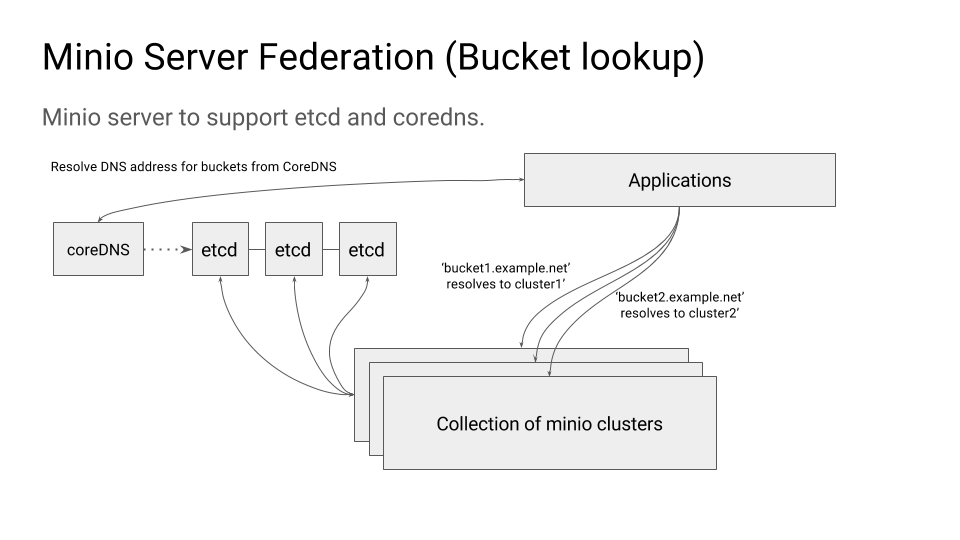 ### Environment variables #### MINIO_ETCD_ENDPOINTS This is comma separated list of etcd servers that you want to use as the MinIO federation back-end. This should
Created: Sun Apr 05 19:28:12 GMT 2026 - Last Modified: Tue Aug 12 18:20:36 GMT 2025 - 4.2K bytes - Click Count (0) -
docs/tr/docs/advanced/stream-data.md
Akıttığınız veri türüne uygun `Content-Type` header'ını ayarlayan, `StreamingResponse`'tan türetilmiş özel bir alt sınıf (subclass) oluşturabilirsiniz.

Örneğin, `media_type` özniteliğini kullanarak `Content-Type` header'ını `image/png` olarak ayarlayan bir `PNGStreamingResponse` oluşturabilirsiniz:

{* ../../docs_src/stream_data/tutorial002_py310.py ln[6,19:20] hl[20] *}
Created: Sun Apr 05 07:19:11 GMT 2026 - Last Modified: Thu Mar 19 18:51:35 GMT 2026 - 5.8K bytes - Click Count (0) -
docs/uk/docs/advanced/security/oauth2-scopes.md
І ви зможете обрати, які scopes надати доступ: `me` і `items`.

Це той самий механізм, який використовується, коли ви надаєте дозволи під час входу через Facebook, Google, GitHub тощо:

<img src="/img/tutorial/security/image11.png">

## JWT токен зі scopes { #jwt-token-with-scopes }

Тепер змініть операцію шляху токена, щоб повертати запитані scopes.
Created: Sun Apr 05 07:19:11 GMT 2026 - Last Modified: Thu Mar 19 18:27:41 GMT 2026 - 20.2K bytes - Click Count (0) -
docs/ru/docs/tutorial/first-steps.md
### Альтернативная документация API { #alternative-api-docs } И теперь перейдите по адресу [http://127.0.0.1:8000/redoc](http://127.0.0.1:8000/redoc). Вы увидите альтернативную автоматически сгенерированную документацию (предоставлено [ReDoc](https://github.com/Rebilly/ReDoc)):  ### OpenAPI { #openapi }Created: Sun Apr 05 07:19:11 GMT 2026 - Last Modified: Thu Mar 19 17:56:20 GMT 2026 - 18.7K bytes - Click Count (0) -
cmd/s3-zip-handlers.go
	xMinIOExtract = "x-minio-extract"
)

// splitZipExtensionPath splits the S3 path to the zip file and the path inside the zip:
//
//	e.g  /path/to/archive.zip/backup-2021/myimage.png => /path/to/archive.zip, backup/myimage.png
func splitZipExtensionPath(input string) (zipPath, object string, err error) {
	idx := strings.Index(input, archivePattern)
	if idx < 0 {
		// Should never happen
Created: Sun Apr 05 19:28:12 GMT 2026 - Last Modified: Fri Aug 29 02:39:48 GMT 2025 - 15.8K bytes - Click Count (0) -
docs/tr/docs/tutorial/first-steps.md
### Alternatif API Dokümantasyonu { #alternative-api-docs } Ve şimdi [http://127.0.0.1:8000/redoc](http://127.0.0.1:8000/redoc) adresine gidin. Alternatif otomatik dokümantasyonu ([ReDoc](https://github.com/Rebilly/ReDoc) tarafından sağlanan) göreceksiniz:  ### OpenAPI { #openapi }Created: Sun Apr 05 07:19:11 GMT 2026 - Last Modified: Fri Mar 20 07:53:17 GMT 2026 - 14.4K bytes - Click Count (0) -
docs/ru/docs/advanced/security/oauth2-scopes.md
И вы сможете выбрать, какие scopes вы хотите выдать доступ: `me` и `items`.

Это тот же механизм, когда вы даёте разрешения при входе через Facebook, Google, GitHub и т.д.:

<img src="/img/tutorial/security/image11.png">

## JWT-токены со scopes { #jwt-token-with-scopes }

Теперь измените операцию пути, выдающую токен, чтобы возвращать запрошенные scopes.
Created: Sun Apr 05 07:19:11 GMT 2026 - Last Modified: Thu Mar 19 17:56:20 GMT 2026 - 20.6K bytes - Click Count (0) -
docs/zh-hant/docs/tutorial/first-steps.md
 ### 替代 API 文件 { #alternative-api-docs } 現在,前往 [http://127.0.0.1:8000/redoc](http://127.0.0.1:8000/redoc)。 你將看到另一種自動文件(由 [ReDoc](https://github.com/Rebilly/ReDoc) 提供):  ### OpenAPI { #openapi } **FastAPI** 使用定義 API 的 **OpenAPI** 標準來生成一個「schema」,涵蓋你的全部 API。Created: Sun Apr 05 07:19:11 GMT 2026 - Last Modified: Fri Mar 20 17:05:38 GMT 2026 - 13.3K bytes - Click Count (0)