- Sort Score
- Num 10 results
- Language All
Results 271 - 280 of 514 for img (0.02 seconds)
-
docs/de/docs/advanced/dataclasses.md
Die Datenklasse wird automatisch in eine Pydantic-Datenklasse konvertiert.

Auf diese Weise wird deren Schema in der Benutzeroberfläche der API-Dokumentation angezeigt:

<img src="/img/tutorial/dataclasses/image01.png">

## Datenklassen in verschachtelten Datenstrukturen { #dataclasses-in-nested-data-structures }
Created: Sun Dec 28 07:19:09 GMT 2025 - Last Modified: Fri Dec 26 10:43:02 GMT 2025 - 5K bytes - Click Count (0) -
docs/en/docs/advanced/dataclasses.md
{* ../../docs_src/dataclasses_/tutorial002_py310.py hl[1,6:12,18] *}

The dataclass will be automatically converted to a Pydantic dataclass.

This way, its schema will show up in the API docs user interface:

<img src="/img/tutorial/dataclasses/image01.png">

## Dataclasses in Nested Data Structures { #dataclasses-in-nested-data-structures }

You can also combine `dataclasses` with other type annotations to make nested data structures.
Created: Sun Dec 28 07:19:09 GMT 2025 - Last Modified: Fri Dec 26 10:43:02 GMT 2025 - 4.2K bytes - Click Count (0) -
docs/fr/docs/advanced/additional-responses.md
Created: Sun Dec 28 07:19:09 GMT 2025 - Last Modified: Sat Nov 09 16:39:20 GMT 2024 - 9.5K bytes - Click Count (0) -
fastapi/openapi/docs.py
Created: Sun Dec 28 07:19:09 GMT 2025 - Last Modified: Wed Dec 17 21:25:59 GMT 2025 - 10.1K bytes - Click Count (0) -
docs/ru/docs/advanced/security/http-basic-auth.md
{* ../../docs_src/security/tutorial006_an_py39.py hl[4,8,12] *}

Когда вы впервые откроете URL (или нажмёте кнопку «Execute» в документации), браузер попросит ввести имя пользователя и пароль:

<img src="/img/tutorial/security/image12.png">

## Проверка имени пользователя { #check-the-username }

Вот более полный пример.

Используйте зависимость, чтобы проверить, корректны ли имя пользователя и пароль.
Created: Sun Dec 28 07:19:09 GMT 2025 - Last Modified: Tue Sep 30 11:37:11 GMT 2025 - 7.4K bytes - Click Count (0) -
docs/ru/docs/advanced/security/oauth2-scopes.md
И вы сможете выбрать, какие scopes вы хотите выдать доступ: `me` и `items`.

Это тот же механизм, когда вы даёте разрешения при входе через Facebook, Google, GitHub и т.д.:

<img src="/img/tutorial/security/image11.png">

## JWT-токены со scopes { #jwt-token-with-scopes }

Теперь измените операцию пути, выдающую токен, чтобы возвращать запрошенные scopes.
Created: Sun Dec 28 07:19:09 GMT 2025 - Last Modified: Tue Sep 30 11:37:11 GMT 2025 - 20.7K bytes - Click Count (0) -
docs/zh/docs/features.md
 * 另外的 API 文档:<a href="https://github.com/Rebilly/ReDoc" class="external-link" target="_blank"><strong>ReDoc</strong></a>  ### 更主流的 Python 全部都基于标准的 **Python 3.6 类型**声明(感谢 Pydantic )。没有新的语法需要学习。只需要标准的 Python 。
Created: Sun Dec 28 07:19:09 GMT 2025 - Last Modified: Sat Oct 11 17:48:49 GMT 2025 - 8.9K bytes - Click Count (0) -
docs/bucket/quota/README.md
# Bucket Quota Configuration Quickstart Guide [](https://slack.min.io) [](https://hub.docker.com/r/minio/minio/) 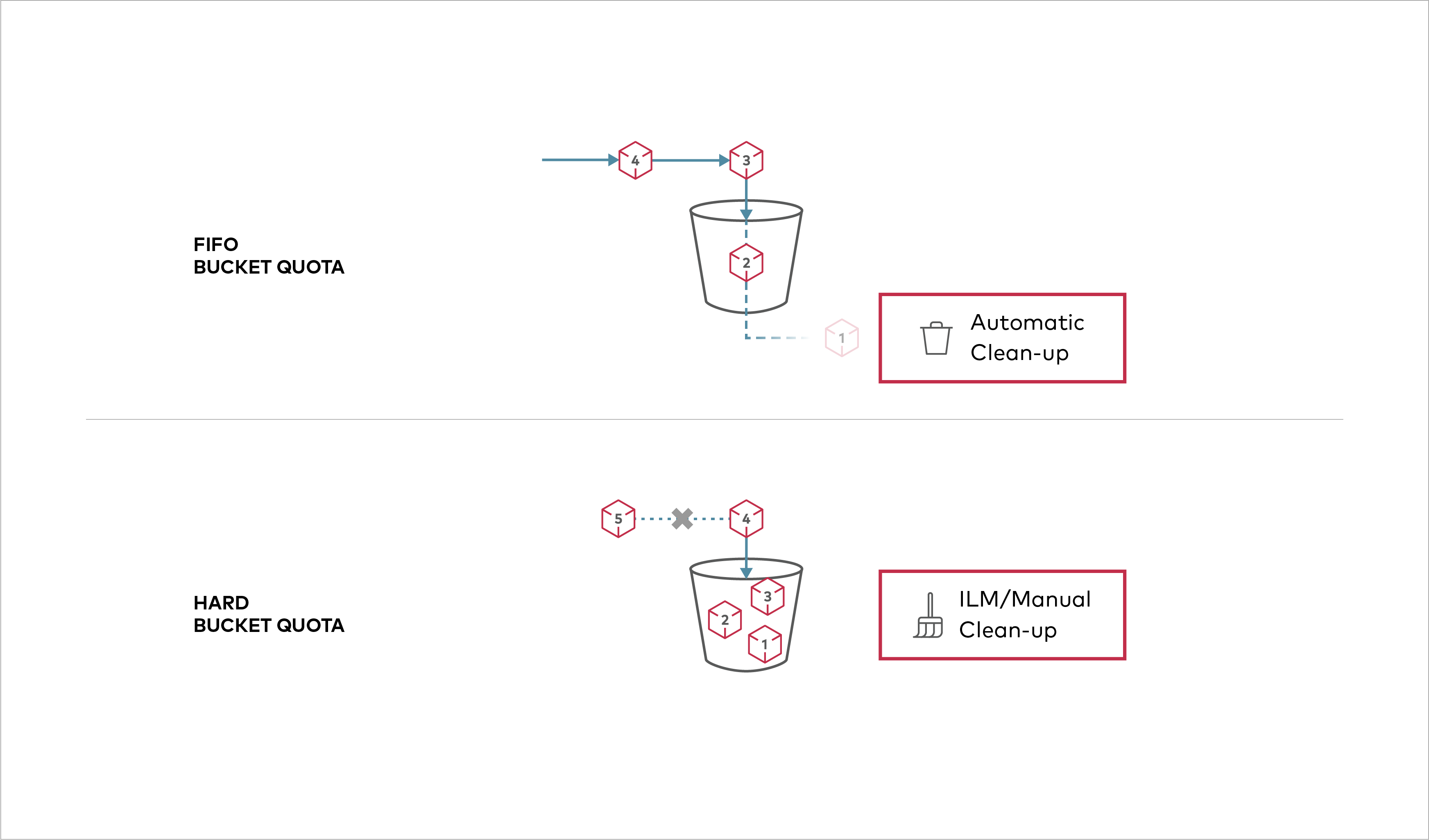 Buckets can be configured to have `Hard` quota - it disallows writes to the bucket after configured quota limit is reached.
Created: Sun Dec 28 19:28:13 GMT 2025 - Last Modified: Tue Aug 12 18:20:36 GMT 2025 - 1.1K bytes - Click Count (0) -
scripts/playwright/separate_openapi_schemas/image05.py
    page.get_by_role("button", name="Item", exact=True).click()
    page.set_viewport_size({"width": 960, "height": 700})
    # Manually add the screenshot
    page.screenshot(
        path="docs/en/docs/img/tutorial/separate-openapi-schemas/image05.png"
    )

    # ---------------------
    context.close()
    browser.close()


process = subprocess.Popen(
Created: Sun Dec 28 07:19:09 GMT 2025 - Last Modified: Fri Sep 13 09:14:46 GMT 2024 - 984 bytes - Click Count (0) -
docs/chroot/README.md
# Deploy MinIO on Chrooted Environment [](https://slack.min.io) [](https://hub.docker.com/r/minio/minio/) Chroot allows user based namespace isolation on many standard Linux deployments. ## 1. Prerequisites - Familiarity with [chroot](http://man7.org/linux/man-pages/man2/chroot.2.html) - Chroot installed on your machine.
Created: Sun Dec 28 19:28:13 GMT 2025 - Last Modified: Wed Oct 15 17:29:55 GMT 2025 - 2.2K bytes - Click Count (0)