- Sort Score
- Num 10 results
- Language All
Results 161 - 170 of 212 for 8800 (0.03 seconds)
The search processing time has exceeded the limit. The displayed results may be partial.
-
src/test/java/org/codelibs/fess/helper/RoleQueryHelperTest.java
        assertTrue(roleQueryHelper.encryptedHeaderValue);
        assertNull(roleQueryHelper.cookieKey);
        assertTrue(roleQueryHelper.encryptedCookieValue);
        assertEquals(1800, roleQueryHelper.maxAge); // 30 minutes
        assertNull(roleQueryHelper.cookieNameMap);
        assertNotNull(roleQueryHelper.defaultRoleList);
        assertEquals(0, roleQueryHelper.defaultRoleList.size());
    }
Created: Tue Mar 31 13:07:34 GMT 2026 - Last Modified: Fri Mar 13 23:01:26 GMT 2026 - 28.8K bytes - Click Count (0) -
src/main/config/openapi/openapi-user.yaml
    name: Apache 2.0
    url: http://www.apache.org/licenses/LICENSE-2.0.html
  version: 14.8.0
externalDocs:
  description: API Documentation
  url: https://fess.codelibs.org/14.8/api/
servers:
  - url: http://localhost:8080/api/v1
tags:
  - name: search
    description: Search operations
  - name: popularword
    description: Popular word operations
  - name: monitor
    description: Monitoring operations
  - name: suggest
Created: Tue Mar 31 13:07:34 GMT 2026 - Last Modified: Thu May 09 06:31:27 GMT 2024 - 21.6K bytes - Click Count (0) -
docs/pt/docs/advanced/generate-clients.md
### Hey API { #hey-api }

Depois que tivermos uma aplicação FastAPI com os modelos, podemos usar o Hey API para gerar um cliente TypeScript. A forma mais rápida é via npx.

```sh
npx @hey-api/openapi-ts -i http://localhost:8000/openapi.json -o src/client
```

Isso gerará um SDK TypeScript em `./src/client`.
Created: Sun Apr 05 07:19:11 GMT 2026 - Last Modified: Thu Mar 19 18:20:43 GMT 2026 - 10.5K bytes - Click Count (0) -
compat/maven-model-builder/src/main/java/org/apache/maven/model/interpolation/StringSearchModelInterpolator.java
@Deprecated
public class StringSearchModelInterpolator extends AbstractStringBasedModelInterpolator {
    private static final Map<Class<?>, InterpolateObjectAction.CacheItem> CACHED_ENTRIES =
            new ConcurrentHashMap<>(80, 0.75f, 2);
    // Empirical data from 3.x, actual =40

    private interface InnerInterpolator {
        String interpolate(String value);
    }

    @Override
    public Model interpolateModel(
Created: Sun Apr 05 03:35:12 GMT 2026 - Last Modified: Fri Jan 10 07:09:12 GMT 2025 - 15.6K bytes - Click Count (0) -
src/main/java/org/codelibs/fess/llm/AbstractLlmClient.java
     * The default returns 800. Override in subclasses for provider-specific tuning.
     *
     * @return the maximum characters
     */
    @Override
    public int getHistoryAssistantMaxChars() {
        return 800;
    }

    /**
     * Gets the maximum characters for assistant summary content in history.
     * The default returns 800. Override in subclasses for provider-specific tuning.
Created: Tue Mar 31 13:07:34 GMT 2026 - Last Modified: Sat Mar 21 06:04:58 GMT 2026 - 72K bytes - Click Count (0) -
docs/fr/docs/advanced/behind-a-proxy.md
Si le client essaie d'aller à `/items`, par défaut, il sera redirigé vers `/items/`.

Mais avant de définir l'option de CLI `--forwarded-allow-ips`, il pourrait rediriger vers `http://localhost:8000/items/`.

Mais peut‑être que votre application est hébergée à `https://mysuperapp.com`, et la redirection devrait être vers `https://mysuperapp.com/items/`.
Created: Sun Apr 05 07:19:11 GMT 2026 - Last Modified: Thu Mar 19 18:37:13 GMT 2026 - 17.4K bytes - Click Count (0) -
docs/pt/docs/advanced/behind-a-proxy.md
Se o cliente tentar ir para `/items`, por padrão, ele seria redirecionado para `/items/`.

Mas antes de definir a opção de linha de comando `--forwarded-allow-ips`, poderia redirecionar para `http://localhost:8000/items/`.

Mas talvez sua aplicação esteja hospedada em `https://mysuperapp.com`, e o redirecionamento deveria ser para `https://mysuperapp.com/items/`.
Created: Sun Apr 05 07:19:11 GMT 2026 - Last Modified: Thu Mar 19 18:20:43 GMT 2026 - 16.6K bytes - Click Count (0) -
docs/ja/docs/advanced/generate-clients.md
OpenAPI に含まれるこれらのモデル情報を使って、**クライアントコードを生成**できます。

### Hey API { #hey-api }

モデルを備えた FastAPI アプリがあれば、Hey API で TypeScript クライアントを生成できます。最も手早い方法は npx を使うことです。

```sh
npx @hey-api/openapi-ts -i http://localhost:8000/openapi.json -o src/client
```

これで TypeScript SDK が `./src/client` に生成されます。

[`@hey-api/openapi-ts` のインストール方法](https://heyapi.dev/openapi-ts/get-started)や、[生成物の詳細](https://heyapi.dev/openapi-ts/output)は公式サイトを参照してください。
Created: Sun Apr 05 07:19:11 GMT 2026 - Last Modified: Fri Mar 20 14:07:17 GMT 2026 - 11.1K bytes - Click Count (0) -
internal/config/notify/help.go
)

// Help template inputs for all notification targets
var (
	HelpWebhook = config.HelpKVS{
		config.HelpKV{
			Key:         target.WebhookEndpoint,
			Description: "webhook server endpoint e.g. http://localhost:8080/minio/events",
			Type:        "url",
			Sensitive:   true,
		},
		config.HelpKV{
			Key:         target.WebhookAuthToken,
			Description: "opaque string or JWT authorization token",
			Optional:    true,
Created: Sun Apr 05 19:28:12 GMT 2026 - Last Modified: Fri Sep 06 23:06:30 GMT 2024 - 19.2K bytes - Click Count (0) -
docs/bigdata/README.md
## **3. Configure Hadoop, Spark, Hive to use MinIO** After successful installation navigate to the Ambari UI `http://<ambari-server>:8080/` and login using the default credentials: [**_username: admin, password: admin_**] 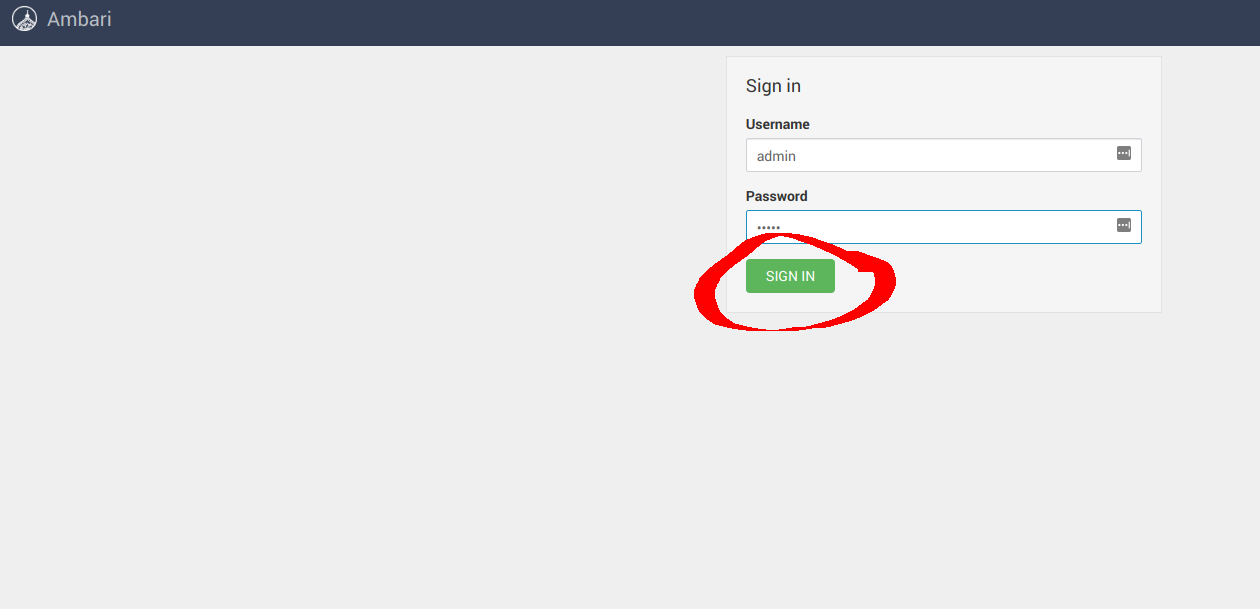 ### **3.1 Configure Hadoop**
Created: Sun Apr 05 19:28:12 GMT 2026 - Last Modified: Tue Aug 12 18:20:36 GMT 2025 - 14.7K bytes - Click Count (0)