- Sort Score
- Result 10 results
- Languages All
Results 91 - 100 of 187 for specifying (0.04 sec)
-
docs/bucket/versioning/README.md
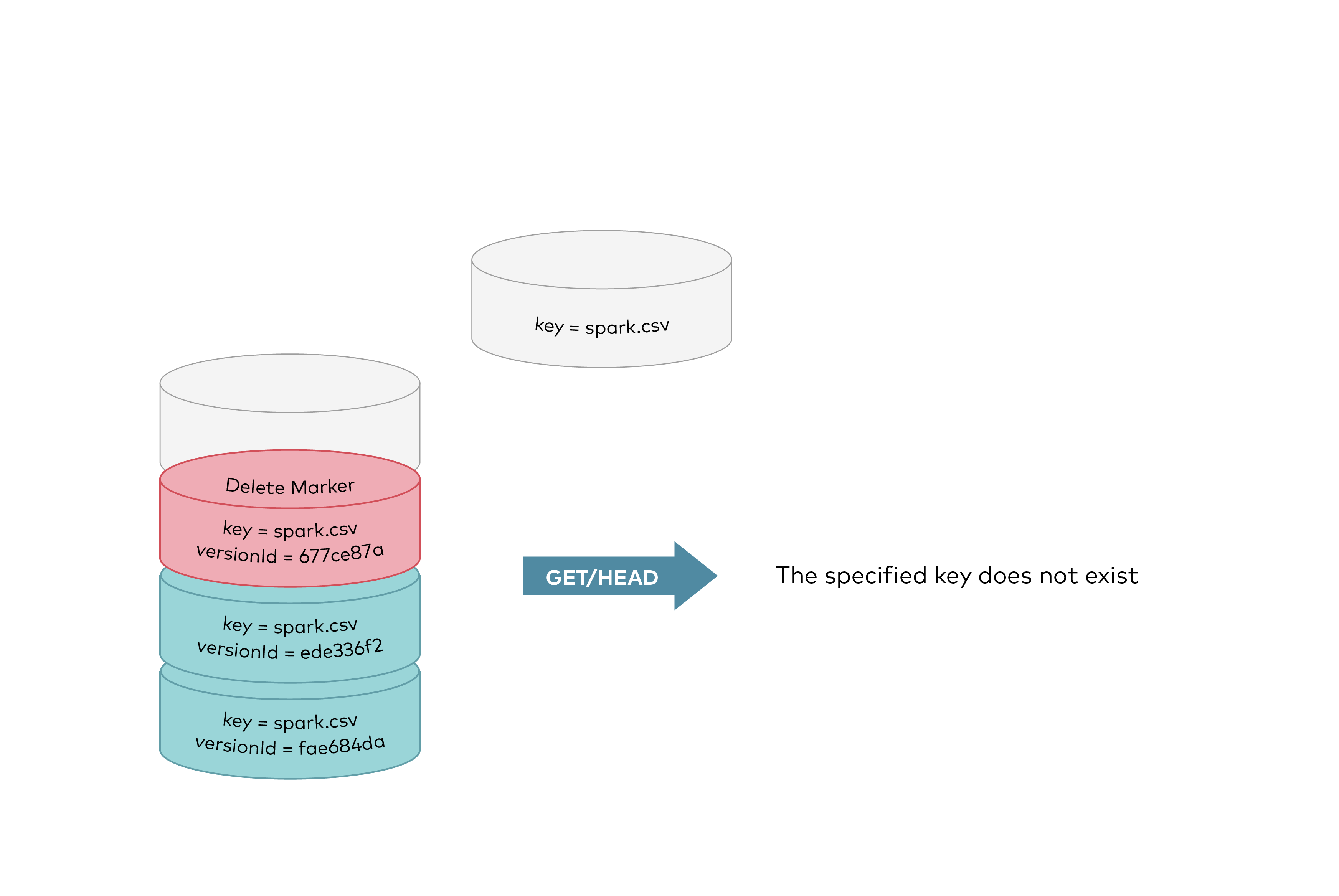 GET requests by specifying a version ID as shown below, you can retrieve the specific object version `fae684da`. 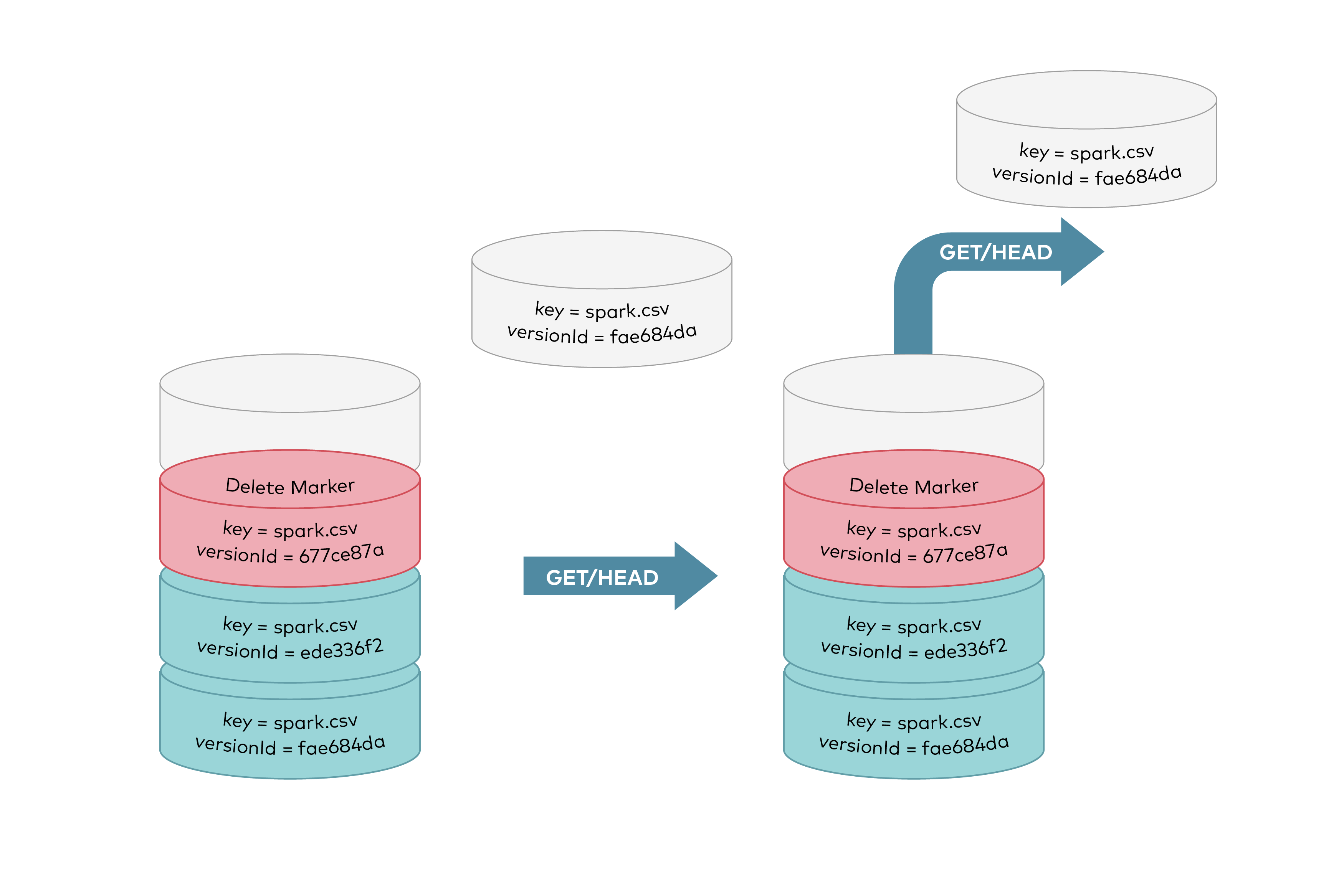
Registered: Sun Dec 28 19:28:13 UTC 2025 - Last Modified: Tue Aug 12 18:20:36 UTC 2025 - 12K bytes - Viewed (0) -
helm-releases/minio-5.4.0.tgz
preexisting secret, much like an existing PersistentVolumeClai. First, create the secret: ```bash kubectl create secret generic my-minio-secret --from-literal=rootUser=foobarbaz --from-literal=rootPassword=foobarbazqux ``` Then install the chart, specifying that you want to use an existing secret: ```bash helm install --set existingSecret=my-minio-secret minio/minio ``` The following fields are expected in the secret: | .data.\<key\> in Secret | Corresponding variable | Description | Required | |:--------...
Registered: Sun Dec 28 19:28:13 UTC 2025 - Last Modified: Fri Jan 03 05:34:47 UTC 2025 - 21.7K bytes - Viewed (0) -
src/main/java/jcifs/smb/SmbTreeImpl.java
                    final String unc = "\\\\" + tconHostName + '\\' + this.share;

                    /*
                     * IBM iSeries doesn't like specifying a service. Always reset
                     * the service to whatever was determined in the constructor.
                     */
                    final String svc = this.service0;

                    /*
Registered: Sat Dec 20 13:44:44 UTC 2025 - Last Modified: Sun Aug 31 08:00:57 UTC 2025 - 30K bytes - Viewed (0) -
helm-releases/minio-1.0.2.tgz
preexisting secret, much like an existing PersistentVolumeClai. First, create the secret: ```bash kubectl create secret generic my-minio-secret --from-literal=rootUser=foobarbaz --from-literal=rootPassword=foobarbazqux ``` Then install the chart, specifying that you want to use an existing secret: ```bash helm install --set existingSecret=my-minio-secret minio/minio ``` The following fields are expected in the secret: | .data.<key> in Secret | Corresponding variable | Description | Required | |:--------...
Registered: Sun Dec 28 19:28:13 UTC 2025 - Last Modified: Tue Aug 24 18:58:05 UTC 2021 - 13.6K bytes - Viewed (0) -
helm-releases/minio-3.5.4.tgz
preexisting secret, much like an existing PersistentVolumeClai. First, create the secret: ```bash kubectl create secret generic my-minio-secret --from-literal=rootUser=foobarbaz --from-literal=rootPassword=foobarbazqux ``` Then install the chart, specifying that you want to use an existing secret: ```bash helm install --set existingSecret=my-minio-secret minio/minio ``` The following fields are expected in the secret: | .data.\<key\> in Secret | Corresponding variable | Description | Required | |:--------...
Registered: Sun Dec 28 19:28:13 UTC 2025 - Last Modified: Mon Feb 14 06:04:53 UTC 2022 - 17.2K bytes - Viewed (0) -
helm-releases/minio-3.5.5.tgz
preexisting secret, much like an existing PersistentVolumeClai. First, create the secret: ```bash kubectl create secret generic my-minio-secret --from-literal=rootUser=foobarbaz --from-literal=rootPassword=foobarbazqux ``` Then install the chart, specifying that you want to use an existing secret: ```bash helm install --set existingSecret=my-minio-secret minio/minio ``` The following fields are expected in the secret: | .data.\<key\> in Secret | Corresponding variable | Description | Required | |:--------...
Registered: Sun Dec 28 19:28:13 UTC 2025 - Last Modified: Wed Feb 16 19:44:53 UTC 2022 - 17.2K bytes - Viewed (0) -
helm-releases/minio-3.5.7.tgz
preexisting secret, much like an existing PersistentVolumeClai. First, create the secret: ```bash kubectl create secret generic my-minio-secret --from-literal=rootUser=foobarbaz --from-literal=rootPassword=foobarbazqux ``` Then install the chart, specifying that you want to use an existing secret: ```bash helm install --set existingSecret=my-minio-secret minio/minio ``` The following fields are expected in the secret: | .data.\<key\> in Secret | Corresponding variable | Description | Required | |:--------...
Registered: Sun Dec 28 19:28:13 UTC 2025 - Last Modified: Sun Feb 20 08:55:08 UTC 2022 - 17.6K bytes - Viewed (0) -
helm-releases/minio-3.5.8.tgz
preexisting secret, much like an existing PersistentVolumeClai. First, create the secret: ```bash kubectl create secret generic my-minio-secret --from-literal=rootUser=foobarbaz --from-literal=rootPassword=foobarbazqux ``` Then install the chart, specifying that you want to use an existing secret: ```bash helm install --set existingSecret=my-minio-secret minio/minio ``` The following fields are expected in the secret: | .data.\<key\> in Secret | Corresponding variable | Description | Required | |:--------...
Registered: Sun Dec 28 19:28:13 UTC 2025 - Last Modified: Sun Feb 27 06:44:38 UTC 2022 - 17.7K bytes - Viewed (0) -
helm-releases/minio-3.6.1.tgz
preexisting secret, much like an existing PersistentVolumeClai. First, create the secret: ```bash kubectl create secret generic my-minio-secret --from-literal=rootUser=foobarbaz --from-literal=rootPassword=foobarbazqux ``` Then install the chart, specifying that you want to use an existing secret: ```bash helm install --set existingSecret=my-minio-secret minio/minio ``` The following fields are expected in the secret: | .data.\<key\> in Secret | Corresponding variable | Description | Required | |:--------...
Registered: Sun Dec 28 19:28:13 UTC 2025 - Last Modified: Tue Mar 15 00:13:17 UTC 2022 - 17.9K bytes - Viewed (0) -
src/main/java/jcifs/smb/SmbFileInputStream.java
     * {@link jcifs.smb.SmbFile} for a detailed description and examples of
     * the smb URL syntax.
     *
     * @param file
     *            An <code>SmbFile</code> specifying the file to read from
     * @throws SmbException if an SMB error occurs
     */
    public SmbFileInputStream(final SmbFile file) throws SmbException {
Registered: Sat Dec 20 13:44:44 UTC 2025 - Last Modified: Sat Aug 30 05:58:03 UTC 2025 - 15.6K bytes - Viewed (0)