- Sort Score
- Num 10 results
- Language All
Results 1 - 10 of 205 for below (0.01 seconds)
-
docs/metrics/prometheus/alerts.md
Follow below steps to enable and use AlertManager.

## Deploy and start AlertManager
Install Prometheus AlertManager from https://prometheus.io/download/ and create configuration as below

```yaml
route:
  group_by: ['alertname']
  group_wait: 30s
  group_interval: 5m
  repeat_interval: 1h
Created: Sun Dec 28 19:28:13 GMT 2025 - Last Modified: Wed Apr 23 15:13:23 GMT 2025 - 4.4K bytes - Click Count (0) -
helm/minio/templates/NOTES.txt
MinIO can be accessed via port {{ .Values.service.port }} on the following DNS name from within your cluster:
{{ template "minio.fullname" . }}.{{ .Release.Namespace }}.{{ .Values.clusterDomain }}

To access MinIO from localhost, run the below commands:

  1. export POD_NAME=$(kubectl get pods --namespace {{ .Release.Namespace }} -l "release={{ .Release.Name }}" -o jsonpath="{.items[0].metadata.name}")
Created: Sun Dec 28 19:28:13 GMT 2025 - Last Modified: Tue Aug 12 18:20:36 GMT 2025 - 2.7K bytes - Click Count (0) -
docs/logging/README.md
```

NOTE: `http://endpoint:port/path` is a placeholder value to indicate the URL format, please change this accordingly as per your configuration.

MinIO also honors environment variable for HTTP target logging as shown below, this setting will override the endpoint settings in the MinIO server config.

```
export MINIO_LOGGER_WEBHOOK_ENABLE_target1="on"
export MINIO_LOGGER_WEBHOOK_AUTH_TOKEN_target1="token"
Created: Sun Dec 28 19:28:13 GMT 2025 - Last Modified: Tue Aug 12 18:20:36 GMT 2025 - 10.5K bytes - Click Count (0) -
docs/bucket/versioning/README.md
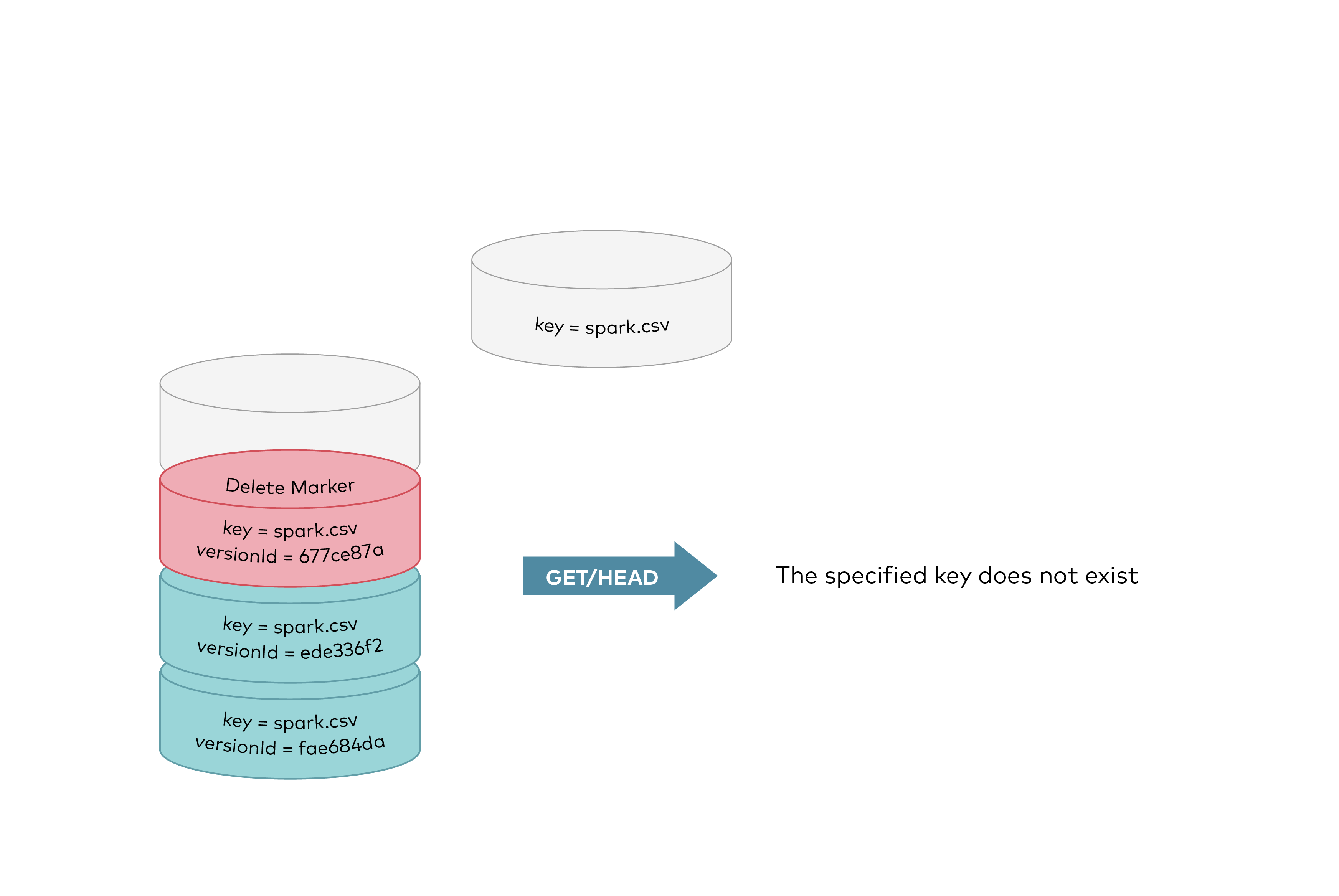 GET requests by specifying a version ID as shown below, you can retrieve the specific object version `fae684da`.
Created: Sun Dec 28 19:28:13 GMT 2025 - Last Modified: Tue Aug 12 18:20:36 GMT 2025 - 12K bytes - Click Count (0) -
docs/tls/kubernetes/README.md
[Kubernetes secrets](https://kubernetes.io/docs/concepts/configuration/secret) are intended to hold sensitive information.
We'll use secrets to hold the TLS certificate and key. To create a secret, update the paths to `private.key` and `public.crt`
below.

Then type

```sh
kubectl create secret generic tls-ssl-minio --from-file=path/to/private.key --from-file=path/to/public.crt
```

Cross check if the secret is created successfully using

```sh
Created: Sun Dec 28 19:28:13 GMT 2025 - Last Modified: Tue Aug 12 18:20:36 GMT 2025 - 3K bytes - Click Count (0) -
KEYS.md
# Signing key for Gradle artifacts

Below is the public PGP key used to sign all Gradle artifacts.

The key ID is `E2F38302C8075E3D` and its fingerprint is `1BD97A6A154E7810EE0BC832E2F38302C8075E3D`.
You can also find the key in the [Gradle website](https://gradle.org/keys/) and on [public key servers](https://keys.openpgp.org/search?q=maven-publishing%40gradle.com).

## Verification instructions

### Importing the key
Created: Wed Dec 31 11:36:14 GMT 2025 - Last Modified: Thu Dec 04 14:29:13 GMT 2025 - 4.7K bytes - Click Count (0) -
docs/en/docs/tutorial/first-steps.md
You put it on top of a function. Like a pretty decorative hat (I guess that's where the term came from).

A "decorator" takes the function below and does something with it.

In our case, this decorator tells **FastAPI** that the function below corresponds to the **path** `/` with an **operation** `get`.

It is the "**path operation decorator**".

///

You can also use the other operations:

* `@app.post()`
Created: Sun Dec 28 07:19:09 GMT 2025 - Last Modified: Wed Dec 17 20:41:43 GMT 2025 - 12.8K bytes - Click Count (0) -
internal/s3select/jstream/README.md
Unlike most JSON parsers, `jstream` is document position- and depth-aware -- this enables the extraction of values at a specified depth, eliminating the overhead of allocating encompassing arrays or objects; e.g:

Using the below example document:
<img width="85%" src="https://bradley.codes/static/img/jstream-levels.gif" alt="jstream"/>

we can choose to extract and act only the objects within the top-level array:
```go
f, _ := os.Open("input.json")
Created: Sun Dec 28 19:28:13 GMT 2025 - Last Modified: Mon Sep 23 19:35:41 GMT 2024 - 3.2K bytes - Click Count (0) -
docs/bigdata/README.md
  - [Installing Spark](https://docs.hortonworks.com/HDPDocuments/HDP3/HDP-3.0.1/installing-spark/content/installing_spark.html)
- Install MinIO Distributed Server using one of the guides below.
  - [Deployment based on Kubernetes](https://docs.min.io/community/minio-object-store/operations/deployments/kubernetes.html)
  - [Deployment based on MinIO Helm Chart](https://github.com/helm/charts/tree/master/stable/minio)
Created: Sun Dec 28 19:28:13 GMT 2025 - Last Modified: Tue Aug 12 18:20:36 GMT 2025 - 14.7K bytes - Click Count (0) -
compat/maven-compat/src/main/java/org/apache/maven/settings/DefaultMavenSettingsBuilder.java
        // -------------------------------------------------------------------------------------
        // Alright, here's the justification for all the regexp wizardry below...
        //
        // Continuum and other server-like apps may need to locate the user-level and
        // global-level settings somewhere other than ${user.home} and ${maven.home},
Created: Sun Dec 28 03:35:09 GMT 2025 - Last Modified: Fri Jun 06 14:28:57 GMT 2025 - 5.8K bytes - Click Count (0)