- Sort Score
- Num 10 results
- Language All
Results 1 - 10 of 83 for recommend (0.05 seconds)
-
docs/minio-limits.md
> NOTE: While MinIO does not implement an upper boundary on buckets, your cluster's hardware has natural limits that depend on the workload and its scaling patterns. We strongly recommend [MinIO SUBNET](https://min.io/pricing) for architecture and sizing guidance for your production use case.
Created: Sun Dec 28 19:28:13 GMT 2025 - Last Modified: Tue Aug 12 18:20:36 GMT 2025 - 6K bytes - Click Count (0) -
docs/multi-tenancy/README.md
``` **Note:** Execute the commands on all 4 nodes. 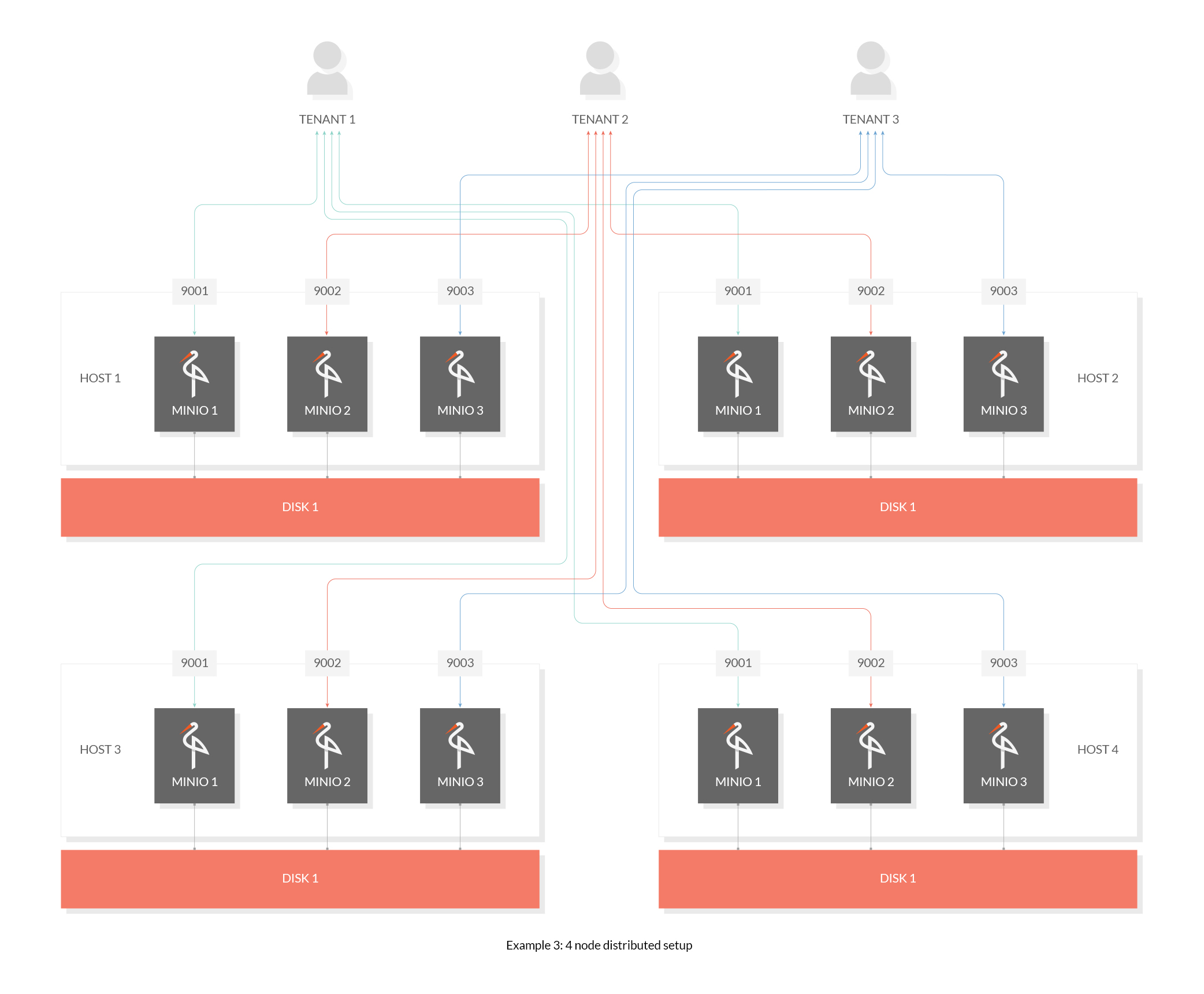
Created: Sun Dec 28 19:28:13 GMT 2025 - Last Modified: Tue Aug 12 18:20:36 GMT 2025 - 3.1K bytes - Click Count (0) -
docs/en/docs/how-to/graphql.md
/// tip

If you need GraphQL, I still would recommend you check out <a href="https://strawberry.rocks/" class="external-link" target="_blank">Strawberry</a>, as it's based on type annotations instead of custom classes and types.

///

## Learn More { #learn-more }
Created: Sun Dec 28 07:19:09 GMT 2025 - Last Modified: Fri Dec 26 10:43:02 GMT 2025 - 3.4K bytes - Click Count (0) -
docs/sts/wso2.md
operations. MinIO STS API uses [JSON Web Key Set Endpoint](https://docs.wso2.com/display/IS541/JSON+Web+Key+Set+Endpoint) to validate if JWT is valid and is properly signed.

**We recommend setting `policy` as a custom claim for the JWT service provider follow [here](https://docs.wso2.com/display/IS550/Configuring+Claims+for+a+Service+Provider) and [here](https://docs.wso2.com/display/IS550/Handling+Custom+Claims+with+the+JWT+Bearer+Grant+Type) for relevant docs on how to configure claims for a...
Created: Sun Dec 28 19:28:13 GMT 2025 - Last Modified: Tue Aug 12 18:20:36 GMT 2025 - 8.7K bytes - Click Count (0) -
docs/distributed/README.md
**If MinIO distributed setup is using NFS volumes underneath it is not guaranteed MinIO will provide these consistency guarantees since NFS is not strictly consistent (If you must use NFS we recommend that you at least use NFSv4 instead of NFSv3 for relatively better outcomes).**

## Get started
Created: Sun Dec 28 19:28:13 GMT 2025 - Last Modified: Tue Aug 12 18:20:36 GMT 2025 - 8.9K bytes - Click Count (0) -
docs/docker/README.md
  -e "MINIO_ROOT_PASSWORD=wJalrXUtnFEMI/K7MDENG/bPxRfiCYEXAMPLEKEY" \
  quay.io/minio/minio server /data --console-address ":9001"
```

## Run Distributed MinIO on Containers

We recommend kubernetes based deployment for production level deployment <https://github.com/minio/operator>.
Created: Sun Dec 28 19:28:13 GMT 2025 - Last Modified: Tue Aug 12 18:20:36 GMT 2025 - 8.2K bytes - Click Count (0) -
docs/erasure/README.md
By default, MinIO shards the objects across N/2 data and N/2 parity drives. Though, you can use [storage classes](https://github.com/minio/minio/tree/master/docs/erasure/storage-class) to use a custom configuration. We recommend N/2 data and parity blocks, as it ensures the best protection from drive failures.
Created: Sun Dec 28 19:28:13 GMT 2025 - Last Modified: Tue Aug 12 18:20:36 GMT 2025 - 4.2K bytes - Click Count (0) -
README.md
- GitHub Releases: https://github.com/minio/minio/releases
- Direct downloads: https://dl.min.io/server/minio/release/

**These legacy binaries will not receive updates.** We strongly recommend using source builds for access to the latest features, bug fixes, and security updates.

## Install from Source

Use the following commands to compile and run a standalone MinIO server from source.
Created: Sun Dec 28 19:28:13 GMT 2025 - Last Modified: Wed Dec 03 08:13:11 GMT 2025 - 9K bytes - Click Count (0) -
helm/minio/README.md
## Prerequisites

- Helm cli with Kubernetes cluster configured.
- PV provisioner support in the underlying infrastructure. (We recommend using <https://github.com/minio/direct-csi>)
- Use Kubernetes version v1.19 and later for best experience.

## Configure MinIO Helm repo

```bash
helm repo add minio https://charts.min.io/
```
Created: Sun Dec 28 19:28:13 GMT 2025 - Last Modified: Tue Aug 12 18:20:36 GMT 2025 - 10.9K bytes - Click Count (0) -
docs/bucket/replication/README.md
The user setting up replication needs *s3:GetReplicationConfiguration* and *s3:GetBucketVersioning* permission on the source cluster. We do not recommend running root credentials/super admin with replication, instead create a dedicated user. The access credentials used at the destination requires *s3:ReplicateObject* permission.
Created: Sun Dec 28 19:28:13 GMT 2025 - Last Modified: Tue Aug 12 18:20:36 GMT 2025 - 18.3K bytes - Click Count (0)