- Sort Score
- Num 10 results
- Language All
Results 1 - 10 of 51 for 8080 (0.01 seconds)
-
docs/sts/web-identity.md
identity_openid config_url=https://accounts.google.com/.well-known/openid-configuration client_id=843351d4-1080-11ea-aa20-271ecba3924a
```

Testing with an example
> Visit [Google Developer Console](https://console.cloud.google.com) under Project, APIs, Credentials to get your OAuth2 client credentials. Add `http://localhost:8080/oauth2/callback` as a valid OAuth2 Redirect URL.

```
Created: Sun Dec 28 19:28:13 GMT 2025 - Last Modified: Tue Aug 12 18:20:36 GMT 2025 - 18.9K bytes - Click Count (0) -
docs/logging/README.md
```
export MINIO_LOGGER_WEBHOOK_ENABLE_target1="on"
export MINIO_LOGGER_WEBHOOK_AUTH_TOKEN_target1="token"
export MINIO_LOGGER_WEBHOOK_ENDPOINT_target1=http://localhost:8080/minio/logs
minio server /mnt/data
```

## Audit Targets

Assuming `mc` is already [configured](https://docs.min.io/community/minio-object-store/reference/minio-mc.html#quickstart)

### Audit HTTP Target
Created: Sun Dec 28 19:28:13 GMT 2025 - Last Modified: Tue Aug 12 18:20:36 GMT 2025 - 10.5K bytes - Click Count (0) -
api/maven-api-settings/src/main/mdo/settings.mdo
     * the {@link #getPortString()} value as an integer and defaults to {@code 8080}
     * if not set.
     *
     * @return an integer indicating the port to use for this proxy
     */
    public int getPort() {
        return (getPortString() != null) ? Integer.parseInt(getPortString()) : 8080;
    }

          </code>
        </codeSegment>
      </codeSegments>
    </class>
Created: Sun Dec 28 03:35:09 GMT 2025 - Last Modified: Sun May 18 09:15:56 GMT 2025 - 33.8K bytes - Click Count (0) -
cmd/endpoint_test.go
		{"http://:8080/path", Endpoint{}, -1, fmt.Errorf("invalid URL endpoint format: empty host name")},
		{"http://server:/path", Endpoint{}, -1, fmt.Errorf("invalid URL endpoint format: invalid port number")},
		{"https://93.184.216.34:808080/path", Endpoint{}, -1, fmt.Errorf("invalid URL endpoint format: port number must be between 1 to 65535")},
Created: Sun Dec 28 19:28:13 GMT 2025 - Last Modified: Fri Aug 29 02:39:48 GMT 2025 - 18.9K bytes - Click Count (0) -
compat/maven-compat/src/test/java/org/apache/maven/repository/MirrorProcessorTest.java
        assertTrue(DefaultMirrorSelector.isExternalRepo(getRepo("foo", "http://")));
        // these are local
        assertFalse(DefaultMirrorSelector.isExternalRepo(getRepo("foo", "http://localhost:8080")));
        assertFalse(DefaultMirrorSelector.isExternalRepo(getRepo("foo", "http://127.0.0.1:9090")));
        assertFalse(DefaultMirrorSelector.isExternalRepo(getRepo("foo", "file://localhost/somepath")));
Created: Sun Dec 28 03:35:09 GMT 2025 - Last Modified: Fri Oct 25 12:31:46 GMT 2024 - 10.7K bytes - Click Count (0) -
compat/maven-embedder/src/main/java/org/apache/maven/cli/configuration/SettingsXmlConfigurationProcessor.java
Created: Sun Dec 28 03:35:09 GMT 2025 - Last Modified: Sat Apr 19 18:49:57 GMT 2025 - 12K bytes - Click Count (0) -
docs/ru/docs/deployment/server-workers.md
```

</div>

////

//// tab | `uvicorn`

Если вы предпочитаете использовать команду `uvicorn` напрямую:

<div class="termy">

```console
$ uvicorn main:app --host 0.0.0.0 --port 8080 --workers 4
<font color="#A6E22E">INFO</font>:     Uvicorn running on <b>http://0.0.0.0:8080</b> (Press CTRL+C to quit)
<font color="#A6E22E">INFO</font>:     Started parent process [<font color="#A1EFE4"><b>27365</b></font>]
Created: Sun Dec 28 07:19:09 GMT 2025 - Last Modified: Tue Sep 30 11:37:11 GMT 2025 - 10.6K bytes - Click Count (0) -
docs/ko/docs/deployment/server-workers.md
그럼에도 불구하고, 유비콘은 워커 프로세스를 다루는 데에 있어서 구니콘보다 더 제한적입니다. 따라서 이 수준(파이썬 수준)의 프로세스 관리자를 사용하려면 구니콘을 프로세스 관리자로 사용하는 것이 좋습니다.

보통 이렇게 실행할 수 있습니다:

<div class="termy">

```console
$ uvicorn main:app --host 0.0.0.0 --port 8080 --workers 4
<font color="#A6E22E">INFO</font>:     Uvicorn running on <b>http://0.0.0.0:8080</b> (Press CTRL+C to quit)
<font color="#A6E22E">INFO</font>:     Started parent process [<font color="#A1EFE4"><b>27365</b></font>]
Created: Sun Dec 28 07:19:09 GMT 2025 - Last Modified: Sat Nov 09 16:39:20 GMT 2024 - 10.2K bytes - Click Count (0) -
internal/config/notify/help.go
)

// Help template inputs for all notification targets
var (
	HelpWebhook = config.HelpKVS{
		config.HelpKV{
			Key:         target.WebhookEndpoint,
			Description: "webhook server endpoint e.g. http://localhost:8080/minio/events",
			Type:        "url",
			Sensitive:   true,
		},
		config.HelpKV{
			Key:         target.WebhookAuthToken,
			Description: "opaque string or JWT authorization token",
			Optional:    true,
Created: Sun Dec 28 19:28:13 GMT 2025 - Last Modified: Fri Sep 06 23:06:30 GMT 2024 - 19.2K bytes - Click Count (0) -
docs/bigdata/README.md
## **3. Configure Hadoop, Spark, Hive to use MinIO** After successful installation navigate to the Ambari UI `http://<ambari-server>:8080/` and login using the default credentials: [**_username: admin, password: admin_**] 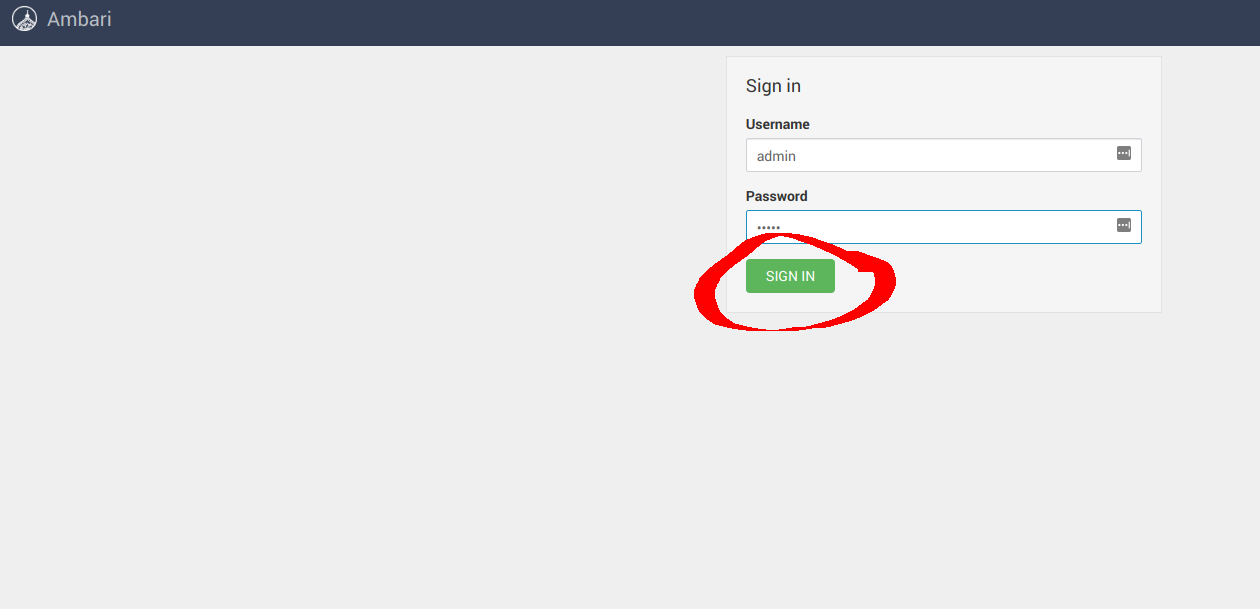 ### **3.1 Configure Hadoop**
Created: Sun Dec 28 19:28:13 GMT 2025 - Last Modified: Tue Aug 12 18:20:36 GMT 2025 - 14.7K bytes - Click Count (0)