- Sort Score
- Num 10 results
- Language All
Results 1 - 10 of 764 for EXAMPLE (0.28 seconds)
-
docs/en/docs/tutorial/schema-extra-example.md
The keys of the `dict` identify each example, and each value is another `dict`.

Each specific example `dict` in the `examples` can contain:

* `summary`: Short description for the example.
* `description`: A long description that can contain Markdown text.
* `value`: This is the actual example shown, e.g. a `dict`.
Created: Sun Apr 05 07:19:11 GMT 2026 - Last Modified: Thu Mar 05 18:13:19 GMT 2026 - 8.7K bytes - Click Count (0) -
docs/federation/lookup/Corefile.example
Ashish Kumar Sinha <******@****.***> 1569948788 +0530
Created: Sun Apr 05 19:28:12 GMT 2026 - Last Modified: Tue Oct 01 16:53:08 GMT 2019 - 216 bytes - Click Count (0) -
docs/zh-hant/docs/tutorial/schema-extra-example.md
例如,你可以用它為前端使用者介面新增中繼資料等。

///

/// info

OpenAPI 3.1.0(自 FastAPI 0.99.0 起使用)新增了對 `examples` 的支援,這是 **JSON Schema** 標準的一部分。

在那之前,只支援使用單一範例的關鍵字 `example`。OpenAPI 3.1.0 仍然支援 `example`,但它已被棄用,且不是 JSON Schema 標準的一部分。因此建議你將 `example` 遷移為 `examples`。🤓

你可以在本頁結尾閱讀更多。

///

## `Field` 其他參數 { #field-additional-arguments }

在 Pydantic 模型中使用 `Field()` 時,你也可以宣告額外的 `examples`:
Created: Sun Apr 05 07:19:11 GMT 2026 - Last Modified: Fri Mar 20 17:05:38 GMT 2026 - 8.4K bytes - Click Count (0) -
docs/zh/docs/tutorial/schema-extra-example.md
你也可以用同样的技巧扩展 JSON Schema,添加你自己的自定义额外信息。

例如,你可以用它为前端用户界面添加元数据等。

///

/// info | 信息

OpenAPI 3.1.0(自 FastAPI 0.99.0 起使用)增加了对 `examples` 的支持,它是 JSON Schema 标准的一部分。

在此之前,只支持使用单个示例的关键字 `example`。OpenAPI 3.1.0 仍然支持它,但它已被弃用,并不属于 JSON Schema 标准。因此,建议你把 `example` 迁移到 `examples`。🤓

你可以在本页末尾阅读更多内容。

///

## `Field` 的附加参数 { #field-additional-arguments }

在 Pydantic 模型中使用 `Field()` 时,你也可以声明额外的 `examples`:
Created: Sun Apr 05 07:19:11 GMT 2026 - Last Modified: Fri Mar 20 17:06:37 GMT 2026 - 8.5K bytes - Click Count (0) -
docs/tr/docs/tutorial/schema-extra-example.md
Bundan önce yalnızca tek bir örnek için `example` anahtar kelimesini destekliyordu. Bu hâlâ OpenAPI 3.1.0 tarafından desteklenir; ancak artık deprecated durumdadır ve JSON Schema standardının parçası değildir. Bu nedenle `example` kullanımını `examples`’a taşımanız önerilir. 🤓

Daha fazlasını sayfanın sonunda okuyabilirsiniz.

///
Created: Sun Apr 05 07:19:11 GMT 2026 - Last Modified: Fri Mar 20 07:53:17 GMT 2026 - 9.6K bytes - Click Count (0) -
docs/es/docs/tutorial/schema-extra-example.md
Antes de eso, solo soportaba la palabra clave `example` con un solo ejemplo. Eso aún es soportado por OpenAPI 3.1.0, pero está obsoleto y no es parte del estándar de JSON Schema. Así que se te anima a migrar `example` a `examples`. 🤓

Puedes leer más al final de esta página.

///

## Argumentos adicionales en `Field` { #field-additional-arguments }
Created: Sun Apr 05 07:19:11 GMT 2026 - Last Modified: Thu Mar 19 18:15:55 GMT 2026 - 9.5K bytes - Click Count (0) -
docs/pt/docs/tutorial/schema-extra-example.md
Antes disso, ele suportava apenas a palavra‑chave `example` com um único exemplo. Isso ainda é suportado pelo OpenAPI 3.1.0, mas é descontinuado e não faz parte do padrão JSON Schema. Portanto, você é incentivado a migrar de `example` para `examples`. 🤓

Você pode ler mais no final desta página.

///
Created: Sun Apr 05 07:19:11 GMT 2026 - Last Modified: Thu Mar 19 18:20:43 GMT 2026 - 9.5K bytes - Click Count (0) -
docs/multi-tenancy/README.md
```sh minio server --address :9001 /data/tenant1 minio server --address :9002 /data/tenant2 minio server --address :9003 /data/tenant3 ``` 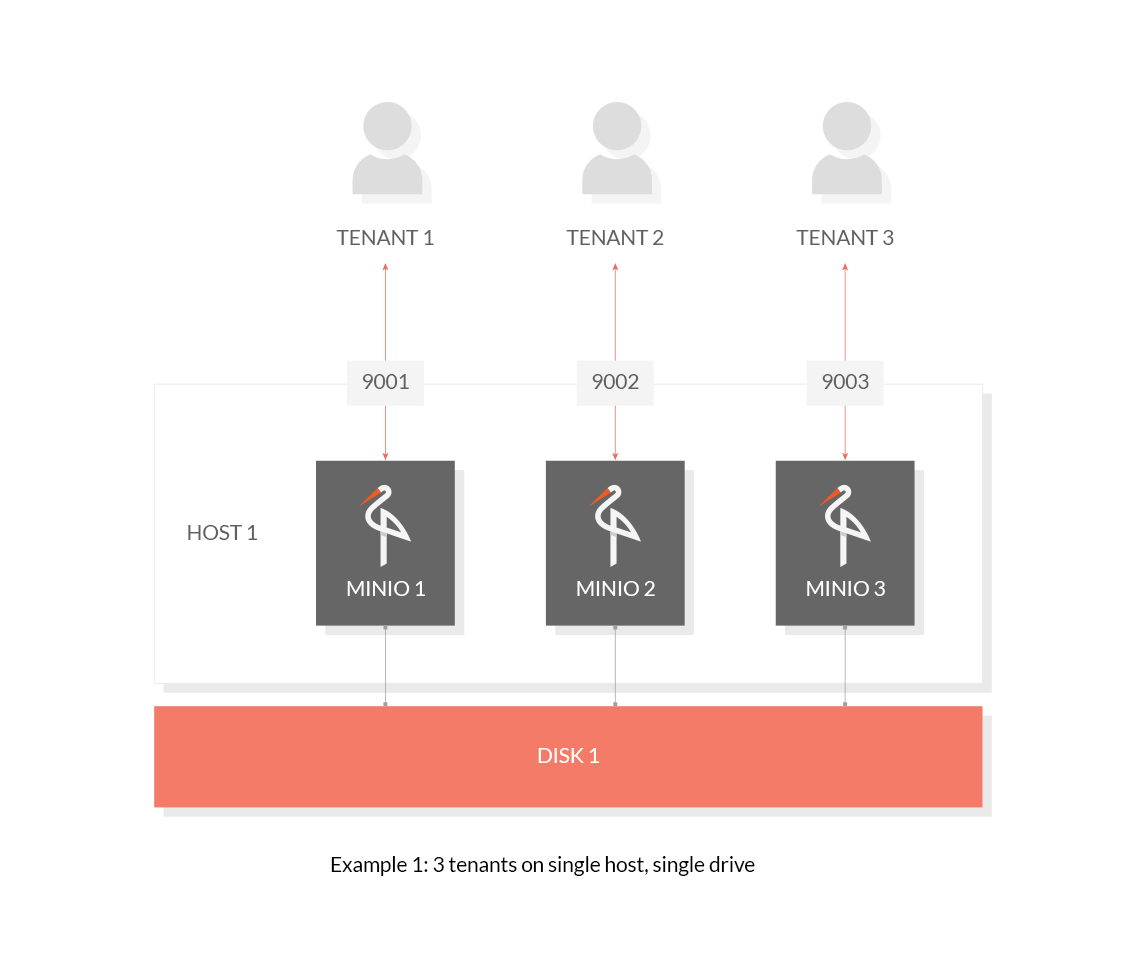 ### 1.2 Host Multiple Tenants on Multiple Drives (Erasure Code) Use the following commands to host 3 tenants on multiple drives: ```sh
Created: Sun Apr 05 19:28:12 GMT 2026 - Last Modified: Tue Aug 12 18:20:36 GMT 2025 - 3.1K bytes - Click Count (0) -
build-tools-internal/src/main/groovy/elasticsearch.formatting.gradle
  ':client:rest-high-level',
  ':client:sniffer',
  ':client:test',
  ':example-plugins:custom-settings',
  ':example-plugins:custom-significance-heuristic',
  ':example-plugins:custom-suggester',
  ':example-plugins:painless-whitelist',
  ':example-plugins:rescore',
  ':example-plugins:rest-handler',
  ':example-plugins:script-expert-scoring',
  ':example-plugins:security-authorization-engine',
  ':libs:elasticsearch-cli',
Created: Wed Apr 08 16:19:15 GMT 2026 - Last Modified: Thu Sep 09 18:53:35 GMT 2021 - 9.1K bytes - Click Count (0) -
src/main/java/org/codelibs/core/lang/SystemUtil.java
     */
    public static final String PATH_SEPARATOR = System.getProperty("path.separator");

    /**
     * <code>os.name</code> system property. Example: <code>Mac OS X</code>
     */
    public static final String OS_NAME = System.getProperty("os.name");

    /**
     * <code>java.io.tmpdir</code> system property. Example: /tmp
     */
Created: Fri Apr 03 20:58:12 GMT 2026 - Last Modified: Thu Feb 12 12:10:45 GMT 2026 - 4.1K bytes - Click Count (0)